
1. Introduction
The Speaka Professional VESA Adapter Kit is designed to enable the mounting of monitors and small televisions that lack a standard VESA hole pattern onto VESA-compatible monitor stands or wall mounts. This universal adapter provides a secure solution for integrating non-VESA displays into existing VESA mounting systems, offering flexibility and compatibility.
Key features include adjustable mounting arms to accommodate various monitor shapes and sizes, and compatibility with common VESA standards (75x75 mm and 100x100 mm).
2. Safety Information
- Read all instructions carefully before installation and use.
- Ensure that the VESA mount or stand you are attaching the adapter to is rated for the combined weight of the adapter and your monitor. The adapter itself has a maximum load capacity of 8 kg (17.6 lbs).
- Do not exceed the maximum load capacity of 8 kg (17.6 lbs) for this adapter.
- Verify that all screws and connections are securely tightened before use. Loose connections can lead to instability and potential damage.
- Use appropriate tools for installation. If unsure, seek professional assistance.
- Keep small parts and packaging materials away from children.
3. Package Contents
Please check the package contents to ensure all parts are present and undamaged:
- 1x Speaka Professional VESA Adapter Kit (consisting of main VESA plate and four adjustable arms)
- Mounting hardware (screws, washers, nuts) for attachment to VESA mount and securing the monitor.
- Instruction manual (this document)
Note: The VESA monitor stand or wall mount is sold separately and is not included with this adapter kit.
4. Setup and Installation
Follow these steps to install your Speaka Professional VESA Adapter Kit and mount your monitor:
4.1 Attaching the Adapter to a VESA Mount
- Identify the VESA mounting plate on your monitor stand or wall mount.
- Align the central VESA plate of the adapter kit with the VESA holes on your mount (75x75 mm or 100x100 mm).
- Secure the adapter's central plate to your VESA mount using the appropriate screws and washers provided with your VESA mount or the adapter kit. Ensure it is firmly attached.

Image: The VESA adapter kit securely attached to a monitor arm, ready to hold a display.
4.2 Attaching Your Monitor to the Adapter
This adapter is suitable for monitors and small TVs with a thickness between 25.5 mm and 45.5 mm.
- Take the four adjustable arms from the adapter kit.
- Position your monitor in front of the central VESA plate.
- Attach each of the four adjustable arms to the central VESA plate. The arms can be mounted in four different positions to best fit your monitor's shape and size.
- Carefully extend the arms around the edges of your monitor. The rubberized grips on the ends of the arms should gently but firmly hold the monitor in place.
- Tighten the screws on each arm to secure the monitor. Ensure even pressure and a stable grip on all four sides. Do not overtighten, but ensure the monitor is held firmly.
- Gently test the stability of the mounted monitor before full use.
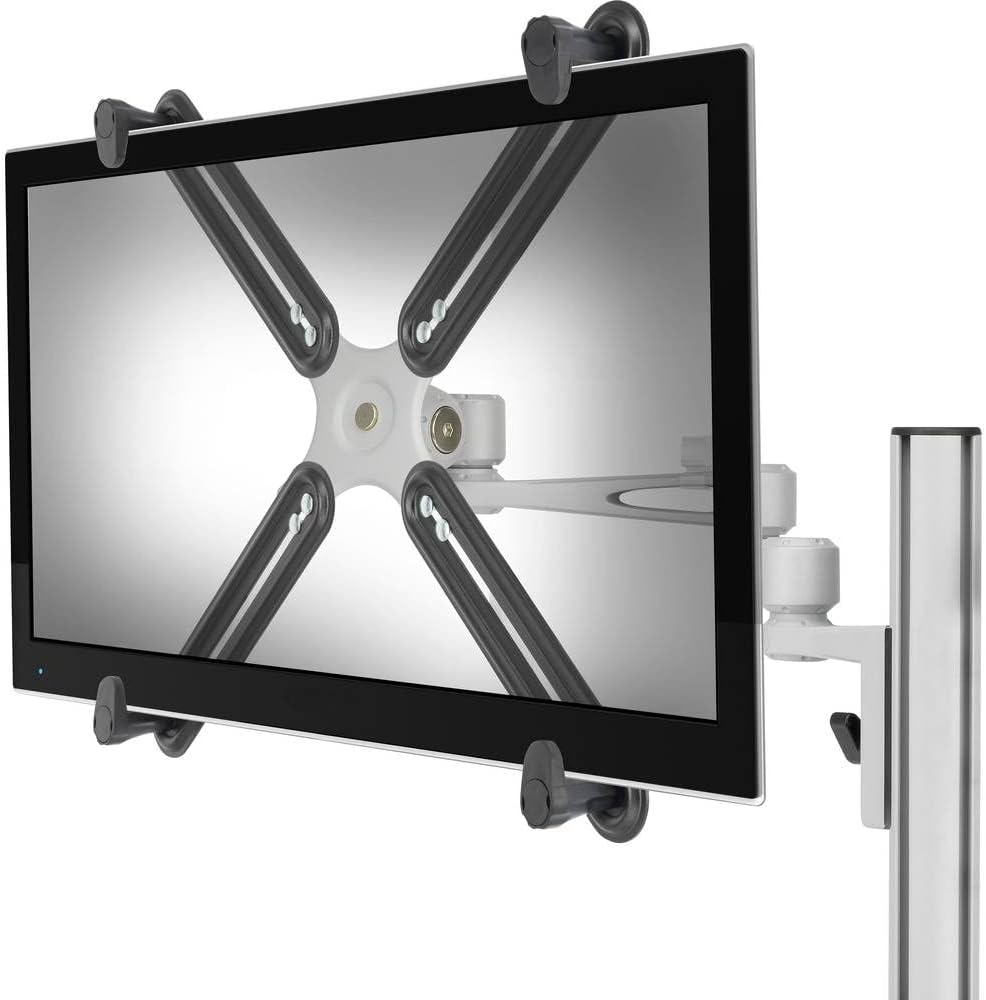
Image: Front view of a monitor secured by the adapter arms.

Image: Rear view of the adapter holding a monitor on a desk-mounted arm.

Image: The four adjustable arms of the VESA adapter kit.
5. Operating Instructions
Once your monitor is securely mounted using the Speaka Professional VESA Adapter Kit, you can adjust its position according to the capabilities of your VESA monitor stand or wall mount. This adapter supports the full tilt and swivel range offered by your existing VESA mount.
- Tilt Adjustment: Gently tilt your monitor to achieve the desired vertical viewing angle.
- Swivel Adjustment: Rotate your monitor horizontally to adjust the viewing direction.
- Height Adjustment: If your VESA mount supports height adjustment, use its mechanism to set the monitor to an ergonomic height.
Always make adjustments smoothly and avoid sudden, forceful movements to prevent damage to the monitor or mount.
6. Maintenance
- Cleaning: Use a soft, dry cloth to clean the adapter. Avoid abrasive cleaners or solvents that could damage the finish.
- Periodic Checks: Periodically inspect all mounting screws and connections to ensure they remain tight and secure. Re-tighten if necessary.
- Damage: If any part of the adapter appears damaged or worn, discontinue use and contact customer support for assistance.
7. Troubleshooting
- Monitor is not secure:
- Ensure all four adjustable arms are properly positioned and tightened around the monitor.
- Verify that your monitor's thickness is within the supported range of 25.5 mm to 45.5 mm.
- Check that the central VESA plate is firmly attached to your VESA mount.
- Adapter does not fit my VESA mount:
- This adapter is compatible with 75x75 mm and 100x100 mm VESA standards. Confirm your VESA mount supports one of these patterns.
- Monitor is too large for the adapter:
- While the adapter is universal, it is primarily designed for smaller monitors and TVs. Ensure your monitor's dimensions allow the arms to securely grip it without excessive strain. The adapter is designed for monitors with a thickness between 25.5 mm and 45.5 mm.
- Missing parts:
- Refer to the "Package Contents" section. If any parts are missing, contact Speaka Professional customer support immediately.
8. Specifications
| Model Number | 1496530 (SP-5986120) |
| Brand | Speaka Professional |
| Material | Alloy Steel, Plastic |
| Color | Black |
| Product Dimensions (W x H x D) | 14.76 x 14.76 x 1.57 inches (375 x 375 x 40 mm) |
| Item Weight | 1.45 pounds (0.66 kg) |
| Max. Load Capacity | 8 kg (17.6 lbs) |
| Compatible VESA Standards | 75x75 mm, 100x100 mm |
| Compatible Monitor Thickness | 25.5 mm to 45.5 mm |
| Movement Type | Swivel, Tilt (dependent on VESA mount) |
| Compatible Devices | Monitors, Small Televisions |
9. Warranty and Support
For warranty information or technical support, please refer to the documentation provided with your purchase or contact Speaka Professional customer service directly. You can typically find contact details on the manufacturer's official website.
For further assistance, please visit the Speaka Professional website.


