
VONYX VX800BT
Contents
Vonyx VX800BT 2.1 Active PA Speaker System User Manual
Model: VX800BT
1. Introduction
Thank you for purchasing the Vonyx VX800BT 2.1 Active PA Speaker System. This powerful and versatile audio system is designed for various applications, including DJ sets, karaoke, small bands, and event presentations. It features an active subwoofer, two satellite speakers, integrated Bluetooth, and an MP3 media player with USB and SD card slots. This manual provides essential information for safe operation, setup, and maintenance of your system.

Figure 1: Complete Vonyx VX800BT System Overview
2. Safety Information
Please read these safety instructions carefully before operating the unit. Keep this manual for future reference.
- Power Supply: Ensure the power supply voltage matches the rating on the unit. Always use a grounded power outlet.
- Ventilation: Do not block ventilation openings. Ensure adequate airflow around the unit to prevent overheating.
- Moisture: Do not expose the unit to rain, moisture, or liquids. Do not place objects filled with liquids on the unit.
- Heat Sources: Keep the unit away from heat sources such as radiators, heat registers, stoves, or other apparatus that produce heat.
- Cables: Protect power cords from being walked on or pinched. Do not pull the power cord to disconnect from the outlet.
- Servicing: Do not attempt to service the unit yourself. Refer all servicing to qualified service personnel.
- Placement: Place the system on a stable, level surface. Ensure speaker stands are fully extended and locked before mounting satellite speakers.
- Hearing Protection: Prolonged exposure to high sound pressure levels can cause hearing damage. Use appropriate hearing protection when operating the system at high volumes.
3. Package Contents
Verify that all items are present and in good condition upon unpacking:
- 1x Active 12-inch Subwoofer with integrated amplifier
- 2x Passive Satellite Speakers (150W each)
- 2x Speaker Tripod Stands
- 1x Wired Microphone
- 2x Speaker Cables (for satellite speakers)
- 1x Remote Control
- 1x Power Cable
- This User Manual

Figure 2: Included Accessories - Microphone, Remote, and Cables
4. Product Overview
4.1. Active Subwoofer
The subwoofer houses the main amplifier, control panel, and media player. It features a 12-inch driver for powerful bass reproduction and includes wheels and a telescopic handle for easy transport.
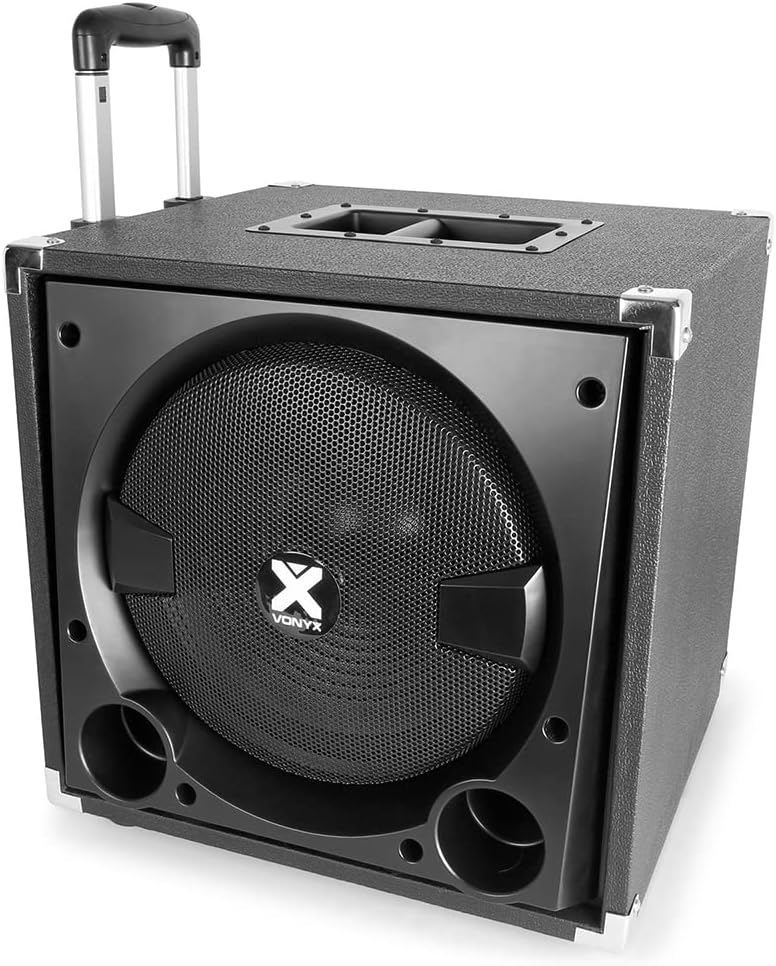
Figure 3: Vonyx VX800BT Active Subwoofer with Trolley Handle
4.2. Subwoofer Rear Panel / Control Panel
The rear panel of the subwoofer provides all input/output connections and control knobs for the system.

Figure 4: Subwoofer Rear Panel Controls and Connections
- MEDIAPLAYER: Digital display and controls for USB/SD/Bluetooth playback.
- MIC VOL: Adjusts microphone input volume.
- MIC ECHO: Adjusts microphone echo effect.
- TREBLE: Adjusts high frequencies for the overall mix.
- BASS: Adjusts low frequencies for the overall mix.
- SUB VOL: Adjusts the volume of the subwoofer.
- VOLUME: Master volume control for the entire system.
- INPUTS: Microphone (6.3mm Jack), Line (RCA), AUX In (3.5mm Jack).
- SPEAKER OUTPUT: Speakon connectors for satellite speakers (Minimum Load 8 Ohms).
- POWER: Main power switch.
- AC IN: Power cable input.
4.3. Satellite Speakers
The two passive satellite speakers deliver clear mid-range and high-frequency audio. They are designed to be mounted on the included tripod stands.

Figure 5: Vonyx VX800BT Satellite Speaker Front

Figure 6: Vonyx VX800BT Satellite Speaker Rear Panel
5. Setup
Follow these steps to set up your Vonyx VX800BT PA system:
- Unpack: Carefully remove all components from their packaging.
- Position Subwoofer: Place the active subwoofer in a central location, preferably on a stable, flat surface.
- Set Up Speaker Stands: Extend the tripod legs of the speaker stands fully and lock them securely. Adjust the height to your desired level, ensuring stability.
- Mount Satellite Speakers: Carefully place one satellite speaker onto the pole of each speaker stand. Ensure they are securely seated.
- Connect Satellite Speakers: Use the provided speaker cables to connect the satellite speakers to the 'SPEAKER OUTPUT' Speakon connectors on the rear panel of the subwoofer. Ensure a firm connection.
- Connect Microphone (Optional): Plug the wired microphone into the 'MIC' input (6.3mm Jack) on the subwoofer's rear panel.
- Connect Audio Source (Optional): Connect your audio source (e.g., mixer, laptop, smartphone) to the 'LINE' (RCA) or 'AUX IN' (3.5mm Jack) inputs on the subwoofer.
- Power Connection: Ensure the 'POWER' switch on the subwoofer is in the OFF position. Connect the power cable to the 'AC IN' on the subwoofer and then to a suitable grounded power outlet.

Figure 7: Speaker Tripod Stands
6. Operating Instructions
6.1. Powering On/Off
To power on the system, flip the 'POWER' switch on the subwoofer's rear panel to the ON position. The display on the media player will illuminate. To power off, flip the switch back to OFF.
6.2. Volume Controls
- VOLUME (Master): Controls the overall output volume of the entire system.
- SUB VOL: Adjusts the volume level of the subwoofer independently.
- MIC VOL: Adjusts the volume of the connected microphone.
- TREBLE / BASS: Adjusts the high and low frequencies of the overall sound.
6.3. Media Player Operation (USB/SD/Bluetooth)
The integrated media player supports playback from USB drives, SD cards, and Bluetooth devices.

Figure 8: Media Player with USB and SD Card Slots
- USB/SD Playback: Insert a USB drive or SD card into the respective slot. The system will automatically switch to USB/SD mode and begin playing compatible audio files. Use the 'MODE' button to switch between sources if needed.
- Bluetooth Pairing:
- Press the 'MODE' button on the media player until 'Bluetooth' or 'BT' appears on the display.
- On your smartphone or tablet, enable Bluetooth and search for available devices.
- Select 'Vonyx VX800BT' (or similar name) from the list.
- Once paired, you can stream audio wirelessly from your device to the PA system.
- Remote Control: Use the included remote control for convenient operation of the media player functions (play, pause, skip tracks, volume, mode selection).
6.4. Microphone Usage
Adjust the 'MIC VOL' knob to control the microphone's volume. The 'MIC ECHO' knob can be used to add an echo effect to the microphone signal, suitable for karaoke or vocal performances.
7. Maintenance
Proper maintenance ensures the longevity and optimal performance of your Vonyx VX800BT system.
- Cleaning: Use a soft, dry cloth to clean the exterior surfaces of the speakers and subwoofer. Do not use abrasive cleaners, solvents, or waxes.
- Dust: Regularly remove dust from ventilation grilles using a soft brush or vacuum cleaner.
- Storage: When not in use for extended periods, store the system in a cool, dry place, ideally in its original packaging or protective covers.
- Cables: Inspect all cables periodically for signs of wear or damage. Replace any damaged cables immediately.
8. Troubleshooting
If you encounter issues with your system, refer to the following common problems and solutions:
| Problem | Possible Cause | Solution |
|---|---|---|
| No sound output | Power off; Volume too low; Incorrect input selected; Loose cables; Source device issue. | Check power switch; Increase master volume; Select correct input mode; Secure all cable connections; Verify source device is playing audio. |
| Distorted sound | Volume too high (clipping); Input signal too strong; Damaged speaker/cable. | Reduce master volume; Lower input signal level from source; Check cables and speakers for damage. |
| Bluetooth not connecting | Not in Bluetooth mode; Device too far; Already paired to another device; Interference. | Ensure media player is in Bluetooth mode; Move device closer; Disconnect from other devices; Restart both units. |
| USB/SD not playing | Unsupported file format; Corrupt files; Drive/card not inserted correctly; Drive/card capacity too large. | Ensure files are MP3 or compatible; Reformat drive/card; Reinsert drive/card; Try a different USB drive/SD card. |
| Microphone not working | Mic volume too low; Mic not connected; Faulty microphone. | Increase MIC VOL; Ensure microphone is fully plugged in; Test with another microphone if available. |
9. Specifications
| Feature | Specification |
|---|---|
| Model | VX800BT |
| Power Output (Peak) | 800W |
| Subwoofer Size | 12-inch Active |
| Satellite Speaker Power | 2 x 150W (Passive) |
| Connectivity | Bluetooth, USB, SD, Microphone (6.3mm Jack), Line In (RCA), AUX In (3.5mm Jack) |
| Compatible Devices | Laptop, Smartphone, MP3 Players |
| Mounting Type | Pole Mount (for satellite speakers) |
| Product Dimensions (L x W x H) | 50 x 50 x 113 cm (assembled) |
| Weight | 37.25 kg |
| Manufacturer | Tronios B.V. |
| Country of Origin | China |
10. Warranty and Support
Vonyx products are designed and manufactured to the highest quality standards. This product is covered by a manufacturer's warranty against defects in materials and workmanship from the date of purchase. Please retain your proof of purchase for warranty claims.
For technical support, troubleshooting assistance, or warranty inquiries, please contact your retailer or the Vonyx customer service department. Refer to the contact information provided with your purchase or visit the official Vonyx website for further details.
Ask a question about this manual
Ask about setup, troubleshooting, compatibility, parts, safety, or missing instructions. Manuals+ will review the question and use this page’s manual context to help answer it.