
Introduction
This manual provides instructions for the USARMT replacement remote control, designed for use with various Seiki Blu-ray players. This remote is pre-programmed and requires no additional setup beyond battery installation.
Setup
Installing Batteries
The remote control operates on two AAA alkaline batteries (not included).
- Locate the battery compartment on the back of the remote control.
- Slide the battery compartment cover downwards to open.
- Insert two AAA batteries, ensuring the positive (+) and negative (-) terminals align correctly with the markings inside the compartment.
- Slide the battery compartment cover back into place until it clicks securely.
The remote is now ready for use.
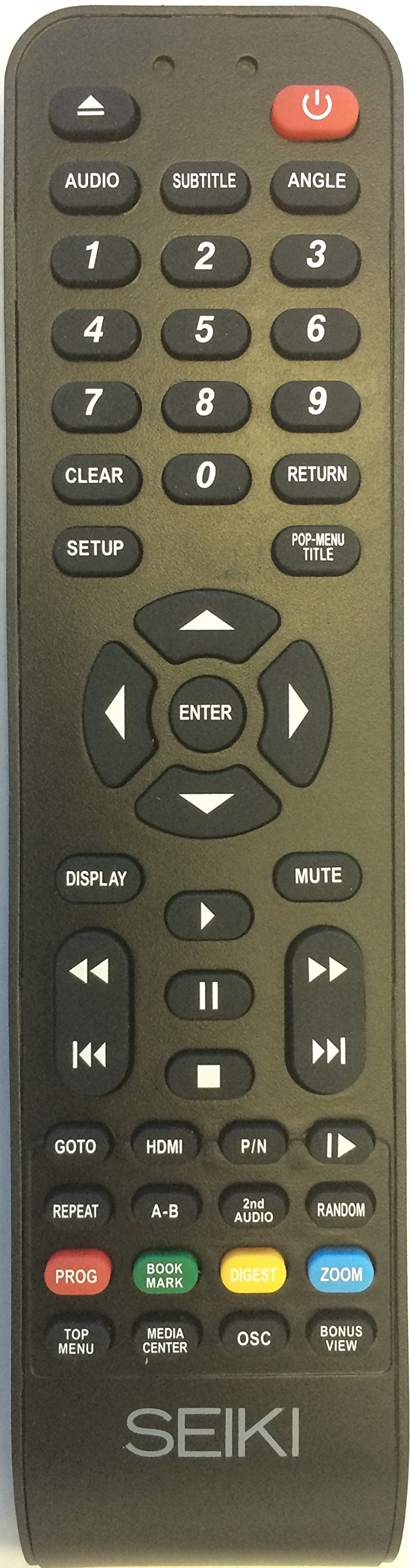
Figure 1: USARMT Replacement Remote Control for Seiki Blu-ray Players. This image displays the full layout of the remote control, showing all buttons and their labels, including the power button, number pad, navigation controls, and function buttons.
Operating Instructions
Button Functions
This section details the function of each button on your USARMT replacement remote control.
- Power Button (⑂): Turns the Blu-ray player on or off.
- AUDIO: Selects audio tracks or modes.
- SUBTITLE: Toggles subtitles on or off, or cycles through available subtitle languages.
- ANGLE: Changes the viewing angle on compatible discs.
- Number Pad (0-9): Used for direct track selection, chapter selection, or inputting numerical values.
- CLEAR: Clears the current input or selection.
- RETURN: Returns to the previous menu or screen.
- SETUP: Accesses the system setup menu of the Blu-ray player.
- POP-MENU/TITLE: Displays the disc's pop-up menu or title menu.
- Navigation Buttons (Up, Down, Left, Right): Navigates through menus and options.
- ENTER: Confirms a selection or action.
- DISPLAY: Shows on-screen display information, such as playback time or disc status.
- MUTE: Mutes or unmutes the audio output.
- Playback Controls:
- Rewind (⏪): Rewinds playback.
- Fast Forward (⏩): Fast forwards playback.
- Previous Track (⏮): Skips to the beginning of the previous track or chapter.
- Next Track (⏭): Skips to the beginning of the next track or chapter.
- Play (▶): Starts or resumes playback.
- Pause (⏸): Pauses playback.
- Stop (⏹): Stops playback.
- GOTO: Jumps to a specific time, track, or chapter.
- HDMI: Selects the HDMI input (if applicable to the player).
- P/N: Switches between PAL and NTSC video formats (if applicable).
- REPEAT: Repeats a track, chapter, or entire disc.
- A-B: Repeats a specific section between two marked points (A and B).
- 2nd AUDIO: Selects a secondary audio track.
- RANDOM: Plays tracks in a random order.
- PROG (Program): Enters program mode to create a custom playback sequence.
- BOOK MARK: Sets or recalls a bookmark during playback.
- DIGEST: Displays a digest or thumbnail view of the disc content.
- ZOOM: Zooms in on the video image.
- TOP MENU: Accesses the main menu of the disc.
- MEDIA CENTER: Opens the media center function (if available on the player).
- OSC: On-Screen Control (functionality may vary).
- BONUS VIEW: Activates BonusView/Picture-in-Picture features on compatible discs.
Maintenance
Care and Handling
- Keep the remote control dry. Liquids can damage the internal circuitry.
- Avoid exposing the remote to extreme temperatures.
- Do not drop or subject the remote to strong impacts.
- Clean the remote with a soft, dry cloth. Do not use abrasive cleaners or solvents.
- Remove batteries if the remote will not be used for an extended period to prevent leakage.
Troubleshooting
Common Issues and Solutions
| Problem | Possible Cause | Solution |
|---|---|---|
| Remote is not working. | Dead or incorrectly inserted batteries. | Replace batteries with new AAA alkaline batteries, ensuring correct polarity. |
| Remote signal is not reaching the player. | Obstruction between remote and player; remote is too far away; infrared sensor on player is blocked. | Ensure a clear line of sight between the remote and the Blu-ray player. Move closer to the player. Check if anything is blocking the player's IR sensor. |
| Specific buttons are not responding. | Button may be stuck or damaged; remote may not be fully compatible with all player functions. | Gently press the button multiple times. If the issue persists, the remote may not support that specific function for your player model. |
Specifications
Technical Details
- Brand: USARMT
- Model Number: 4330255057
- Connectivity Technology: Infrared
- Compatible Devices: Seiki Blu-ray, DVD/Blu-ray Players
- Battery Type: 2 x AAA Alkaline (not included)
- Maximum Range: 10 Meters (approximately 33 feet)
- Special Feature: Ergonomic design, Pre-programmed
Warranty and Support
Product Information
This USARMT replacement remote control comes with a 30-day hassle-free return policy. For further assistance or inquiries, please refer to the seller's contact information on the purchase platform.
For specific operational details of your Seiki Blu-ray player, please consult the original manual provided with your player.