Introduction
This manual provides essential instructions for the setup, operation, and maintenance of your new USARMT replacement remote control. This remote is designed to function with various Vizio Home Theater Sound Bar models without requiring any programming.
Compatible Vizio Sound Bar Models:
- Vizio VSB200
- Vizio VSB210
- Vizio VSB210WS
- Vizio VSB211
- Vizio VSB211WS
- Vizio VSB205
- Vizio VSB206
- Vizio VSB207
Setup
Battery Installation
The remote control requires two AAA batteries (not included) for operation. Follow these steps to install the batteries:
- Locate the battery compartment on the back of the remote control.
- Press down on the latch and slide the battery cover downwards to open it.
- Insert two new AAA batteries, ensuring the positive (+) and negative (-) terminals align with the markings inside the compartment.
- Slide the battery cover back into place until it clicks securely.
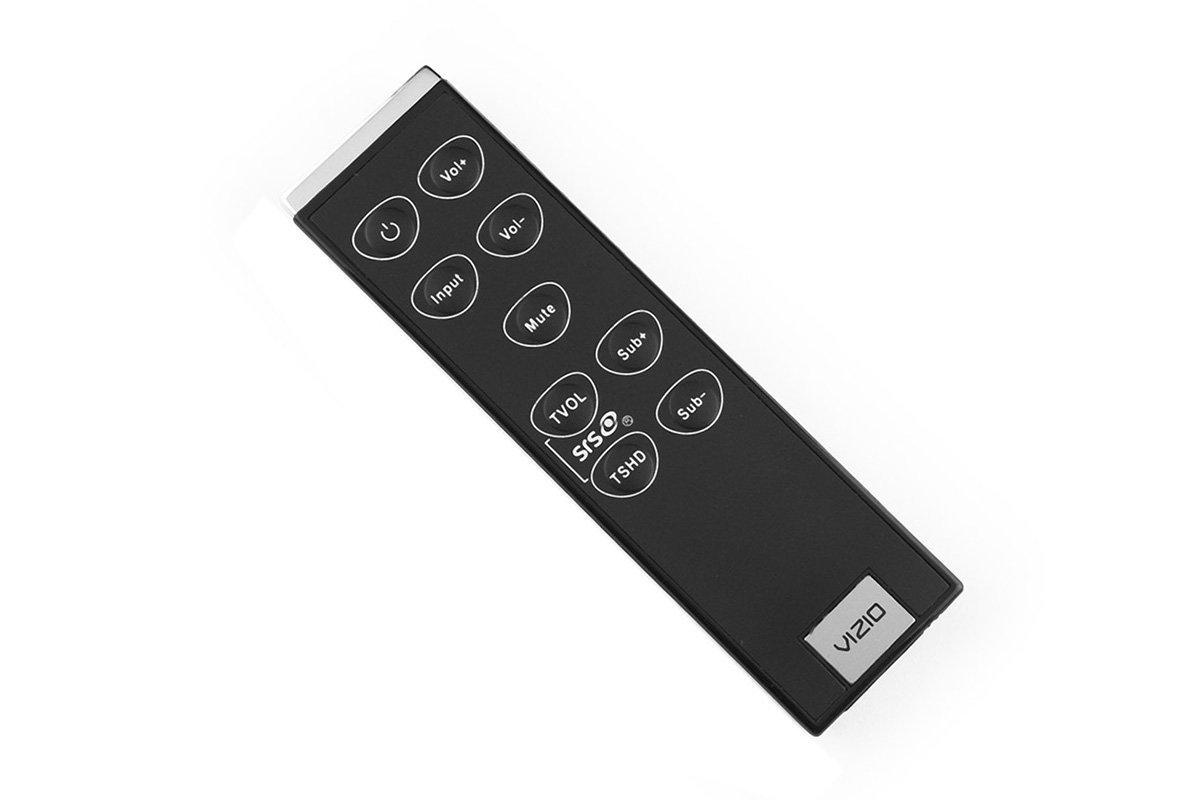
Image: The USARMT replacement remote control. The battery compartment is located on the back of the device.
Once batteries are installed, the remote is ready for use with your compatible Vizio sound bar system without any additional programming.
Operating Instructions
This remote control provides direct access to the primary functions of your Vizio Home Theater Sound Bar. Point the remote directly at the sound bar's sensor for optimal performance.
Basic Functions:
- Power Button: Turns the sound bar on or off.
- Volume Up/Down: Adjusts the sound bar's volume level.
- Mute Button: Silences or restores the sound.
- Input Button: Cycles through available audio input sources (e.g., Optical, Bluetooth, AUX).
- Bass/Treble Controls: Adjusts bass and treble levels (if supported by your sound bar model).
- Surround/TruVolume: Activates or deactivates sound enhancement features (if supported).
Maintenance
Battery Replacement
Replace the batteries when the remote control's response becomes inconsistent or stops working. Always replace both batteries with new AAA batteries simultaneously. Do not mix old and new batteries or different types of batteries.
Cleaning
To clean the remote control, gently wipe its surface with a soft, dry cloth. Avoid using liquid cleaners, solvents, or abrasive materials, as these can damage the remote's finish or internal components.
Troubleshooting
If you encounter issues with your remote control, refer to the following table for common problems and solutions:
| Problem | Solution |
|---|---|
| Remote is not working. | Check if the batteries are installed correctly with the correct polarity. Replace old batteries with new ones. Ensure there are no obstructions between the remote and the sound bar's sensor. |
| Buttons are unresponsive. | Ensure the remote is pointed directly at the sound bar. Replace batteries. Clean the remote's surface if there is any residue affecting button presses. |
| Short operating range. | Replace the batteries. Ensure no strong light sources (like direct sunlight) are interfering with the infrared signal. |
Specifications
- Brand: USARMT
- Compatible Devices: Vizio Home Theater Sound Bar Systems (VSB200, VSB210, VSB210WS, VSB211, VSB211WS, VSB205, VSB206, VSB207)
- Connectivity Technology: Infrared (IR)
- Controller Type: Button Control
- Special Feature: Ergonomic design
- Batteries Required: 2 x AAA (not included)
Warranty and Support
This product includes a 30-day hassle-free return policy. If you experience any issues with your remote control within 30 days of purchase, please contact your retailer for assistance or return options.
For further support or inquiries, please refer to the contact information provided by your seller or retailer.


