
T POWER TP-Tk4-YR8
Contents
T-Power AC/DC Adapter User Manual
Model: TP-Tk4-YR8
Introduction
This user manual provides essential information for the safe and effective use of your T-Power AC/DC Adapter. This power supply charger is designed to provide reliable power to a range of compatible cordless vacuum cleaners and other devices. It features a brand-new design with an input voltage range of AC 100V - 240V and an output of 29-31V, compatible with devices requiring this voltage range for charging Lithium-ion batteries.
Safety Information
Please read and understand all safety warnings before using this product. Failure to follow these instructions may result in electric shock, fire, or serious injury.
- As an electrical item, the adapter must be stored correctly and monitored during use.
- If the item appears to be overheating, immediately disconnect it from the power source and the device.
- Do not expose the adapter to water, moisture, or extreme temperatures.
- Do not attempt to disassemble or modify the adapter. Refer all servicing to qualified personnel.
- Ensure the adapter is used only with compatible devices as specified in this manual. Using it with incompatible devices may cause damage.
- Keep out of reach of children and pets.

Image: T-Power Superior Safety Power Adapter highlighting protection features such as over-current, over-temperature, over-voltage, and short circuit protection. This image illustrates the built-in safeguards of the adapter.
Product Overview and Components
Your T-Power AC/DC Adapter package includes the following components:
- 1 x T-Power AC/DC Adapter with integrated power cord.

Image: The T-Power AC/DC Adapter, showing the main adapter unit with its specifications label and the attached power cord with a barrel connector.

Image: A detailed view of the T-Power charger, highlighting its LED indicator display and explaining the built-in integrated microchip that prevents overcharging and prolongs battery life. The LED indicator shows green for charging/fully charged and red for defective/temperature anomaly.
Setup
- Verify Compatibility: Before connecting, ensure your device's model number or part number matches the compatible list provided in this manual.
- Connect to Device: Insert the barrel connector of the T-Power adapter firmly into the charging port of your compatible device.
- Connect to Power Outlet: Plug the AC prongs of the adapter into a standard AC 100V-240V wall outlet.
- Observe Indicator: The LED indicator on the adapter will illuminate to show the charging status. Refer to the "LED Indicator Display" section for details.
Operating Instructions
Once connected, the T-Power adapter will automatically begin charging your device. The adapter is designed for continuous use with compatible devices, providing a stable power supply.
LED Indicator Display:
- Charging: Green light flashing
- Fully charged: Green light solid
- Defective: Red light flashes fast
- Temperature anomaly: Red light flashes fast & slow
Always ensure the adapter is placed in a well-ventilated area during operation to prevent overheating.
Compatibility
This T-Power AC/DC Adapter is specifically designed to be compatible with a range of cordless vacuum cleaners and other devices. Please ensure your device's model or part number matches the list below for proper functionality and safety.
Compatible Vacuum Cleaner Models:
- BuTure: JR200, JR400, JR500, JR600, VC40, VC50 Vacuum Cleaner
- Belife: BVC-V11, BVCV11, BVC-V12 (25.9V 2600mAh 25.9VDC Lithium Ion Battery Pack)
- Buture Pro: Model BP10 Cordless Vacuum Cleaner
- Hompany: Smartvac 12 Cordless Vacuum Cleaner
- Laresar: Model Elite 1, Elite 3, Elite 4, Elite 5, Elite 6 Pro vacuum cleaner Power supply
- Voweek: VW-VC09, VW-VC10 Cordless Vacuum Cleaner
- Orfeld: Model V16 Pro, V16Pro Stick Vac Lightweight Cordless Vacuum Cleaner
Important Note: The vacuum's battery voltage (e.g., 25.9V) is different from the charger's output voltage (29-31V). This is normal for charging Lithium-ion batteries. Always check for compatibility with your specific unit.
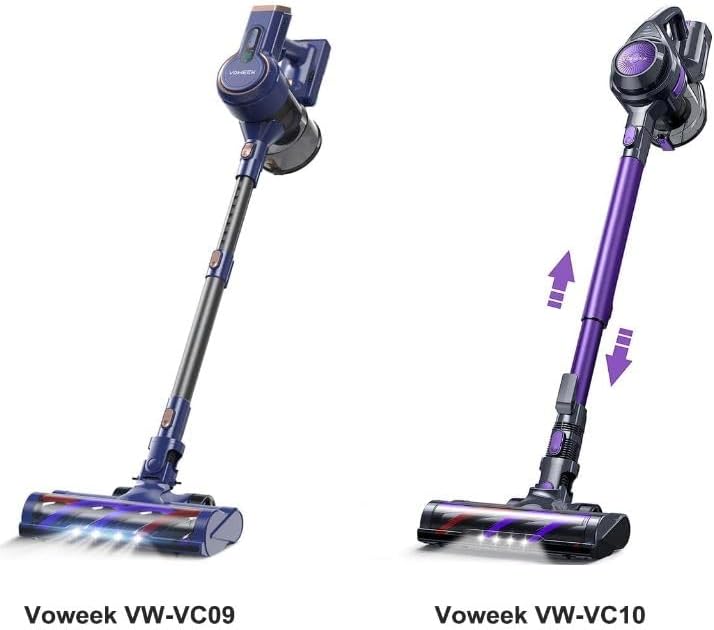
Image: Two Voweek cordless vacuum cleaner models, VW-VC09 and VW-VC10, illustrating the types of devices compatible with this adapter.

Image: Various models of Buture (JR500, VC50, VC40) and Laresar Elite (1, 3, 4, 5) series vacuum cleaners, demonstrating the range of compatible devices.
Maintenance
Proper maintenance ensures the longevity and safe operation of your T-Power AC/DC Adapter.
- Cleaning: Disconnect the adapter from both the power outlet and the device before cleaning. Use a dry, soft cloth to wipe the surface. Do not use liquid cleaners or aerosols.
- Storage: When not in use, store the adapter in a cool, dry place away from direct sunlight and moisture. Avoid coiling the cable too tightly to prevent damage.
- Inspection: Periodically inspect the adapter and its cable for any signs of damage, such as cuts, fraying, or bent pins. If damage is found, discontinue use immediately and replace the adapter.
Troubleshooting
If you encounter issues with your T-Power AC/DC Adapter, refer to the following common problems and solutions:
| Problem | Possible Cause | Solution |
|---|---|---|
| Adapter not charging device / No LED light |
|
|
| Red LED light flashing fast |
|
|
| Red LED light flashing fast & slow |
|
|
| Device not charging to full capacity |
|
|
Specifications
| Product Dimensions | 4 x 4 x 2 inches |
| Item Weight | 4 ounces |
| Model Number | TP-Tk4-YR8 |
| Input Voltage Range | AC 100V - 240V |
| Output Voltage | 29-31V (Compatible) |
| Amperage | 2 Amps |
| Connectivity Technology | Infrared (Note: This seems to be an error in the source data, as it's a power adapter, not an IR device. The primary connection is a barrel connector.) |
| Connector Type | Barrel Connector |
| Mounting Type | Wall Mount |
| Certifications | CE/FCC/RoHS certified |
Warranty and Support
T-Power is committed to providing high-quality products and customer satisfaction.
- 30-Day Return Policy: You may return your undamaged product and packaging within 30 days of purchase to receive a full refund.
- 1-Year Limited Manufacturer Warranty: We provide a 1-year limited manufacturer warranty covering quality-related issues. Easy exchange with a replacement is available.
- Technical Support: If you received the wrong item, are looking for a charger for your device, or if the adapter doesn't fit your device, please contact us. We are here to help.
For inquiries or support, please refer to the contact information provided by your retailer or visit the official T-Power website.
Documents and downloads
Ask a question about this manual
Ask about setup, troubleshooting, compatibility, parts, safety, or missing instructions. Manuals+ will review the question and use this page’s manual context to help answer it.