1. Introduction
Thank you for choosing the Hoover SB 01 Syrene Bagless Vacuum Cleaner. This manual provides essential information for the safe and efficient use, maintenance, and troubleshooting of your new appliance. Please read it thoroughly before first use and keep it for future reference.
The Hoover SB 01 is a lightweight and versatile bagless vacuum cleaner designed for effective cleaning of various floor types, including carpets and hard floors. Its Cyclean dust-free technology and washable EPA filter ensure efficient dust collection and easy maintenance.
2. Important Safety Instructions
When using electrical appliances, basic safety precautions should always be followed to reduce the risk of fire, electric shock, or injury.
- Read all instructions before using the appliance.
- Do not leave the appliance unattended when plugged in. Unplug from outlet when not in use and before servicing.
- Do not use outdoors or on wet surfaces.
- Do not allow to be used as a toy. Close attention is necessary when used by or near children.
- Use only as described in this manual. Use only manufacturer's recommended attachments.
- Do not use with damaged cord or plug. If appliance is not working as it should, has been dropped, damaged, left outdoors, or dropped into water, return it to a service center.
- Do not pull or carry by cord, use cord as a handle, close a door on cord, or pull cord around sharp edges or corners. Do not run appliance over cord. Keep cord away from heated surfaces.
- Do not unplug by pulling on cord. To unplug, grasp the plug, not the cord.
- Do not handle plug or appliance with wet hands.
- Do not put any object into openings. Do not use with any opening blocked; keep free of dust, lint, hair, and anything that may reduce airflow.
- Keep hair, loose clothing, fingers, and all parts of body away from openings and moving parts.
- Do not pick up anything that is burning or smoking, such as cigarettes, matches, or hot ashes.
- Do not use to pick up flammable or combustible liquids, such as gasoline, or use in areas where they may be present.
- Do not pick up toxic material, such as chlorine bleach, ammonia, or drain cleaner.
- Do not use without dust cup and/or filters in place.
- Turn off all controls before unplugging.
- Use extra care when cleaning on stairs.
3. Product Overview
Familiarize yourself with the components of your Hoover SB 01 Syrene vacuum cleaner before assembly and operation.
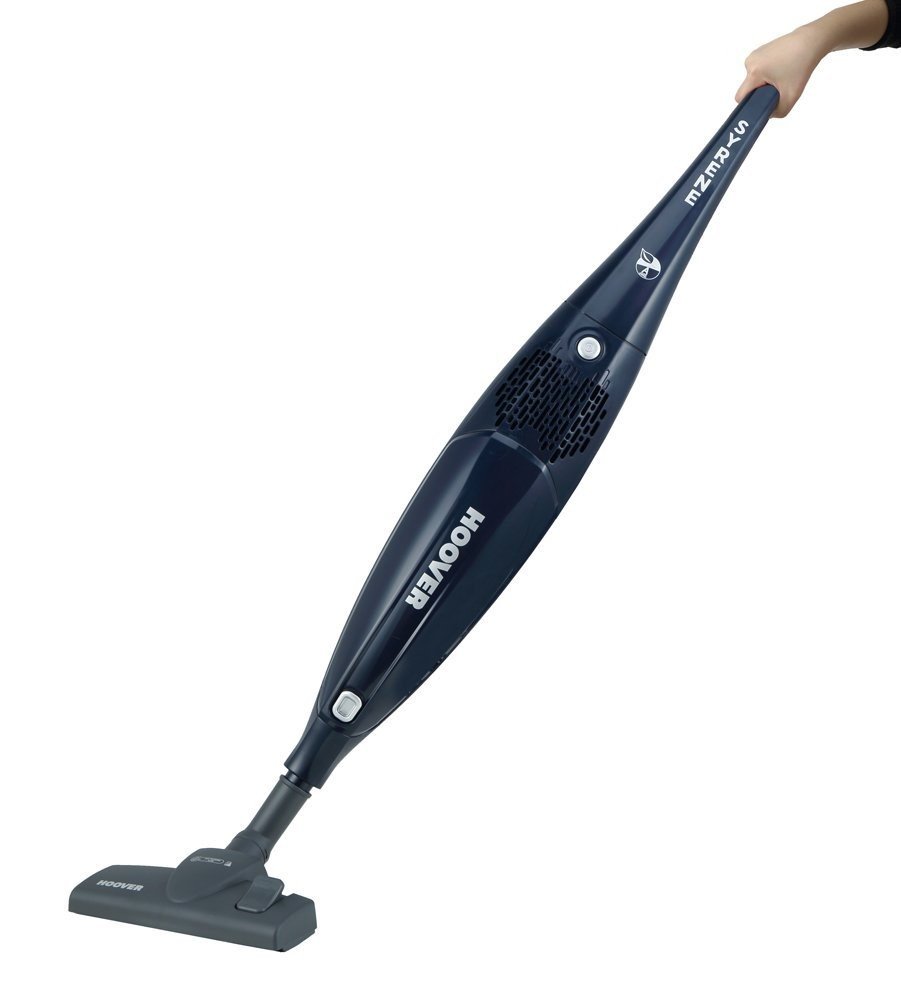
Image: The Hoover SB 01 Syrene Bagless Vacuum Cleaner, showing its upright stick design with the dustbin and handle. The main unit is green and transparent.
Components Included:
- Main Vacuum Unit (Motor and Dustbin Assembly)
- Handle Assembly
- Floor Nozzle (Brush for carpets and tiles)
- Extension Tube (if applicable, for stick configuration)
- Washable EPA Filter (pre-installed)
- User Manual
Note: Specific accessory brushes may vary. Refer to your packaging for a complete list of included items.
4. Setup and Assembly
The Hoover SB 01 Syrene is designed for quick and easy assembly. Follow these steps to prepare your vacuum cleaner for use.
- Unpack Components: Carefully remove all parts from the packaging. Ensure all components listed in the "Product Overview" section are present.
- Attach Handle: Insert the handle assembly into the top of the main vacuum unit until it clicks securely into place. Ensure it is firmly seated.
- Connect Floor Nozzle: Attach the floor nozzle (brush for carpets and tiles) to the bottom of the main vacuum unit or the extension tube (if using). Push firmly until it locks.
- Check Filter: Ensure the washable EPA filter is correctly installed inside the dustbin. Refer to the "Maintenance" section for filter location and installation.
- Power Cord: Unwind the power cord. The appliance is ready for use.
Visual Aid Description: An illustration showing the handle being inserted into the main body, and the floor nozzle attaching to the base.
5. Operating Instructions
Follow these steps for effective and safe operation of your Hoover SB 01 Syrene vacuum cleaner.
- Plug In: Insert the power plug into a suitable electrical outlet.
- Power On: Locate the power switch, usually on the handle or main unit, and press it to turn the vacuum cleaner ON.
- Vacuuming:
- Move the vacuum cleaner slowly and steadily over the surface to be cleaned.
- For carpets, use the brush setting designed for carpets.
- For hard floors (tiles, laminate, wood), use the brush setting designed for hard floors. The included brush is suitable for both.
- The 700W motor provides strong suction for various debris.
- Maneuverability: The lightweight design and practical carrying handle allow for easy movement around furniture and between rooms.
- Power Off: When finished, press the power switch to turn the vacuum cleaner OFF and unplug it from the electrical outlet.
- Cord Storage: Wrap the power cord neatly around the designated cord hooks on the vacuum cleaner for storage.
Visual Aid Description: An image showing a person operating the vacuum cleaner on a floor, demonstrating its maneuverability.
6. Maintenance
Regular maintenance ensures optimal performance and extends the lifespan of your Hoover SB 01 Syrene vacuum cleaner. Always unplug the appliance before performing any maintenance.
6.1. Emptying the Dustbin
Empty the dustbin regularly, ideally after each use or when the MAX fill line is reached, to maintain suction power.
- Disconnect Power: Ensure the vacuum cleaner is unplugged from the wall outlet.
- Remove Dustbin: Locate the dustbin release button or latch, usually near the handle or on the main unit. Press or unlatch to detach the dustbin.
- Empty Contents: Hold the dustbin over a waste bin and open the bottom flap or lid to empty the collected debris.
- Reattach Dustbin: Close the dustbin flap securely and reattach the dustbin to the main unit until it clicks into place.
Visual Aid Description: A sequence of images showing how to detach the dustbin, open its flap, empty debris, and reattach it.
6.2. Cleaning the EPA Filter
The EPA filter is washable and should be cleaned periodically to prevent loss of suction. Clean the filter at least once a month, or more frequently with heavy use.
- Disconnect Power: Ensure the vacuum cleaner is unplugged.
- Remove Dustbin: Detach the dustbin as described above.
- Access Filter: The EPA filter is located inside the dustbin. Gently twist or pull to remove it.
- Wash Filter: Rinse the filter under cold running water until the water runs clear. Do not use detergents or hot water.
- Dry Filter: Allow the filter to air dry completely for at least 24 hours before reinserting. Do not use a hairdryer or other heating devices. Ensure it is completely dry to prevent damage to the motor.
- Reinstall Filter: Once dry, place the filter back into the dustbin, ensuring it is correctly seated.
- Reattach Dustbin: Reattach the dustbin to the main unit.
Visual Aid Description: An image showing the EPA filter being removed from the dustbin, and another showing it being rinsed under a tap.
6.3. Cleaning the Floor Nozzle/Brush
Periodically check the floor nozzle and brush for tangled hair, threads, or debris that may reduce cleaning efficiency.
- Disconnect Power: Unplug the vacuum cleaner.
- Inspect Brush: Turn the floor nozzle upside down and inspect the rotating brush.
- Remove Debris: Use scissors or a small tool to carefully cut and remove any tangled hair or fibers from the brush bristles.
- Check Airway: Ensure the airway from the nozzle to the main unit is clear of blockages.
Visual Aid Description: An image showing the underside of the floor nozzle with tangled hair on the brush, and a hand using scissors to remove it.
7. Troubleshooting
Before contacting customer support, refer to the following troubleshooting guide for common issues you might encounter.
| Problem | Possible Cause | Solution |
|---|---|---|
| Vacuum cleaner does not turn on. |
|
|
| Poor suction. |
|
|
| Unusual noise. |
|
|
8. Specifications
Technical specifications for the Hoover SB 01 Syrene Bagless Vacuum Cleaner.
- Model: SB 01
- Brand: Hoover
- Power: 700 Watts
- Voltage: 700 Volts
- Dimensions (L x W x H): 25.5 x 23.8 x 116.8 cm
- Weight: 2.6 Kilograms
- Filter Type: Washable EPA Filter
- Dust Collection: Bagless, Cyclean Technology
- Noise Level: 79 Decibels
- Annual Energy Consumption: 27 kilowatthours per year
- Surface Recommendation: Carpets, Hard Floors
- Power Source: Corded Electric
- Special Feature: Lightweight, Practical Carrying Handle
9. Warranty and Customer Support
Warranty information for the Hoover SB 01 Syrene Bagless Vacuum Cleaner is not explicitly provided in the product data. For detailed warranty terms and conditions, please refer to the warranty card included with your product or contact Hoover customer support directly.
If you experience any issues not covered in the troubleshooting section or require further assistance, please contact Hoover customer service. Contact details can typically be found on the Hoover official website or on the product packaging.
Manufacturer: Hoover
Model Number: SR71_SB01011


