
Technical Pro TPWMU99
Technical Pro TPWMU99 UHF Wireless Handheld Microphone System User Manual
Model: TPWMU99
Introduction
Thank you for choosing the Technical Pro TPWMU99 UHF Wireless Handheld Microphone System. This manual provides essential information for the proper setup, operation, and maintenance of your new microphone system. Please read it thoroughly before use to ensure optimal performance and longevity of the product.
The TPWMU99 is designed for various audio applications, including consumer use, computer integration, PA systems, and DJ environments. It features a wireless UHF handheld microphone and a USB-powered receiver, offering flexibility and ease of use.
Safety Information
- Do not expose the unit to rain or moisture to prevent fire or electric shock.
- Do not open the casing. There are no user-serviceable parts inside. Refer all servicing to qualified personnel.
- Ensure proper battery insertion in the microphone, observing polarity.
- Keep the microphone and receiver away from heat sources and direct sunlight.
- Avoid dropping or subjecting the unit to strong impacts.
- Dispose of batteries responsibly according to local regulations.
Package Contents
Verify that all items are present in the package:
- 1 x UHF Wireless Handheld Microphone
- 1 x USB Powered Receiver
- 1 x 1/8" to 1/4" Audio Cable
- 1 x 1/8" to 1/8" Audio Cable
- User Manual (this document)
Product Features
The Technical Pro TPWMU99 offers the following key features:
- Wireless UHF Technology: Operates on a UHF high band signal for reliable wireless transmission.
- USB Powered Receiver: The receiver draws power from any standard USB port (e.g., computer, mixer, amplifier, AC adapter).
- USB Passthrough: Features a female USB input port on the receiver, allowing connection of other USB devices to the same port.
- Versatile Connectivity: Includes 1/8" output on the receiver, with supplied 1/8" to 1/4" and 1/8" to 1/8" cables for compatibility with various audio inputs.
- Dynamic Cardioid Microphone: Designed for precise audio capture and effective ambient noise reduction.
- Plug-and-Play Operation: Simple setup for immediate use.
- Extended Wireless Range: Up to 150 feet (45 meters) wireless range.
- Digital Sound Processing: Enhances audio quality.
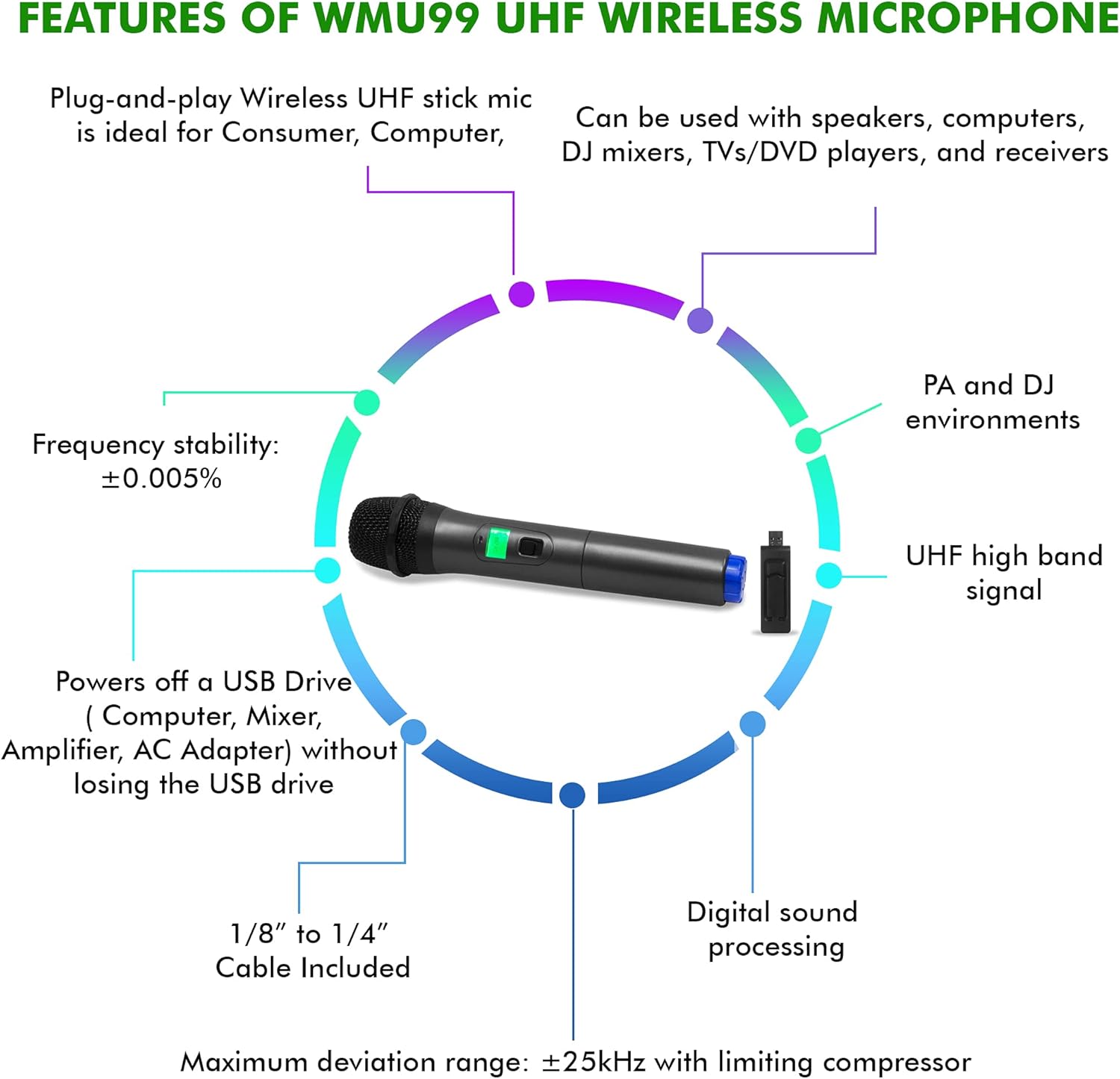
Figure 1: Overview of TPWMU99 UHF Wireless Microphone features, including plug-and-play, compatibility, frequency stability, USB power, cable inclusions, digital sound processing, and maximum deviation range.
Setup
1. Microphone Battery Installation
- Unscrew the bottom part of the handheld microphone.
- Insert the required batteries (typically AA, check the microphone compartment for specific type and polarity markings).
- Screw the bottom part back on securely.
- Locate the power switch on the microphone and ensure it is in the "OFF" position before proceeding.

Figure 2: The wireless handheld microphone and its USB receiver. The microphone requires batteries for operation.
2. Receiver Connection
- Power Connection: Plug the USB receiver into any standard USB power port. This can be a USB port on a computer, mixer, amplifier, or a USB wall adapter. The receiver will draw power from this connection.
- Audio Output Connection:
- For 1/4" microphone inputs: Use the supplied 1/8" to 1/4" cable. Connect the 1/8" end to the receiver's output jack and the 1/4" end to your audio device's microphone input.
- For 1/8" microphone inputs: Use the supplied 1/8" to 1/8" cable. Connect one end to the receiver's output jack and the other end to your audio device's microphone input.
- USB Passthrough (Optional): If your USB power source is limited, you can connect another USB device (e.g., a USB drive) to the female USB port on the receiver. This allows the receiver to share the USB port without losing its functionality for the connected device.

Figure 3: The wireless microphone in use, transmitting audio to a speaker system with a control panel, demonstrating the receiver's connection.
Operating Instructions
- Power On: Once the receiver is connected and powered, switch the microphone's power button to the "ON" position. An indicator light on the microphone should illuminate.
- Volume Adjustment: Adjust the volume on your connected audio device (speaker, mixer, computer) to a suitable level. Start with a low volume and gradually increase it to avoid sudden loud noises.
- Testing: Speak or sing into the microphone to test the audio output. Ensure the sound is clear and free of interference.
- Optimal Usage: For best sound quality, hold the microphone approximately 2-6 inches (5-15 cm) from your mouth. Avoid covering the microphone grille with your hand.
- Power Off: When finished, switch the microphone to the "OFF" position. It is also recommended to unplug the USB receiver when not in use.

Figure 4: The TPWMU99 microphone being used by a performer, illustrating its application in live settings.
Maintenance
- Cleaning: Use a soft, dry cloth to clean the microphone and receiver. Do not use liquid cleaners or abrasive materials.
- Storage: Store the microphone system in a cool, dry place away from direct sunlight and extreme temperatures.
- Battery Replacement: Replace batteries promptly when the microphone's performance degrades or the indicator light dims. Remove batteries if the microphone will not be used for an extended period to prevent leakage.
Troubleshooting
| Problem | Possible Cause | Solution |
|---|---|---|
| No sound from microphone |
|
|
| Poor sound quality / Interference |
|
|
| Microphone cuts out intermittently |
|
|
Specifications
| Feature | Specification |
|---|---|
| Model | TPWMU99 |
| Microphone Type | Dynamic, Handheld |
| Polar Pattern | Cardioid (Unidirectional) |
| Wireless Frequency | UHF High Band |
| Frequency Stability | ±0.005% |
| Modulation Mode | FM |
| Maximum Deviation Range | ±25kHz with limiting compressor |
| Frequency Response | 40Hz-20kHz |
| Signal to Noise Ratio (S/N) | 100dB |
| Total Harmonic Distortion (THD) | <0.5% |
| Audio Dynamic Range | 90dB |
| Wireless Range | Up to 150 ft (45 meters) |
| Receiver Power Source | USB Powered |
| Receiver Output | 1/8" (3.5mm) Jack |
| Receiver Additional Port | Female USB Input (Passthrough) |
| Microphone Dimensions (L x W x H) | Refer to Product Dimensions for overall size. Receiver: 1.69" x 1.3" x 1.3" |
| Product Dimensions (L x W x H) | 10.7 x 3.9 x 2.3 inches |
| Item Weight | 11.2 ounces |
| UPC | 817802013653 |

Figure 5: Dimensions of the microphone and receiver components. Note that the listed dimensions 1.69"x1.3"x1.3" refer to the receiver, while the microphone is larger.
Warranty and Support
For warranty information and technical support, please refer to the official Technical Pro website or contact their customer service department. Keep your purchase receipt as proof of purchase for any warranty claims.
Contact Information: Please visit the Technical Pro Store on Amazon or their official website for the most up-to-date support details.
Related documentsTPWMU99


Ask a question about this manual
Ask about setup, troubleshooting, compatibility, parts, safety, or missing instructions. Manuals+ will review the question and use this page’s manual context to help answer it.