
1. Introduction
Thank you for choosing the American Bass VFL4800-1D Class D Mono Hybrid Amplifier. This manual provides essential information for the proper installation, operation, and maintenance of your amplifier. Please read this manual thoroughly before attempting installation or operation to ensure optimal performance and safety.

Figure 1: Package Contents. This image displays the items included with your American Bass VFL4800-1D amplifier: the amplifier unit, the owner's manual, a remote gain controller, and various wiring accessories for installation.
2. Safety Information
Improper installation or use of this amplifier can result in serious injury or damage to the equipment. Please observe the following safety precautions:
- Always disconnect the vehicle's battery negative terminal before starting any electrical work.
- Ensure all wiring is properly sized and fused to prevent overheating and short circuits.
- Mount the amplifier securely in a well-ventilated area, away from moisture and excessive heat.
- Avoid running wires near sharp edges or moving parts. Use grommets where wires pass through metal.
- Do not operate the amplifier if it is damaged or malfunctioning. Seek professional assistance.
- Keep the volume at a safe level to avoid hearing damage and to remain aware of your surroundings while driving.
3. Product Features and Specifications
The American Bass VFL4800-1D is a high-performance Class D mono hybrid amplifier designed for car audio systems.

Figure 2: Amplifier Top View. This image shows the top of the VFL4800-1D amplifier, highlighting its robust black heat sink and the model designation.
Key Features:
- 1-Ohm stable operation.
- Mono-block hybrid amplifier design.
- Low-level input and output.
- Variable subsonic filter (10Hz ~ 50Hz).
- Variable low pass filter (35Hz ~ 250Hz).
- Variable bass boost (0 ~ 9dB at 45Hz).
- Variable phase shift (0 ~ 180 degrees).
- Remote gain controller included.
- Two amplifiers linkable connector & selector for master/slave configuration.
Technical Specifications:
| Specification | Value |
|---|---|
| Max Power @ 1 Ohm | 4800 Watts |
| RMS Power @ 1 Ohm | 2200 Watts |
| Frequency Response | 20Hz ~ 250Hz |
| Input Level | 0.2V ~ 6V |
| Variable Subsonic Filter | 10Hz ~ 50Hz |
| Variable Low Pass Filter | 35Hz ~ 250Hz |
| Variable Bass Boost | 0 ~ 9dB at 45Hz |
| Variable Phase Shift | 0 ~ 180 degrees |
| Fuse Rating | 120A |
| Linked Fuse Rating (for two amplifiers) | 240A |
| Dimensions (L x W x H) | 13.26" x 6.5" x 2.25" (33.7cm x 16.5cm x 5.7cm) |
| Voltage | 12 Volts (DC) |
| Item Weight | 3.81 Kilograms |
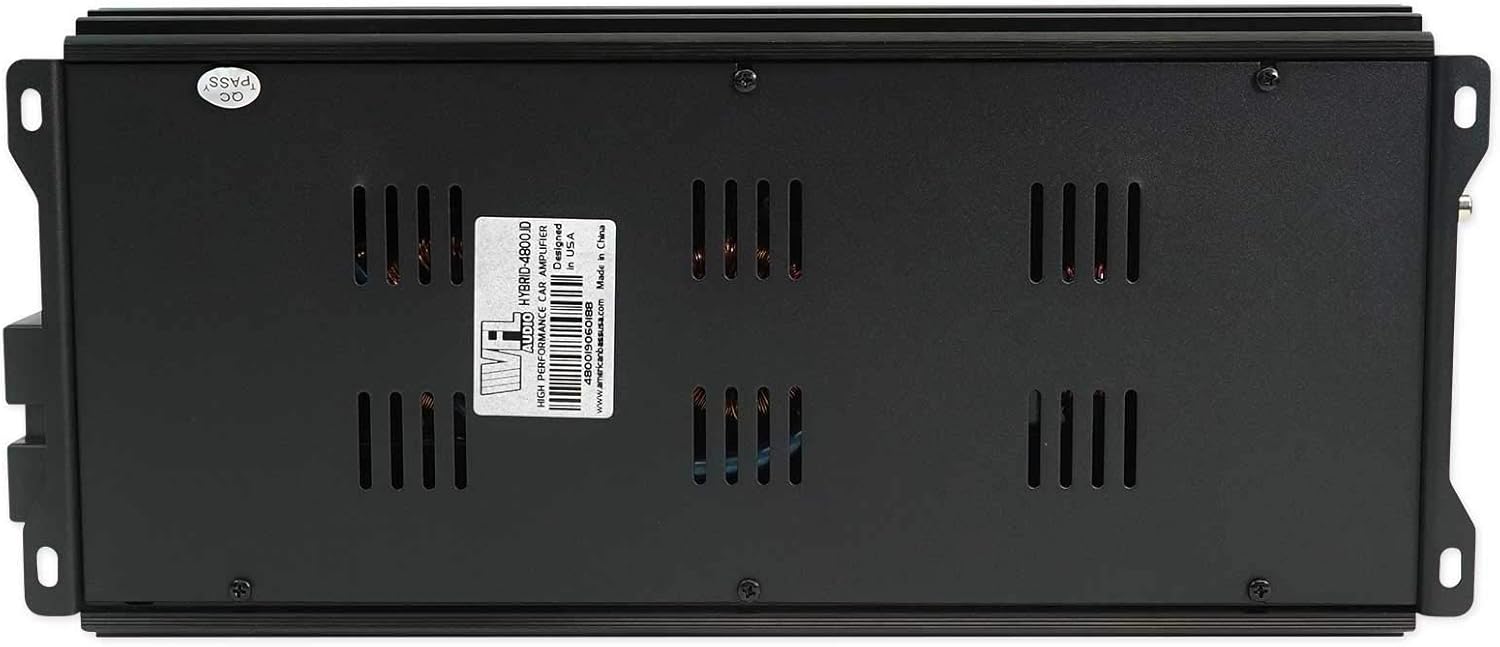
Figure 3: Amplifier Bottom View. This image shows the underside of the amplifier, including the product label with serial number and manufacturing information.
4. Installation and Setup
Proper installation is crucial for the performance and longevity of your amplifier. If you are unsure about any step, consult a professional car audio installer.
4.1 Mounting Location
- Choose a location that is dry, well-ventilated, and protected from direct sunlight or excessive heat.
- Ensure sufficient airflow around the amplifier's heat sinks.
- Mount the amplifier securely to a solid surface to prevent movement during vehicle operation.
4.2 Wiring Connections
Refer to the diagram below for proper wiring connections. Use high-quality cables of appropriate gauge.

Figure 4: Power and Speaker Terminals. This image illustrates the rear panel of the amplifier, detailing the connections for Ground (GND), Remote (REM), Battery Positive (BATT+), and Speaker Output.
- Power (BATT+): Connect a fused power cable directly from the positive terminal of the vehicle's battery to the BATT+ terminal on the amplifier. The fuse should be located within 18 inches (45 cm) of the battery.
- Ground (GND): Connect a ground cable of the same gauge as the power cable to a clean, unpainted metal surface of the vehicle chassis. Ensure a solid, low-resistance connection.
- Remote (REM): Connect a remote turn-on wire from your head unit's remote output to the REM terminal. This wire turns the amplifier on and off with your head unit.
- Speaker Output: Connect your subwoofer(s) to the speaker output terminals. Ensure correct polarity (+ to + and - to -). This is a mono amplifier, so all speakers should be wired to present a single impedance load to the amplifier.
- RCA Input: Connect RCA cables from your head unit's subwoofer or full-range pre-outs to the amplifier's RCA input jacks.
- Remote Gain Controller: Plug the included remote gain controller into the designated port on the amplifier.
4.3 Initial Settings
Before powering on, set the amplifier's controls to their initial positions:
- GAIN: Set to minimum (fully counter-clockwise).
- LPF (Low Pass Filter): Set to a suitable frequency for your subwoofers, typically between 80Hz and 120Hz.
- SUBSONIC: Set to a frequency below your subwoofer's resonant frequency, typically 20Hz to 30Hz, or minimum if unsure.
- BASS BOOST: Set to 0dB (minimum).
- PHASE SHIFT: Set to 0 degrees.

Figure 5: Amplifier Control Panel. This image shows the various adjustment knobs and ports on the amplifier, including Gain, Subsonic filter, Remote port, Low Pass Filter (LPF), Bass Boost, and the Input/Output Master/Slave selectors.
5. Operation
Once installed, carefully adjust the amplifier settings for optimal sound performance.
5.1 Gain Adjustment
The GAIN control matches the amplifier's input sensitivity to the output of your head unit.
- Set your head unit volume to about 75-80% of its maximum.
- Slowly increase the GAIN control on the amplifier until you hear distortion, then back it off slightly.
- The remote gain controller allows for convenient adjustment of the output level from the driver's seat.
5.2 Filter Adjustments
- LPF (Low Pass Filter): This filter allows only frequencies below the set point to pass through to the subwoofer. Adjust it to blend smoothly with your main speakers.
- SUBSONIC Filter: This filter removes extremely low frequencies that your subwoofer cannot reproduce efficiently, protecting it from damage and improving sound quality. Set it slightly below your LPF setting or your subwoofer's lowest effective frequency.
5.3 Bass Boost and Phase Shift
- BASS BOOST: Use sparingly. Excessive bass boost can cause distortion and damage to your speakers. Adjust to enhance bass response as desired, but avoid overdriving the system.
- PHASE SHIFT: Adjust this control (0-180 degrees) to ensure the subwoofer's output is in phase with your main speakers. This helps to prevent cancellation and improve overall bass impact. Listen from the listening position and adjust until the bass sounds strongest and most coherent.
5.4 Linkable Operation (Master/Slave)
The VFL4800-1D amplifier features a linkable function, allowing two identical amplifiers to be connected for increased power output into a single load.
- One amplifier will be designated as the "Master" and the other as the "Slave."
- The Master amplifier's controls will dictate the settings for both units.
- Consult the specific wiring diagram for linkable operation provided with your amplifiers or by American Bass for detailed instructions.
6. Maintenance
Regular maintenance helps ensure the longevity and reliable performance of your amplifier.
- Cleaning: Periodically wipe the amplifier's exterior with a soft, dry cloth. Do not use harsh chemicals or abrasive cleaners. Ensure no dust or debris accumulates in the heat sink fins.
- Connections: Regularly check all power, ground, remote, and speaker connections to ensure they are secure and free from corrosion. Loose connections can cause poor performance or damage.
- Ventilation: Ensure the amplifier's mounting location remains clear of obstructions to allow for proper airflow and cooling.
7. Troubleshooting
If you experience issues with your amplifier, refer to the following common problems and solutions before contacting support.
7.1 No Power / Amplifier Not Turning On
- Check Fuses: Verify the in-line fuse on the power cable near the battery and any fuses on the amplifier itself. Replace if blown.
- Power Connection: Ensure the BATT+ terminal has a solid 12V connection.
- Ground Connection: Confirm the GND terminal has a solid, low-resistance connection to the vehicle chassis.
- Remote Turn-On: Check that the REM terminal receives 12V when the head unit is on.
7.2 No Sound Output
- RCA Cables: Ensure RCA cables are securely connected at both the head unit and amplifier, and are not damaged.
- Speaker Wires: Check speaker wire connections for proper polarity and ensure they are not shorted or loose.
- Gain Setting: Confirm the GAIN control is not set to minimum.
- Head Unit Settings: Verify the head unit's subwoofer output is enabled and volume is up.
7.3 Distorted Sound
- Gain Too High: Reduce the GAIN control.
- Bass Boost Too High: Reduce the BASS BOOST setting.
- Speaker Impedance: Ensure the connected speaker impedance is within the amplifier's supported range (1 Ohm stable).
- Clipping: If the amplifier's "Protect" light illuminates, it indicates clipping or another fault. Reduce volume or check connections.
7.4 Amplifier Overheating / Protect Mode
- Ventilation: Ensure the amplifier has adequate airflow and is not covered.
- Impedance: Verify the speaker load impedance is not too low for the amplifier.
- Gain Setting: Reduce the GAIN control to prevent overdriving the amplifier.
- Short Circuit: Check speaker wires for any shorts to ground or to each other.
8. Warranty and Support
For specific warranty information, please refer to the warranty card included with your product or contact American Bass directly.
For technical support or service inquiries, please contact American Bass customer service or visit their official website.
- Manufacturer: American Bass USA
- Brand Store: American Bass Audio Store on Amazon