Introduction
Thank you for choosing the Care Touch Automatic Wrist Blood Pressure Monitor, Classic Edition. This device is designed for convenient and accurate measurement of your blood pressure and pulse rate at home. Regular monitoring can provide valuable information to you and your healthcare provider. Please read this manual thoroughly before using the device to ensure proper operation and accurate results.
Important Safety Information
- Consult your physician before using this device if you have any medical conditions, especially if you have severe circulatory problems, diabetes, or kidney disease.
- This device is intended for adult use only. Do not use on infants or children.
- Do not self-diagnose or self-medicate based on measurement results. Always consult a healthcare professional for interpretation of your blood pressure readings.
- Avoid taking measurements in a moving vehicle, during exercise, or immediately after bathing or consuming alcohol/caffeine.
- Ensure the cuff is applied correctly and comfortably. Over-tightening may cause discomfort or inaccurate readings.
- Keep the device away from strong electromagnetic fields, such as mobile phones or microwave ovens, as they may interfere with operation.
- Use only specified batteries. Do not mix old and new batteries or different types of batteries.
Product Components
The Care Touch Automatic Wrist Blood Pressure Monitor includes the following components:
- Wrist Blood Pressure Monitor Unit with integrated cuff
- Storage Case
- AAA Batteries (included)
- Instruction Manual (this document)

Figure 1: Monitor Display. This image shows a close-up of the monitor's digital display, indicating systolic (SYS), diastolic (DIA) blood pressure readings, and pulse rate (PUL). It also shows indicators for user M1/M2 and an irregular heartbeat symbol.
Setup
1. Battery Installation
- Locate the battery compartment cover on the back of the monitor unit.
- Press down and slide the cover off.
- Insert the included AAA batteries, ensuring the correct polarity (+ and -) as indicated inside the compartment.
- Replace the battery compartment cover until it clicks securely into place.

Figure 2: Battery Installation. This image illustrates the open battery compartment on the underside of the monitor, with two AAA batteries visible inside.
2. Setting Date and Time
Accurate date and time settings are crucial for tracking your readings. Refer to the small manual included in the box for specific instructions on setting the date and time, as this typically involves using the 'SET' or 'MEM' buttons in a specific sequence when the device is off.
Operating Instructions
1. Applying the Wrist Cuff
- Remove any tight clothing or accessories from your left wrist.
- Apply the cuff to your left wrist with the display facing the inside of your wrist (palm side).
- Ensure the cuff is snug but not overly tight. There should be enough space to insert one finger between the cuff and your wrist.
- The bottom edge of the cuff should be approximately 1-2 cm (0.4-0.8 inches) from your palm.
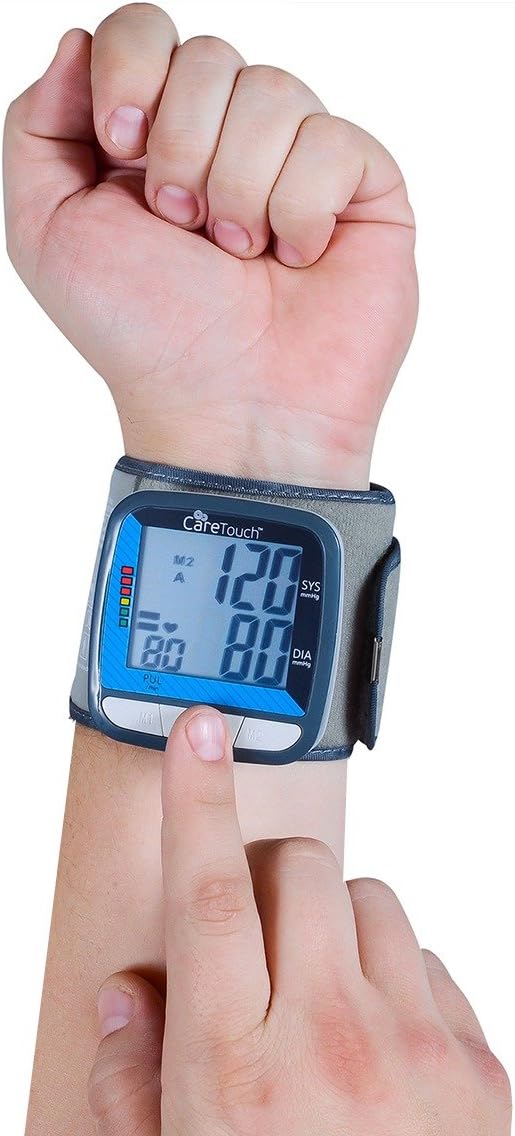
Figure 3: Correct Cuff Application. This image demonstrates the proper placement of the wrist cuff on the left wrist, with the monitor display positioned on the inner side of the wrist.
2. Correct Body Posture for Measurement
- Sit comfortably with your back supported and feet flat on the floor.
- Rest your arm on a table or other stable surface so that the cuff is at the same level as your heart. This is crucial for accurate readings.
- Relax and remain still. Avoid talking or moving during the measurement.
3. Taking a Measurement
- Once the cuff is applied and you are in the correct posture, press the START/STOP button (usually the power button in the center).
- The cuff will automatically inflate, and the measurement will begin. Remain still and quiet.
- Once the measurement is complete (typically less than 1 minute), the systolic pressure (SYS), diastolic pressure (DIA), and pulse rate (PUL) will be displayed on the screen.
- If an irregular heartbeat is detected, an irregular heartbeat symbol will appear on the display.
- The device will automatically store the reading and shut off after a period of inactivity, or you can press the START/STOP button again to turn it off manually.
4. Memory Function
The monitor stores up to 90 readings for each of two users (M1 and M2) with a date and time stamp.
- To access stored readings, ensure the device is off.
- Press the M1 or M2 button to view the readings for the respective user.
- Use the M1 and M2 buttons (or dedicated arrow buttons if present) to scroll through previous readings.
Maintenance
Cleaning
- Wipe the monitor and cuff gently with a soft, dry cloth.
- If necessary, use a slightly damp cloth with mild soap, then wipe dry.
- Do not use abrasive cleaners, solvents, or immerse the device in water.
Storage
- Store the device in its protective case when not in use.
- Keep it in a cool, dry place, away from direct sunlight, extreme temperatures, and humidity.
- If the device will not be used for an extended period, remove the batteries to prevent leakage.
Troubleshooting
| Problem | Possible Cause | Solution |
|---|---|---|
| No power / Display blank | Batteries are dead or incorrectly inserted. | Replace batteries with new AAA alkaline batteries, ensuring correct polarity. |
| Inaccurate or inconsistent readings | Incorrect cuff placement, arm position not at heart level, movement/talking during measurement, or device needs recalibration. | Ensure cuff is applied correctly and snugly. Position wrist at heart level. Remain still and quiet. Take multiple readings at different times. If issues persist, consult a healthcare professional or manufacturer. |
| Irregular Heartbeat Symbol appears frequently | Indicates an irregular heartbeat was detected during measurement. | This is an indicator, not a diagnosis. If this symbol appears frequently, consult your physician for further evaluation. |
| Cuff does not inflate or inflates too little/much | Cuff not properly connected (if detachable), air leakage, or internal malfunction. | Check cuff connection. Ensure no holes or damage to the cuff. If problem persists, contact customer support. |
Specifications
- Product Name: Automatic Wrist Blood Pressure Cuff Monitor
- Model Number: CSW01
- Brand: Care Touch
- Power Source: Battery Powered (AAA batteries)
- Measurement Method: Oscillometric
- Memory: 2 users x 90 readings with date/time stamp
- Product Dimensions: 8.89 x 8.89 x 8.89 cm
- Item Weight: 226.8 g (0.5 Pounds)
- Manufacturer: Future Diagnostics USA
Warranty and Support
For warranty information or technical support, please refer to the warranty card included with your product or contact Care Touch customer service directly. Contact details can typically be found on the product packaging or the official Care Touch website.
Manufacturer: Future Diagnostics USA


