
Introduction
Thank you for choosing Vivitar Earbuds. These comfortable and lightweight earbuds are designed for travel and everyday use, delivering clear stereo sound directly into your ears. This manual provides essential information for the safe and efficient use of your new earbuds. Please read it thoroughly before use and retain it for future reference.
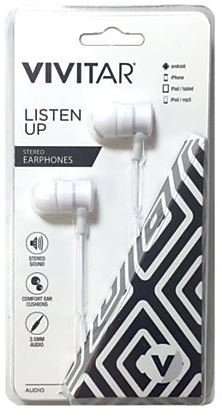
Image: Vivitar White Earbuds. This image displays the compact design of the earbuds, featuring the standard 3.5mm audio jack for universal compatibility.
Safety Information
- Hearing Protection: Avoid using earbuds at high volume for extended periods to prevent hearing damage.
- Environmental Awareness: Do not use earbuds in situations where inability to hear ambient sounds could be dangerous, such as while driving, cycling, or walking in traffic.
- Water and Moisture: Keep earbuds away from water and moisture. They are not waterproof.
- Cleaning: Clean earbuds with a soft, dry cloth only. Do not use liquid cleaners or aerosols.
- Disposal: Dispose of this product responsibly according to local regulations. Do not dispose of with household waste.
Package Contents
Please check the package for the following items:
- Vivitar Earbuds (Model 4330338128)
- User Manual
Setup
- Identify the Audio Jack: Locate the 3.5mm audio jack on your Vivitar Earbuds.
- Connect to Device: Insert the 3.5mm audio jack firmly into the headphone port of your compatible device (e.g., smartphone, tablet, computer, MP3 player).
- Wear Earbuds: Gently place the earbuds into your ears. Ensure a comfortable and secure fit for optimal sound quality.
Operating Instructions
Once connected, your Vivitar Earbuds are ready for use.
- Audio Playback: Start playing audio from your connected device. Sound will be directed through the earbuds.
- Volume Control: Adjust the volume directly on your connected device.
- Media Control: If your earbuds feature an in-line media control button (not all models include this), you can typically use it for functions such as play/pause (single press) or skipping tracks (double/triple press). Refer to your device's manual for specific compatibility.
Maintenance and Care
- Cleaning: Regularly clean the earbuds with a soft, dry, lint-free cloth. Do not use harsh chemicals or abrasive materials.
- Storage: When not in use, store the earbuds in a clean, dry place, away from extreme temperatures and direct sunlight. Avoid tangling the cord.
- Cable Care: The cable is designed to be durable, but avoid excessive pulling, bending, or twisting to prevent internal damage.
Troubleshooting
| Problem | Solution |
|---|---|
| No sound | Ensure the 3.5mm jack is fully inserted into your device. Check the volume level on your device. Test with another audio source or device. |
| Poor sound quality | Ensure the jack is clean and fully inserted. Try adjusting the audio settings on your device. |
| Earbuds feel uncomfortable | Adjust the position of the earbuds in your ears for a better fit. |
Specifications
| Feature | Detail |
|---|---|
| Model Number | 4330338128 |
| Connectivity Technology | Wired |
| Ear Placement | In Ear |
| Form Factor | In Ear |
| Headphones Jack | 3.5 mm Jack |
| Cable Feature | Retractable |
| Control Type | Media Control |
| Color | White |
| Item Weight | 1 Pounds |
| UPC | 681066163375 |
Warranty and Support
Your Vivitar Earbuds are covered by a 1-year limited warranty from the date of purchase. This warranty covers manufacturing defects and workmanship under normal use.
For warranty claims, technical support, or further assistance, please contact Vivitar customer service. Keep your proof of purchase for warranty validation.
For the most up-to-date support information, please visit the official Vivitar website.