
1. Introduction
This manual provides instructions for the proper setup, operation, and maintenance of your USARMT 845-050-05B4 remote control. This remote is designed as a replacement for various Panasonic TV models, offering pre-programmed functionality without the need for additional setup.
2. Product Overview
The USARMT 845-050-05B4 remote control is a direct replacement for your original Panasonic TV remote. It is pre-programmed to work with the specified Panasonic TV models immediately upon battery installation.
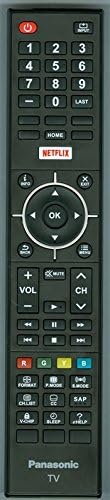
Figure 1: USARMT 845-050-05B4 Remote Control. This image displays the full layout of the remote control, including all buttons for power, input, channel, volume, navigation, and special functions like Netflix and Home.
Compatible TV Models:
- TC-50CX400, TC-50CX400U
- TC-55CX400, TC-55CX400U, TC-55CX420, TC-55CX420U
- TC-65CX400, TC-65CX400U, TC-65CX420, TC-65CX420U
3. Setup
This remote control is pre-programmed and does not require any additional setup or programming. Simply install the batteries to begin operation.
3.1 Battery Installation
- Locate the battery compartment cover on the back of the remote control.
- Slide the cover downwards or press the latch and lift to open the compartment.
- Insert two (2) AA alkaline batteries, ensuring the positive (+) and negative (-) terminals align correctly with the markings inside the compartment.
- Replace the battery compartment cover by sliding it back into place until it clicks securely.
Note: Batteries are not included with the remote control. Always use new batteries and replace both batteries at the same time.
4. Operating Instructions
The remote control provides access to all standard functions of your compatible Panasonic TV. Below is a guide to common button functions:
| Button | Function |
|---|---|
| Power (Red button) | Turns the TV on or off. |
| Input | Selects the input source (e.g., HDMI 1, AV, Component). |
| Number Buttons (0-9) | Direct channel selection. |
| LAST | Returns to the previously viewed channel. |
| HOME | Accesses the TV's Smart Home screen or main menu. |
| NETFLIX | Direct access to the Netflix application. |
| Navigation (Up, Down, Left, Right) | Navigates through menus and options. |
| OK | Confirms selections in menus. |
| INFO | Displays program information. |
| EXIT | Exits the current menu or application. |
| BACK | Returns to the previous screen or menu. |
| MENU | Opens the TV's main menu. |
| VOL (+/-) | Adjusts the volume level. |
| CH (Up/Down) | Changes the channel. |
| MUTE | Mutes or unmutes the TV audio. |
| Playback Controls (Rewind, Play, Fast Forward, Previous, Pause, Next, Stop) | Controls media playback (e.g., USB, streaming apps). |
| Color Buttons (R, G, Y, B) | Context-sensitive functions within menus or applications. |
| FORMAT | Adjusts screen aspect ratio or display format. |
| P.MODE | Selects picture modes (e.g., Standard, Vivid, Cinema). |
| S.MODE | Selects sound modes (e.g., Standard, Music, Movie). |
| SAP | Selects Secondary Audio Program (if available). |
| CH.LIST | Displays the channel list. |
| CC | Activates or deactivates Closed Captions. |
| V-CHIP | Accesses V-Chip parental control settings. |
| SLEEP | Sets the sleep timer for the TV. |
| HELP | Accesses the TV's on-screen help menu. |
5. Maintenance
Proper maintenance ensures the longevity and optimal performance of your remote control.
- Cleaning: Wipe the remote control with a soft, dry cloth. Do not use liquid cleaners or abrasive materials.
- Battery Replacement: Replace batteries when the remote's response becomes sluggish or stops working. Always replace both batteries simultaneously.
- Storage: If the remote will not be used for an extended period, remove the batteries to prevent leakage and damage.
- Avoid Exposure: Keep the remote away from direct sunlight, heat sources, and moisture.
6. Troubleshooting
If you experience issues with your remote control, refer to the following troubleshooting steps:
- Remote not responding:
- Check if the batteries are inserted correctly with the correct polarity (+/-).
- Replace old batteries with new AA alkaline batteries.
- Ensure there are no obstructions between the remote control and the TV's infrared sensor.
- Point the remote directly at the TV's IR sensor.
- Specific buttons not working:
- Clean the remote control surface, especially around the unresponsive buttons, to remove any dirt or debris.
- If only certain buttons are not working, and battery replacement does not help, the remote may require replacement.
- TV not responding to remote at all:
- Verify that the TV itself is powered on and functioning correctly.
- Test the remote with another compatible Panasonic TV if available, to determine if the issue is with the remote or the TV.
7. Specifications
| Feature | Detail |
|---|---|
| Brand | USARMT |
| Model Number | 4330255056 (845-050-05B4) |
| Compatible Devices | Panasonic Televisions |
| Connectivity Technology | Infrared (IR) |
| Battery Type | 2 x AA Alkaline Batteries (not included) |
| Color | Black |
| Special Feature | Ergonomic, Pre-programmed |
| Item Weight | Approximately 1 Pound (without batteries) |
8. Warranty and Support
This product comes with a 30 Days Hassle-Free Return policy. For any issues or support inquiries, please contact the seller or refer to your purchase documentation for customer service details.
For further assistance, please visit the USARMT brand store on Amazon or contact your retailer.