
1. Introduction
The Generation Guard GM-800A is an automatic upper arm blood pressure monitor designed for convenient and accurate home use. This device measures systolic and diastolic blood pressure, as well as heart rate, providing essential health information. It features an advanced measuring technique for accuracy and includes a heartbeat detector and hypertension indicator for comprehensive monitoring.

Image 1: The Generation Guard GM-800A monitor with its arm cuff, displaying blood pressure and heart rate readings.
2. Product Features
- Instant Monitoring: Provides quick and easy measurements of systolic, diastolic blood pressure, and heart rate.
- Clinically Accurate: Utilizes an advanced measuring technique for reliable and precise readings.
- Heartbeat Detector & Hypertension Indicator: Alerts users to irregular heart rates and indicates if readings exceed internationally recognized guidelines for normal home blood pressure levels.
- Memory Recall: Stores up to 90 previous readings, allowing for tracking of blood pressure fluctuations over time.
- Large Screen Display: Features a clear, easy-to-read display for all measurement results.
- Adjustable Arm Cuff: Designed to fit a range of arm sizes (22-32 cm).
- Portable Design: Compact and easy to transport, ideal for home or travel.

Image 2: Visual representation of the monitor's key features.
3. Package Contents
Verify that all items are present in the package:
- Generation Guard GM-800A Blood Pressure Monitor Unit
- Upper Arm Cuff (22-32 cm)
- Carrying Case
- 4 AA Batteries
- User Manual (this document)

Image 3: The monitor, cuff, and included carrying case.
4. Setup
4.1 Battery Installation
- Open the battery compartment cover on the back of the monitor.
- Insert four (4) AA batteries, ensuring correct polarity (+/-).
- Close the battery compartment cover securely.
4.2 Cuff Connection
- Locate the air tube connector on the arm cuff.
- Insert the air tube connector firmly into the air jack on the side of the monitor unit.
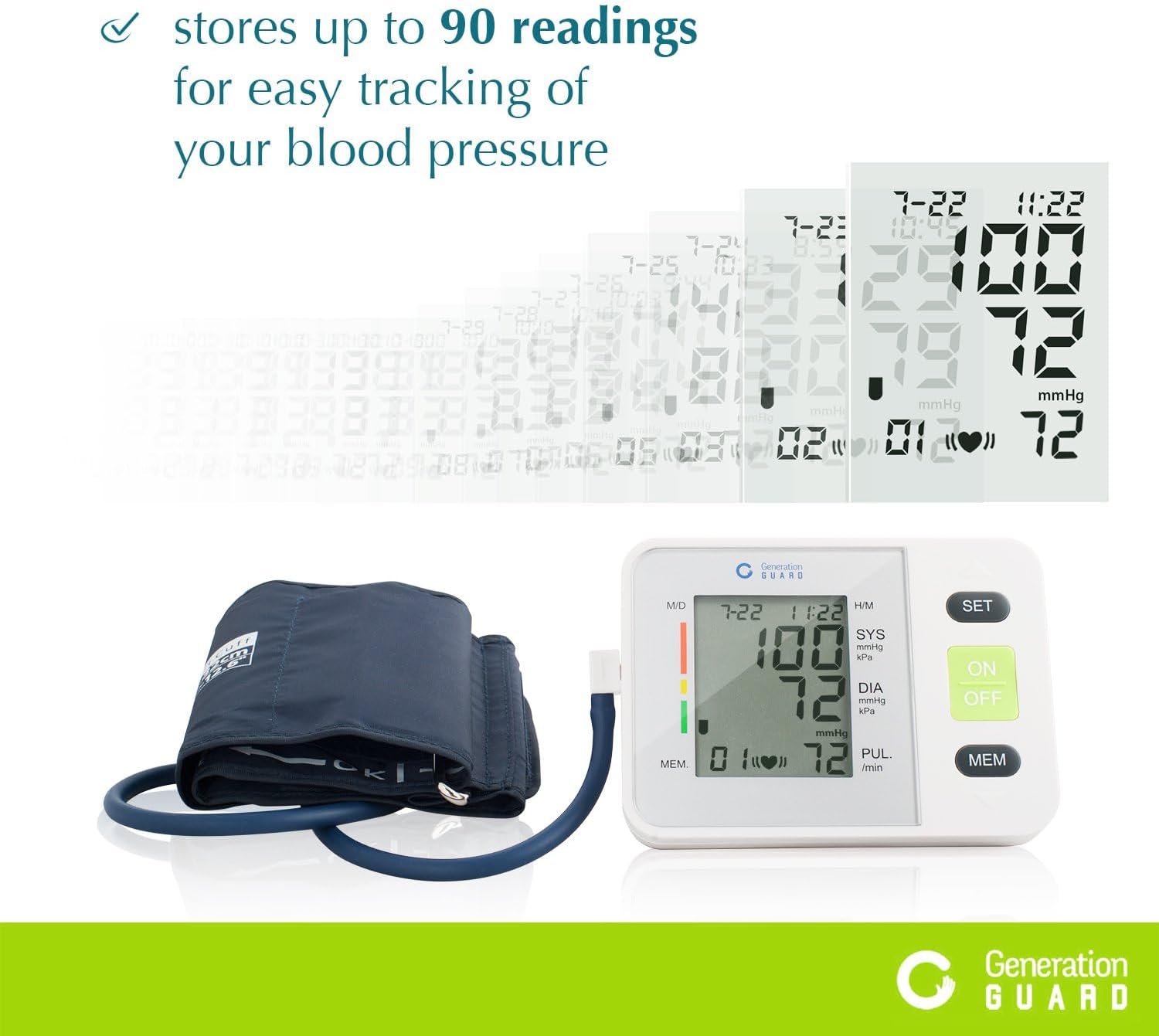
Image 4: The monitor unit with the arm cuff properly connected.
5. Operating Instructions
5.1 Before Measurement
- Avoid eating, drinking alcohol, smoking, exercising, or bathing for 30 minutes before measurement.
- Rest for at least 5 minutes before taking a measurement.
- Sit in a comfortable position with your back supported and feet flat on the floor.
5.2 Applying the Cuff
- Slide the cuff onto your bare left upper arm, approximately 1-2 cm above the elbow joint.
- Ensure the air tube runs down the center of your arm, aligned with your middle finger.
- Wrap the cuff snugly around your arm, securing it with the Velcro closure. The index mark on the cuff should fall within the 'OK' range.
- Position your arm on a table so the cuff is at the same level as your heart.
5.3 Taking a Measurement
- Press the ON/OFF button to power on the monitor.
- Press the ON/OFF button again to start the measurement. The cuff will automatically inflate.
- Remain still and silent during the measurement. Do not talk or move your arm.
- Once the measurement is complete, the cuff will deflate, and your readings will be displayed on the screen.
- Press the ON/OFF button to turn off the monitor, or it will automatically shut off after a period of inactivity.
Video 1: A demonstration of how to set up and take a blood pressure reading using the Generation Guard GM-800A monitor.
6. Reading Your Results
The monitor displays three key values:
- SYS (Systolic Pressure): The top number, indicating the pressure in your arteries when your heart beats.
- DIA (Diastolic Pressure): The bottom number, indicating the pressure in your arteries between beats.
- PUL (Pulse Rate): Your heart rate, measured in beats per minute.
The monitor also includes a color-coded hypertension indicator on the left side of the display, which visually represents your blood pressure category based on established guidelines. An irregular heartbeat detector will display a symbol if an irregular heartbeat is detected during the measurement.
7. Memory Function
The GM-800A monitor can store up to 90 sets of readings, allowing you to track your blood pressure trends over time. Each stored reading includes the blood pressure values, pulse rate, and the date/time of the measurement.
7.1 Accessing Memory
- With the monitor off, press the MEM button.
- The most recent reading will be displayed first.
- Press the MEM button repeatedly to scroll through previous readings.

Image 5: The monitor's display showing stored readings for easy tracking.
8. Maintenance
8.1 Cleaning
- Wipe the monitor unit and cuff with a soft, dry cloth.
- If necessary, use a slightly damp cloth with mild soap, then wipe dry.
- Do not use abrasive cleaners, solvents, or immerse the unit or cuff in water.
8.2 Storage
- Store the monitor and cuff in the provided carrying case when not in use.
- Keep the device in a cool, dry place, away from direct sunlight and extreme temperatures.
- Avoid bending or creasing the air tube excessively.
9. Troubleshooting
If you encounter issues with your blood pressure monitor, refer to the following common problems and solutions:
| Problem | Possible Cause | Solution |
|---|---|---|
| "E" or Error Message on Display | Cuff not properly applied, movement during measurement, or air leakage. | Re-apply the cuff correctly, remain still and silent, check for secure cuff connection. |
| Inaccurate Readings | Incorrect cuff size/placement, talking/moving during measurement, or insufficient rest before measurement. | Ensure proper cuff placement and size, rest for 5 minutes, avoid talking/moving. Take multiple readings with a few minutes in between. |
| Monitor Does Not Turn On | Dead or incorrectly installed batteries. | Replace batteries with new AA batteries, ensuring correct polarity. |
10. Specifications
- Model Name:
- GM-800A
- Brand:
- Generation Guard
- Power Source:
- 4 AA Batteries (included)
- Cuff Size:
- 22-32 cm (Upper Arm)
- Display Type:
- Large Digital Display
- Memory Capacity:
- Up to 90 readings
- Item Weight (approx.):
- 0.01 Ounces
- Included Components:
- Monitor Unit, Cuff, Carrying Case
- Date First Available:
- February 7, 2017
11. Important Safety Information
Please read all instructions carefully before using this device. This blood pressure monitor is intended for home use to measure blood pressure and pulse rate. It is not intended to be a substitute for professional medical advice, diagnosis, or treatment. Always consult with a healthcare professional for interpretation of your blood pressure readings and for any health concerns.
WARNING: This product can expose you to chemicals including [List known chemicals if available, otherwise state 'chemicals known to the State of California to cause cancer and birth defects or other reproductive harm.'], which is/are known to the State of California to cause cancer and birth defects or other reproductive harm. For more information go to www.P65Warnings.ca.gov.
12. Warranty and Support
For warranty information, technical support, or service inquiries, please refer to the documentation included with your product or visit the official Generation Guard website. Keep your purchase receipt as proof of purchase for warranty claims.