Product Overview
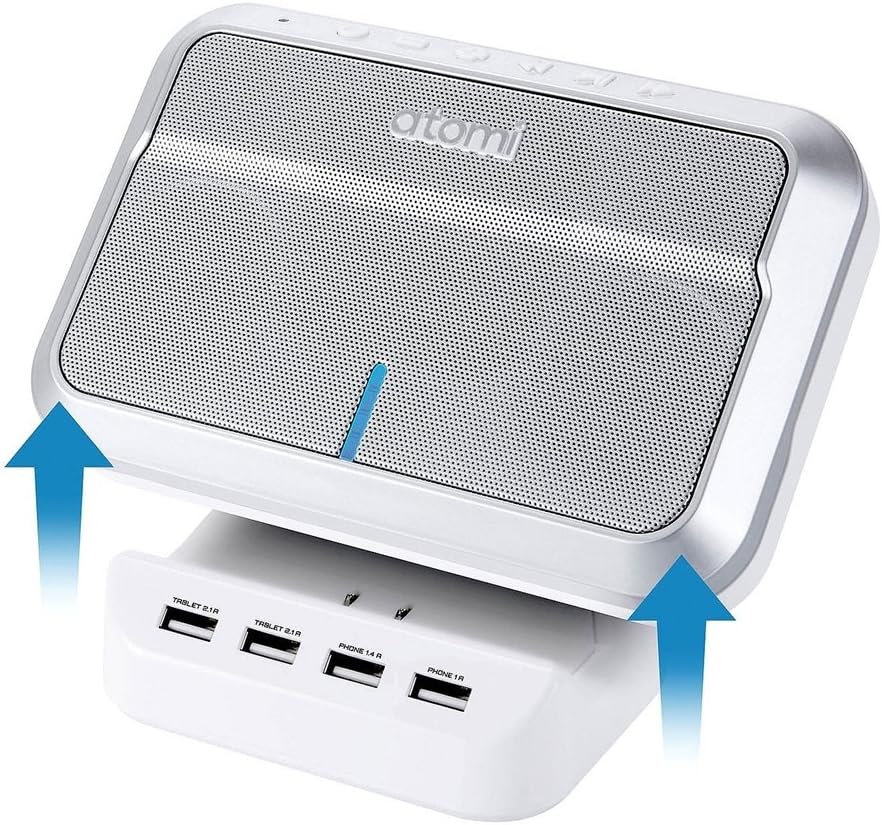
The Atomi Sound Hub is a versatile device combining a portable Bluetooth wireless speaker with a 4-port USB charging station. It allows users to enjoy audio wirelessly from Bluetooth-enabled devices while simultaneously charging up to four USB-connected devices. Designed for portability and convenience, it features dual 5-watt speakers for clear audio and an integrated microphone for hands-free calls.
Key Features
- Equipped with two high-definition 5W speakers for quality audio output.
- Features 4 USB ports for charging up to four devices concurrently.
- Provides up to 5 hours of audio playback on a single charge.
- Compatible with any Bluetooth-enabled smartphone, tablet, or other device.
- Includes a built-in hands-free microphone for phone calls.
What's Included
- Atomi Sound Hub Speaker Unit
- USB Charging Base
- Power Cable



Setup Guide
Powering On
- Connect the power cable from the USB charging base to a standard wall outlet.
- Ensure the Sound Hub speaker unit is securely docked onto the charging base.
- Press and hold the Power button located on the top of the speaker until the indicator light illuminates.
Initial Charge
For optimal performance, it is recommended to fully charge the Sound Hub before its first use. The indicator light will change or turn off once charging is complete. A full charge provides up to 5 hours of wireless audio playback.
Operating Instructions
Bluetooth Pairing
- With the Sound Hub powered on, it will automatically enter Bluetooth pairing mode. The Bluetooth indicator light will flash.
- On your smartphone, tablet, or other Bluetooth-enabled device, navigate to the Bluetooth settings.
- Search for available devices and select "Sound Hub" from the list.
- Once connected, the Bluetooth indicator light on the Sound Hub will become solid, and you will hear an audible confirmation.
- If prompted for a password, enter "0000".
Playing Audio
- After successful Bluetooth pairing, open your preferred music or audio application on your connected device.
- Audio will stream wirelessly to the Sound Hub.
- Use the volume controls on your connected device or the dedicated volume buttons on the Sound Hub to adjust playback volume.
- The Sound Hub also features playback control buttons (Play/Pause, Next Track, Previous Track) on its top panel.
Hands-Free Calling
- When a call is received on your paired smartphone, the Sound Hub will ring.
- Press the Call button on the Sound Hub to answer an incoming call.
- Speak into the built-in microphone on the Sound Hub.
- To end a call, press the Call button again.
Using USB Charging Ports
- The Sound Hub's charging base features four USB ports: two "PHONE 1A" ports and two "TABLET 2.1A" ports.
- Connect your devices using their respective USB charging cables to the appropriate ports.
- The 1A ports are suitable for smartphones and smaller devices, while the 2.1A ports provide faster charging for tablets and larger devices.
- Ensure the Sound Hub is connected to a power outlet for the USB charging ports to function.
Care and Maintenance
- Cleaning: Use a soft, dry cloth to clean the exterior of the Sound Hub. Do not use abrasive cleaners, waxes, or solvents.
- Storage: When not in use for extended periods, store the Sound Hub in a cool, dry place away from direct sunlight and extreme temperatures.
- Water Exposure: This device is not waterproof. Avoid exposing it to water or excessive moisture.
- Handling: Handle the device with care. Avoid dropping it or subjecting it to strong impacts.
Troubleshooting
| Problem | Possible Solution |
|---|---|
| Device does not power on. |
|
| Bluetooth not connecting or pairing. |
|
| No sound or poor sound quality. |
|
| Devices not charging via USB ports. |
|
Technical Specifications
| Brand | Atomi |
| Model Number | 616730 |
| Product Dimensions | 6.7 x 6.7 x 9.1 inches |
| Item Weight | 2.14 pounds |
| Color | White |
| Hardware Interface | USB |
| Compatible Devices | Tablet (and other Bluetooth-enabled devices like smartphones) |
| Total USB Ports | 4 |
| Wattage | 5 watts (per speaker) |
| UPC | 841856110280 |
| First Available | December 21, 2016 |
Warranty and Support
Specific warranty details for the Atomi Sound Hub are not provided in the available product information. For warranty claims, technical support, or further assistance, please refer to the official Atomi website or contact their customer service directly. Keep your purchase receipt as proof of purchase.
You may find additional support resources by visiting the manufacturer's website: www.atomibrands.com


