
KING GATES Couper Kit 24
Couper Kit 24 Swing Gate Automation System User Manual
Model: Couper Kit 24
1. Product Overview
The KING GATES Couper Kit 24 is an irreversible automation system designed for swing gates. This kit provides a robust and reliable solution for automating gates with a maximum width of 2 meters and a weight of up to 250 kg per gate leaf. It is engineered for external mounting and offers convenient operation for residential or light commercial applications.
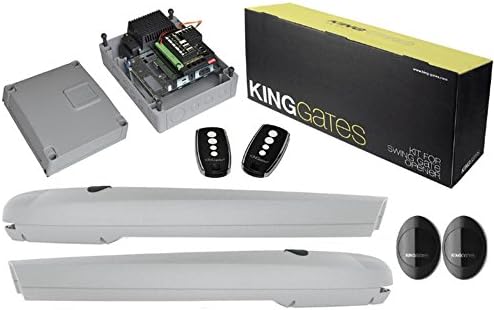
Figure 1: Complete Couper Kit 24 system components. This image displays the two linear gate operators, the control unit enclosure with internal electronics, two remote controls, and two safety photocell sensors, along with the product packaging.
2. Safety Information
Important: Read all instructions carefully before installation and use. Failure to follow these instructions may result in serious injury or property damage.
- Installation should only be performed by qualified personnel in accordance with local electrical and safety regulations.
- Ensure the main power supply is disconnected before performing any installation, maintenance, or repair work.
- Do not allow children to play with or operate the gate automation system. Keep remote controls out of reach of children.
- Regularly inspect the gate and automation system for signs of wear, damage, or misalignment.
- Ensure that the gate's movement path is clear of obstructions before operation.
- The system is designed for swing gates. Do not attempt to use it for other types of gates or applications.
3. Package Contents
Verify that all components listed below are present and undamaged upon unpacking:
- 2 x Couper 24V DC Irreversible Linear Operators
- 1 x Control Unit (with integrated receiver)
- 2 x Remote Controls (4-channel)
- 1 x Pair of Safety Photocell Sensors
- Mounting Brackets and Fasteners (for operators and photocells)
- Instruction Manual (this document)
4. Setup and Installation
Installation of the Couper Kit 24 requires technical expertise and adherence to electrical safety standards. It is highly recommended that installation be carried out by a certified professional.
4.1. Pre-Installation Checks
- Ensure the gate structure is sound, moves freely, and is properly balanced.
- Verify adequate space for operator mounting and gate swing.
- Plan cable routing for power and control wires, ensuring they are protected from damage and moisture.
4.2. Mounting the Operators
- Determine the optimal mounting points on the gate post and gate leaf for each operator, considering the gate's pivot point and desired opening angle.
- Securely attach the front and rear mounting brackets using appropriate fasteners.
- Mount the linear operators onto the brackets, ensuring they are level and aligned for smooth operation.
4.3. Wiring the Control Unit
- Mount the control unit enclosure in a secure, weather-protected location near the gate.
- Connect the power supply to the control unit, ensuring proper grounding.
- Connect the motor cables from each operator to the designated terminals on the control board.
- Wire the safety photocell sensors to the control unit as per the wiring diagram (refer to the detailed wiring diagram in the full technical manual).
- Connect any optional accessories such as flashing lights, keypads, or additional safety devices.
4.4. Installing Photocell Sensors
- Install the transmitter and receiver photocell units on opposite sides of the gate opening, ensuring they are aligned and at an appropriate height (typically 50-60 cm from the ground).
- Ensure the beam path is clear and unobstructed.
4.5. Programming Remote Controls and System Settings
- Refer to the control unit's specific programming instructions for learning remote controls. This typically involves pressing a programming button on the control board and then a button on the remote.
- Adjust system parameters such as opening/closing force, speed, pause time, and obstacle detection sensitivity as required.
- Perform a full cycle test to ensure correct operation and safety features are active.
5. Operating Instructions
5.1. Remote Control Operation
- Press the designated button on your remote control to activate the gate.
- A single press typically initiates an open or close cycle. If the gate is already moving, a press may stop it, and another press will reverse its direction (depending on programming).
- Ensure you have a clear line of sight to the gate and that no persons or objects are in the gate's path during operation.
5.2. Manual Release
In case of power failure or system malfunction, the gate operators can be manually disengaged. Locate the manual release mechanism on each operator (usually a key-operated lock or lever). Follow the instructions provided with the operator to disengage it, allowing the gate to be moved by hand. Remember to re-engage the mechanism for automatic operation.
6. Maintenance
Regular maintenance ensures the longevity and safe operation of your gate automation system. It is recommended to perform checks at least every six months.
- Visual Inspection: Check for any loose cables, damaged components, or signs of corrosion.
- Mechanical Parts: Ensure all moving parts of the gate (hinges, wheels) are lubricated and free from obstruction. Check that the gate moves smoothly by hand when the operators are disengaged.
- Safety Devices: Test the photocell sensors by breaking the beam with an object (e.g., your hand) while the gate is closing. The gate should stop or reverse.
- Cleaning: Keep the photocell lenses clean and free from dirt, dust, or spiderwebs. Clean the exterior of the operators and control unit.
- Fasteners: Periodically check and tighten all mounting bolts and screws.
7. Troubleshooting
Before contacting technical support, review the following common issues and their potential solutions:
| Problem | Possible Cause | Solution |
|---|---|---|
| Gate does not respond to remote control. |
|
|
| Gate opens but does not close (or vice versa). |
|
|
| Gate stops unexpectedly during operation. |
|
|
8. Specifications
- Product Type: Irreversible Automation Kit for Swing Gates
- Model: Couper Kit 24
- Brand: KING GATES
- Maximum Gate Width: 2 meters per gate leaf
- Maximum Gate Weight: 250 kg per gate leaf
- Mounting: External
- Power Supply: 24V DC (to operators, control unit typically 230V AC input)
- Batteries Included: No
- Batteries Required: No (for main operation, remote controls require small batteries)
- ASIN: B01NC0GBTZ
9. Warranty and Support
This KING GATES product is manufactured to high-quality standards. For specific warranty terms and conditions, please refer to the documentation provided at the time of purchase or contact your authorized KING GATES dealer or installer. Keep your proof of purchase for warranty claims.
For technical assistance, troubleshooting beyond this manual, or spare parts, please contact the retailer from whom you purchased the product or an authorized KING GATES service center.
Ask a question about this manual
Ask about setup, troubleshooting, compatibility, parts, safety, or missing instructions. Manuals+ will review the question and use this page’s manual context to help answer it.