
Brinsea USAG47C
Brinsea Ovation 56 EX Egg Incubator Instruction Manual
Model: USAG47C
Brand: Brinsea
Product Overview
The Brinsea Ovation 56 EX is a fully digital egg incubator designed for optimal hatching conditions. It features an advanced "Induced Dual Airflow" system for consistent temperature, automatic humidity control, and programmable egg turning. This incubator is suitable for a wide range of egg sizes, including chicken, duck, and other bird eggs, with a capacity of up to 56 hen eggs.
Key Features:
- Generous Capacity: Fits up to 56 chicken eggs with included standard egg carriers.
- Precision Controls: Highly accurate digital system displaying temperature, humidity, and turning status.
- Automatic Egg Turning: Programmable turning system to customize intervals for enhanced embryo growth.
- Automatic Humidity Management: Fully automated system with integrated humidity pump for optimal conditions.
- Durable & Hygienic: Constructed from ABS plastic with Polygiene Biomaster for easy maintenance.

Figure 1: The Brinsea Ovation 56 EX Egg Incubator, showcasing its clear top for visibility and internal egg carriers.
Setup and Unboxing
Before operating your Brinsea Ovation 56 EX, ensure all components are present and correctly assembled. The incubator comes with egg carriers, a power cord, a hatching mat, a humidity block, and tubing.

Figure 2: Components of the Brinsea Ovation 56 EX, including the main unit, egg carriers, and accessories.
For a visual guide on setting up your incubator, please watch the unboxing video below:
Video 1: Ovation EX - Unboxing Video. This video demonstrates the unboxing and initial setup of the Brinsea Ovation EX incubator, showing how to assemble the components.
Operating Instructions
The Ovation 56 EX features user-friendly digital controls for precise management of incubation parameters. Set your desired temperature and humidity, and the automatic controls will maintain optimal conditions.
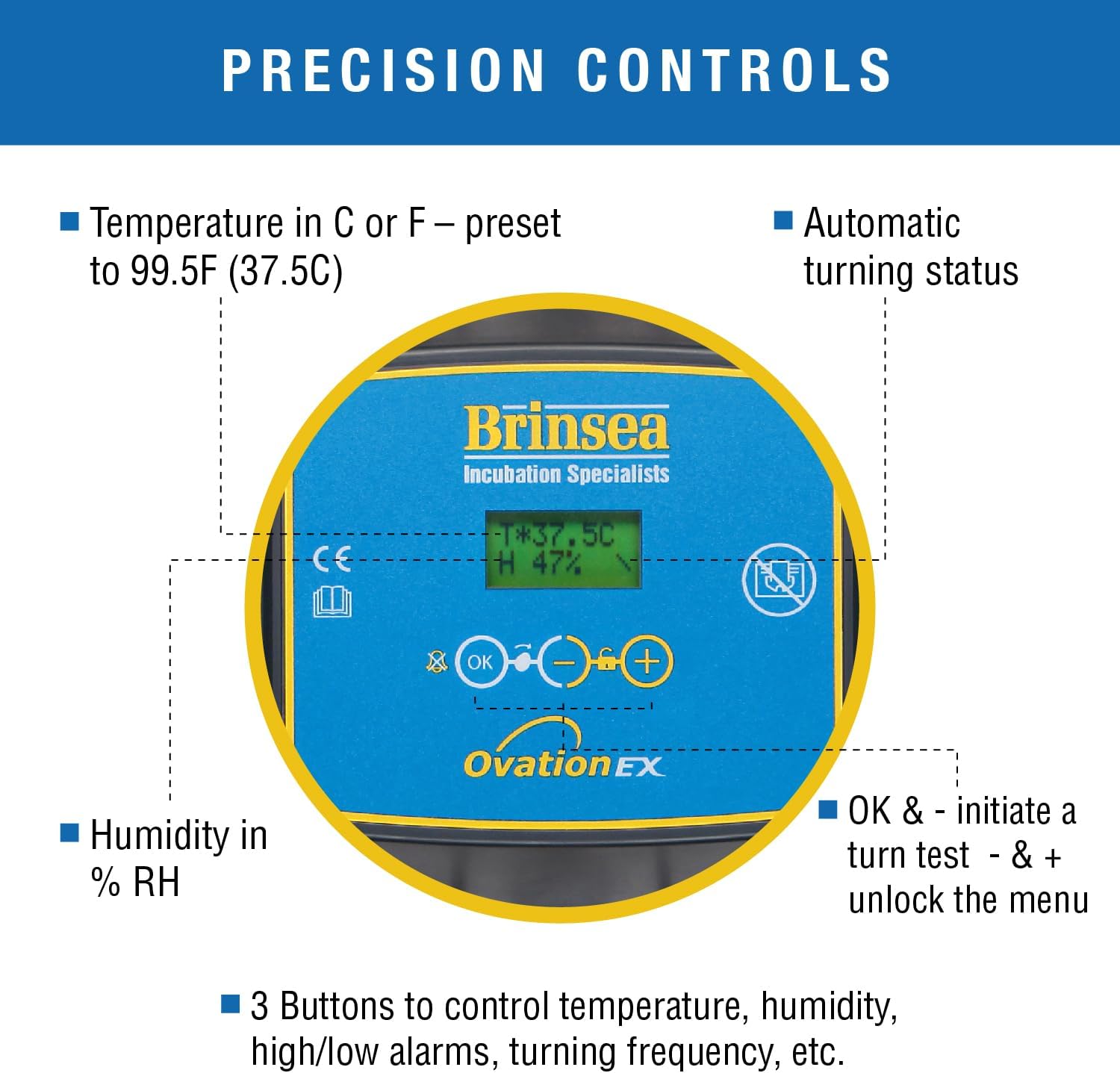
Figure 3: The digital control panel allows for precise temperature and humidity settings, along with automatic turning status.
Temperature and Humidity Control:
The incubator maintains stable temperature and humidity levels through its Induced Dual Airflow system and integrated humidity pump. This system ensures even heat distribution and consistent humidity, crucial for high hatch rates.

Figure 4: Illustration of the Induced Dual Airflow system, which ensures even heating and consistent temperature throughout the incubator.

Figure 5: The fully automatic humidity system with an integral water pump ensures precise humidity control without opening the incubator.
For a comprehensive overview of the Ovation EX features and operation, please refer to the videos below:
Video 2: Brand Videos - Incubator. This video provides a general overview of Brinsea incubators, highlighting their key features and benefits for incubation.
Video 3: BPI Amazon - Ovation EX. This video details the specific features and operational aspects of the Brinsea Ovation EX model.
Maintenance
Regular cleaning and maintenance are essential for the longevity and optimal performance of your incubator. The robust ABS plastic construction, protected by Polygiene Biomaster, makes cleaning effortless.
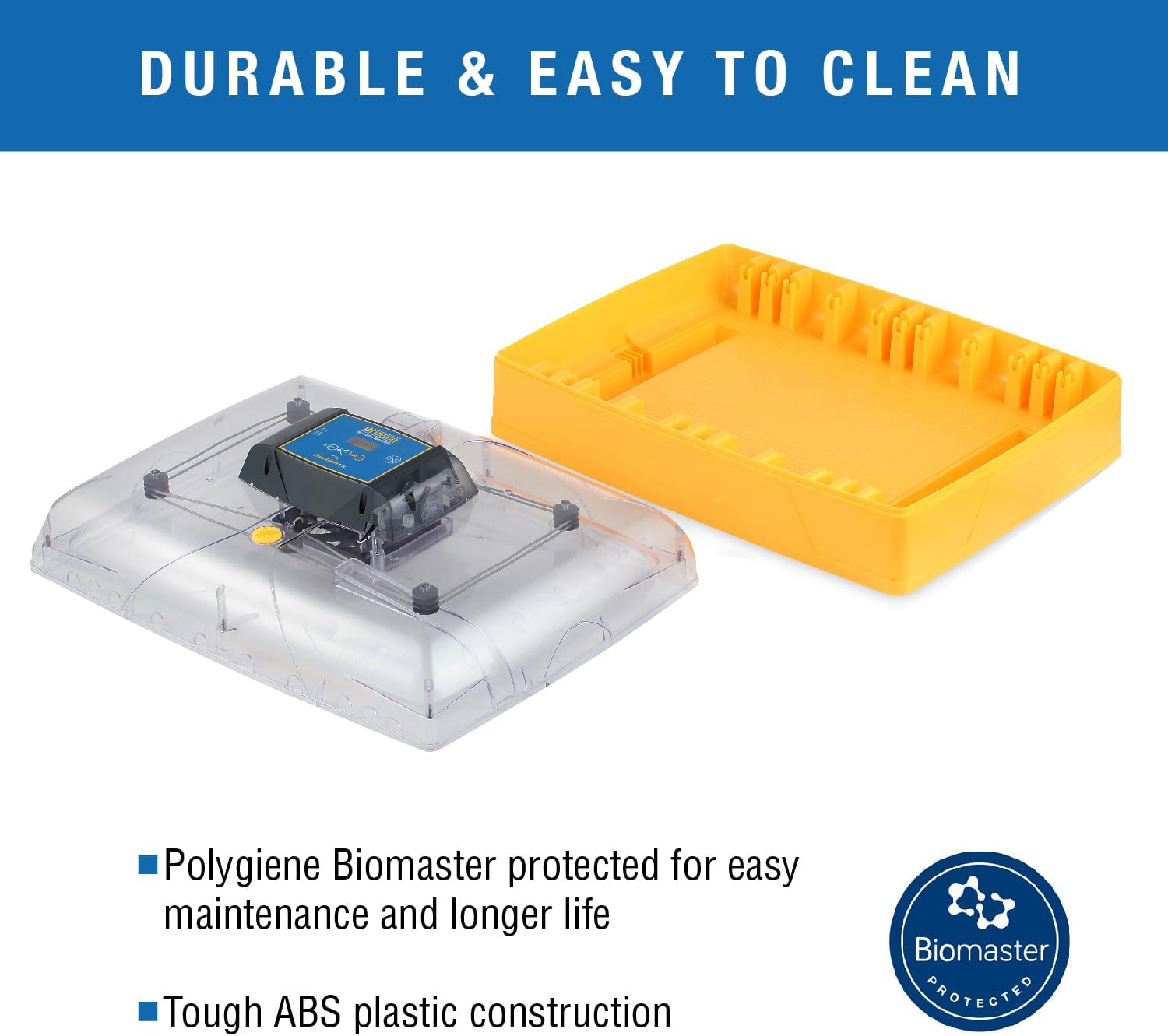
Figure 6: The incubator's design allows for easy disassembly, facilitating thorough cleaning and maintenance.
For detailed cleaning instructions, refer to the user manual provided with your product. Pay particular attention to cleaning the internal components and ensuring the humidity tubing is clear.
Troubleshooting
While the Brinsea Ovation 56 EX is designed for reliability, occasional issues may arise. Here are some common concerns and potential solutions:
- Humidity Pump Issues: If the humidity pump is not functioning correctly, ensure the tubing is properly connected and not kinked. Check for any blockages in the tubing or the pump mechanism. Regular replacement of the internal humidity tube is recommended.
- Temperature Fluctuations/Alarms: The incubator has high and low temperature alarms. If an alarm sounds, check the room temperature and ensure the incubator is not exposed to drafts or direct sunlight. Verify that the temperature settings are correct.
- Egg Turning Problems: If eggs are not turning, check the programmable turning system settings. Ensure the turning link is correctly engaged and there are no obstructions preventing the carriers from moving.
- Digital Display Issues: If the digital screen is not displaying information, ensure the power cord is securely connected. If the issue persists, contact customer support.
For more in-depth troubleshooting, consult the full user manual or contact Brinsea customer support.
Specifications
| Specification | Detail |
|---|---|
| Item Weight | 11 Pounds |
| Item Dimensions (LxWxH) | 22 x 15 x 9 inches |
| Model Name | Ovation 56 EX fully automatic egg incubator with humidity control |
| Capacity | 56 Hen Eggs (standard carriers) |
| Country of Origin | United Kingdom |
| Color | Yellow/Black |
| Included Components | Incubator, power cord, egg carriers, hatching mat, humidity block and tubing |
Warranty and Support
The Brinsea Ovation 56 EX Egg Incubator is backed by a 3-year parts & labor warranty, ensuring long-term reliability and peace of mind for breeders.
For further assistance, technical support, or warranty claims, please refer to the official Brinsea website or the contact information provided in your user manual.
Additional resources:
- User Guide (PDF): Download User Guide
- User Manual (PDF): Download User Manual
Related documentsUSAG47C


Ask a question about this manual
Ask about setup, troubleshooting, compatibility, parts, safety, or missing instructions. Manuals+ will review the question and use this page’s manual context to help answer it.