
Introduction
The DROK Buck Converter is a versatile DC-DC step-down voltage regulator designed to convert a wide input voltage range (DC 9V-36V) to a stable 5.2V output, suitable for powering various 5V devices, including mobile phones for fast charging. This module incorporates synchronous rectification for high efficiency and features both a DC input jack and screw terminals for flexible connectivity.
Key Features:
- Wide Input Voltage Range: Accepts DC 9V-36V.
- Stable Output: Provides a fixed output of 5.2V (adjustable within 5V-5.3V based on input).
- High Efficiency: Utilizes a synchronous rectification scheme.
- Flexible Connectivity: Equipped with a DC input interface and connecting terminals.
- USB Output: Includes a USB interface with a quick charge identifying chip, compatible with Android and Apple devices.
- Reverse Protection: Features protection against reverse input polarity.
Safety Information
Please read and understand all safety instructions before operating this device. Failure to follow these instructions may result in electric shock, fire, or serious injury.
- Electrical Safety: Ensure all connections are secure and correctly polarized before applying power. Incorrect wiring can damage the module and connected devices.
- Voltage Limits: Do not exceed the specified input voltage range of DC 9V-36V. Exceeding this range will damage the converter.
- Current Limits: Be aware of the output current capabilities based on input voltage (refer to Performance Characteristics section). Overloading the converter can lead to overheating and failure.
- Environment: Operate the module in a dry, well-ventilated area. Avoid exposure to moisture, dust, and extreme temperatures.
- Insulation: Ensure the module is properly insulated to prevent accidental short circuits, especially when integrating into custom enclosures.
Product Overview
Familiarize yourself with the components and layout of your DROK Buck Converter.
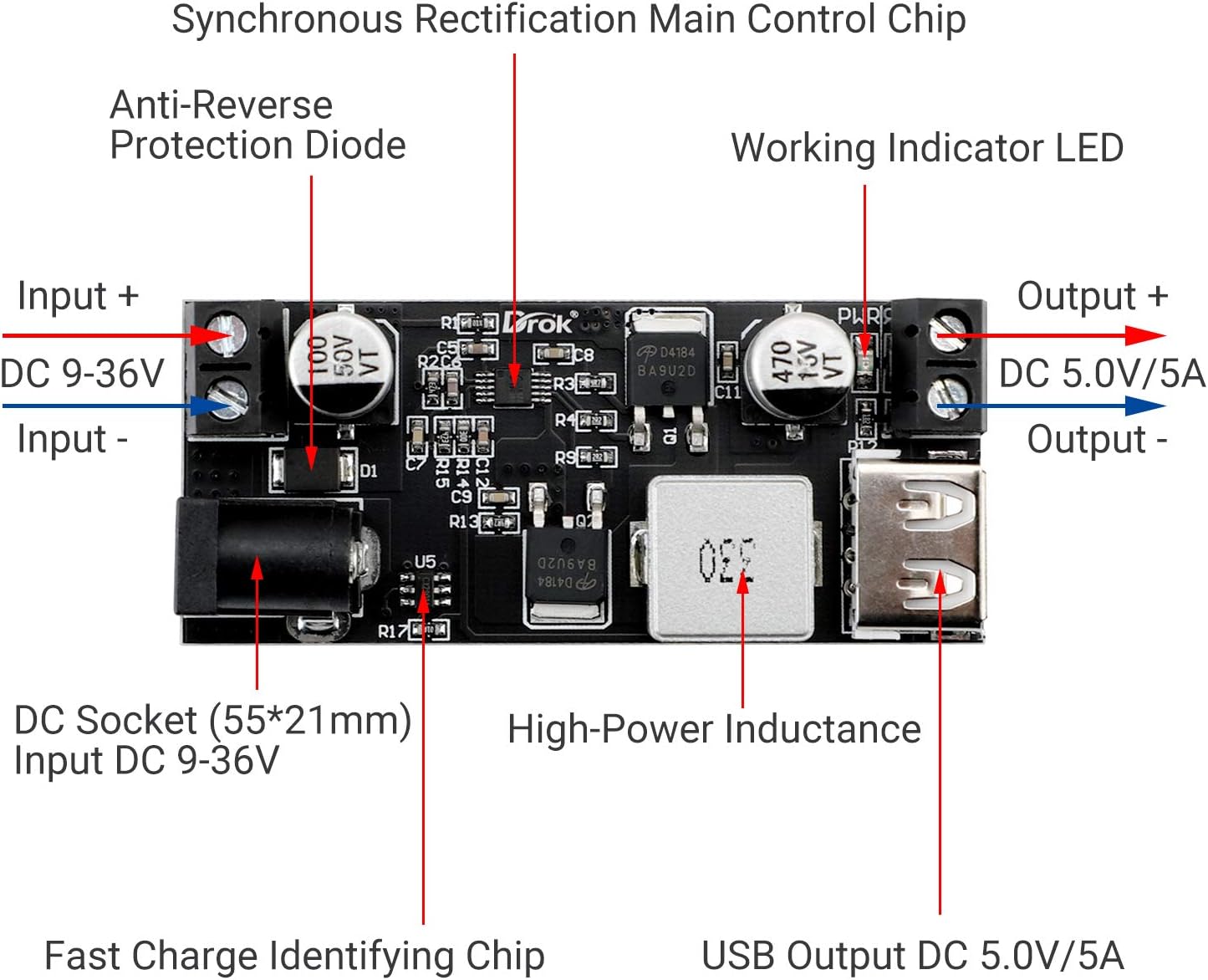

Product Video:
Video 1: DROK 5V USB Buck Converter Demonstration. This video demonstrates the DROK buck converter in action, showing its ability to charge a mobile phone and highlighting its reverse polarity protection feature.
Setup and Installation
Follow these steps to correctly set up and install your buck converter:
- Prepare Input Power: Ensure your DC power source is within the 9V-36V range. Turn off the power source before making any connections.
- Connect Input: You have two options for connecting the input power:
- DC Socket: Plug a compatible DC power adapter (5.5*2.1mm) into the DC socket.
- Screw Terminals: Connect the positive (+) wire of your DC power source to the 'Input +' terminal and the negative (-) wire to the 'Input -' terminal. Ensure wires are securely fastened. The module includes reverse protection, but correct polarity is always recommended.
- Connect Output Device:
- USB Output: Plug your USB charging cable into the USB port on the converter.
- Screw Terminals: For direct wiring, connect the positive (+) wire of your 5V device to the 'Output +' terminal and the negative (-) wire to the 'Output -' terminal.
- Verify Connections: Double-check all wiring for correct polarity and secure connections.
- Apply Power: Turn on your DC power source. The working indicator LED on the module should illuminate, indicating proper operation.
Operating Instructions
Once properly installed, the DROK Buck Converter operates automatically. It will step down the input voltage to a stable 5.2V output. When a compatible device is connected to the USB port, the quick charge identifying chip will negotiate the optimal charging parameters for fast charging.
The working indicator LED provides visual confirmation that the module is receiving input power and functioning.
Performance Characteristics
The output power of the buck converter varies depending on the input voltage:
| Input Voltage Range | Output Voltage | Max Output Current | Max Output Power |
|---|---|---|---|
| DC 9V-24V | 5.2V | 6A | 30W |
| DC 24V-32V | 5.2V | 5A | 25W |
| DC 32V-36V | 5.2V | 3.5A | 18W |
Maintenance
The DROK Buck Converter is designed for reliable operation with minimal maintenance. To ensure longevity and optimal performance:
- Keep Clean: Periodically clean the module with a soft, dry cloth to remove dust and debris. Do not use liquid cleaners.
- Inspect Connections: Regularly check all input and output connections to ensure they remain secure and free from corrosion.
- Avoid Overheating: Ensure adequate ventilation around the module, especially during high-load operation, to prevent overheating.
- Environmental Protection: Protect the module from physical impact, excessive vibration, and harsh environmental conditions.
Troubleshooting
If you encounter issues with your DROK Buck Converter, refer to the following troubleshooting guide:
- No Output Voltage / No Indicator Light:
- Check if the input power source is connected correctly and providing voltage within the 9V-36V range.
- Verify input polarity. Although the module has reverse protection, incorrect wiring can prevent operation.
- Ensure all input and output wires are securely connected to the terminals or DC jack.
- Output Voltage Fluctuates / Device Not Charging:
- Check if the load connected to the output exceeds the maximum current/power rating for your input voltage (refer to Performance Characteristics). Reduce the load if necessary.
- Ensure the input voltage is stable and not fluctuating.
- Inspect the output cable and device for any faults.
- Module Overheating:
- Reduce the load on the converter.
- Ensure adequate airflow around the module. Consider adding a small fan if operating at continuous high loads in an enclosed space.
- Device Not Fast Charging:
- Ensure your device and charging cable support fast charging protocols.
- Verify the input voltage is sufficient to provide the necessary power for fast charging (higher input voltage allows for higher output power).
Specifications
| Feature | Specification |
|---|---|
| Input Voltage | DC 9V-36V |
| Output Voltage | 5.2V (5V-5.3V adjustable) |
| Max Output Current | 6A (varies with input voltage) |
| Max Output Power | 30W (varies with input voltage) |
| Item Model Number | 200217 |
| ASIN | B01NALDSJ0 |
| Package Dimensions | 4.02 x 3.35 x 0.91 inches |
| Item Weight | 0.634 ounces |
| Manufacturer | DROK |
| Plug Format | DC power jack |
Warranty and Support
DROK products are designed for quality and reliability. For any questions, technical assistance, or warranty claims, please refer to the following:
- Warranty: Each product purchased from DROK includes a one-year service period. A brand new replacement can be provided for any quality issues with your item.
- Contact Support: For further assistance, please visit the official DROK Store on Amazon or contact their customer service directly.
- FAQs: Common questions and answers can often be found on the brand's product pages or support sections.


