1. Introduction
Thank you for purchasing the F&D A140X 2.1 Channel Multimedia Speaker system. This manual provides essential information for setting up, operating, and maintaining your speaker system. Please read it thoroughly before use to ensure optimal performance and longevity of the product.
The F&D A140X system is designed to deliver clear audio and powerful bass, enhancing your listening experience for music, movies, and games. It features versatile connectivity options including Bluetooth, USB, and auxiliary input.
2. Package Contents
Upon unpacking, please ensure all items listed below are present and in good condition:
- 1 x Subwoofer Unit
- 2 x Satellite Speakers
- 1 x Remote Control
- 1 x User Manual with Warranty Card
- 2 x Audio Cables (RCA to RCA, 3.5mm to 2RCA)
- 2 AA batteries for the remote control are required and may be included.

Figure 2.1: F&D A140X Speaker System Components
3. Setup Instructions
3.1 Physical Connection
- Positioning: Place the subwoofer on a stable surface. Position the satellite speakers to the left and right of your listening area for optimal stereo separation.
- Connect Satellite Speakers: Connect the audio cables from the satellite speakers to the "AUDIO OUTPUT" ports on the rear panel of the subwoofer. Ensure the white plug goes into the white port and the red plug into the red port.

Figure 3.1: Rear Panel Connections
- Connect to Power: Plug the subwoofer's power cable into a standard electrical outlet.
- Connect Audio Source:
- Auxiliary Input: Use the provided 3.5mm to 2RCA cable to connect your audio source (e.g., smartphone, PC, TV) to the "AUDIO INPUT" ports on the subwoofer.
- USB Input: Insert a USB drive containing audio files into the USB port on the subwoofer's front panel.
3.2 Power On
Locate the power switch on the rear panel of the subwoofer and switch it to the "ON" position. The LED display on the subwoofer will illuminate.
3.3 Bluetooth Pairing
- Activate Bluetooth Mode: Press the "SOURCE" button on the subwoofer's front panel or the remote control until the Bluetooth mode is selected. The Bluetooth indicator light will blink, indicating it's in pairing mode.
- Enable Bluetooth on Device: On your smartphone, tablet, or other Bluetooth-enabled device, go to the Bluetooth settings and ensure Bluetooth is turned on.
- Select Speaker: Search for available devices. You should see "Fenda A140X" or "F&D A140X" in the list. Select it to initiate pairing.
- Confirm Pairing: Once paired, the Bluetooth indicator light on the subwoofer will stop blinking and remain solid. A confirmation tone may also be heard.
4. Operating Instructions
4.1 Basic Controls
The F&D A140X can be controlled using the buttons on the subwoofer's front panel or the included remote control.
- Power: Turn the system ON/OFF.
- Source: Switch between input modes (Bluetooth, AUX, USB, FM Radio).
- Volume: Adjust the master volume using the rotary knob on the subwoofer or the +/- buttons on the remote.
- Bass: Adjust the bass level using the dedicated knob on the subwoofer's rear panel.
- Play/Pause: Play or pause audio playback (in Bluetooth/USB mode).
- Previous/Next: Skip to the previous or next track/station (in Bluetooth/USB/FM mode).
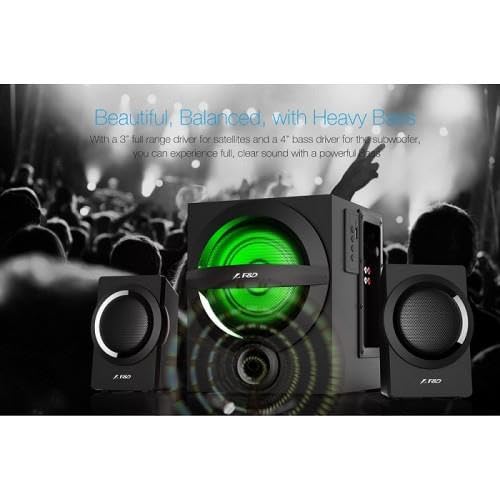
Figure 4.1: Subwoofer with LED lighting
4.2 FM Radio Operation
- Enter FM Mode: Press the "SOURCE" button until FM mode is selected.
- Auto Scan: Long press the Play/Pause button to automatically scan and save available FM stations.
- Change Station: Use the Previous/Next buttons to navigate through saved stations.
5. Maintenance
To ensure the longevity and optimal performance of your F&D A140X speaker system, follow these maintenance guidelines:
- Cleaning: Use a soft, dry cloth to clean the surfaces of the speakers. Avoid using liquid cleaners or abrasive materials.
- Placement: Keep the speakers away from direct sunlight, heat sources, and excessive moisture. Ensure adequate ventilation around the subwoofer.
- Protection: The satellite speakers feature rust-proof metal grills to protect the drivers. Avoid placing heavy objects on the speakers or exposing them to impacts.

Figure 5.1: Rust-Proof Metal Grill on Satellite Speaker
- Cable Management: Ensure all cables are securely connected and not tangled or pinched.
6. Troubleshooting
If you encounter any issues with your F&D A140X speaker system, refer to the following common problems and solutions:
| Problem | Possible Cause | Solution |
|---|---|---|
| No power | Power cable not connected; Power switch OFF | Ensure power cable is securely plugged in; Turn the power switch ON. |
| No sound | Incorrect source selected; Volume too low; Audio cables loose/incorrectly connected; Device not playing audio | Press SOURCE button to select correct input; Increase volume; Check all audio cable connections; Ensure your device is playing audio. |
| Bluetooth not pairing | Speaker not in pairing mode; Bluetooth OFF on device; Device too far | Press SOURCE button to enter Bluetooth pairing mode (blinking light); Enable Bluetooth on your device; Move device closer to speakers (within 20 meters). |
| Distorted sound | Volume too high; Poor audio source quality; Loose connections | Reduce volume; Try a different audio source; Check all cable connections. |
| Remote control not working | Batteries depleted; Obstruction between remote and speaker | Replace batteries (2 AA required); Ensure clear line of sight to the subwoofer's IR receiver. |
If the problem persists after trying these solutions, please contact customer support.
7. Specifications
| Model | A140X |
| Brand | F & D FENDA AUDIO |
| Speaker Type | 2.1 Channel Multimedia Speaker (Subwoofer, Satellite) |
| Audio Output Power | 37 Watts |
| Subwoofer Driver | 4-inch Dynamic Driver |
| Satellite Driver | 2.5-inch Dynamic Driver |
| Connectivity Technology | Bluetooth, USB, Auxiliary (3.5mm), FM Radio |
| Wireless Range | Up to 20 meters (Bluetooth) |
| Control Method | Remote Control, On-unit buttons |
| Power Source | Corded Electric |
| Signal-to-Noise Ratio | 65 dB |
| Color | Black |
| Product Dimensions (Subwoofer) | 29D x 24.8W x 37.7H Centimeters |
| Item Weight | 3.4 Kilograms |
| Manufacturer | SHENZHEN FENDA TECHNOLOGY CO., LTD. |
| Country of Origin | China |

Figure 7.1: Subwoofer Dimensions
8. Warranty and Support
The F&D A140X speaker system comes with a limited warranty. Please refer to the warranty card included in your package for detailed terms and conditions.
For technical support, service, or warranty claims, please contact FENDA AUDIO (INDIA) PVT. LTD. or your authorized dealer. Keep your purchase receipt and warranty card handy for any service requests.
Importer: FENDA AUDIO (INDIA) PVT. LTD. 8/41, IInd Floor, Kirti Nagar Industrial Area, New Delhi-110015