1. Introduction
The Movo MQ-THM01 Triple Shoe Bracket is designed to expand the accessory mounting capabilities of your camera or tripod. This V-shaped bracket provides three cold shoe mounts, allowing you to attach multiple accessories such as microphones, LED lights, and monitors simultaneously, enhancing your photography and videography setup.
2. Product Features
- Triple Shoe Mounts: Provides three independent cold shoe mounts for attaching various accessories.
- Universal Compatibility: Can be mounted to any camera via a standard hot/cold shoe mount or to a tripod/rig with a 1/4"-20 screw mount.
- Durable Construction: Made from robust aluminum alloy for stability and longevity, ensuring a secure, wobble-free mount.
- Compact Design: Lightweight and easy to transport, suitable for on-the-go setups.
3. Package Contents
Please verify that all items are present upon opening the package:
- 1x Movo MQ-THM01 Triple Shoe Bracket
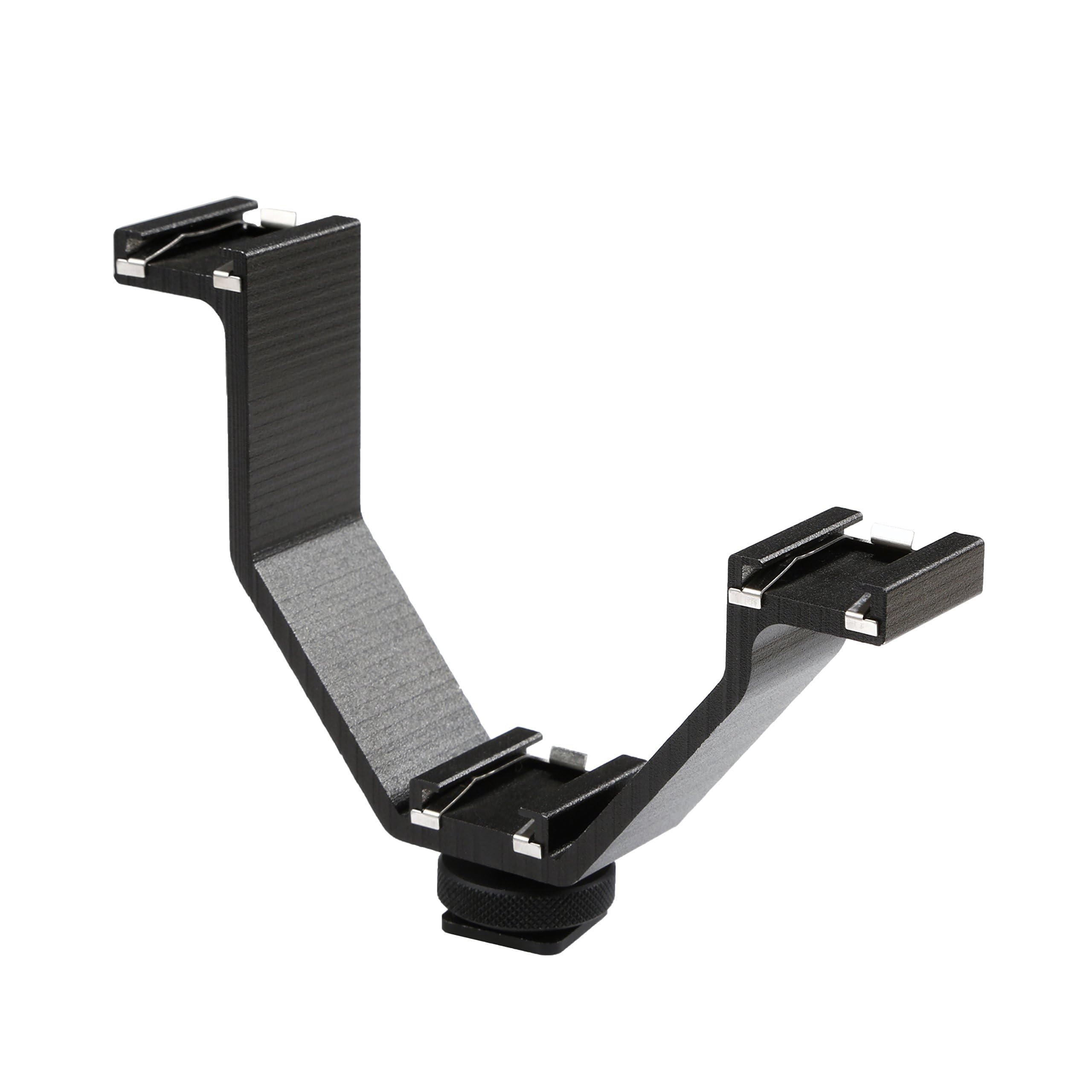
Image: The Movo MQ-THM01 Triple Shoe Bracket, showcasing its V-shape and three cold shoe mounts.
4. Setup and Installation
Follow these steps to properly install your Movo MQ-THM01 Triple Shoe Bracket:
4.1 Attaching to a Camera Hot/Cold Shoe
- Locate the hot/cold shoe mount on your camera (typically on top).
- Slide the base of the Movo MQ-THM01 bracket into the camera's hot/cold shoe.
- Tighten the locking wheel at the base of the bracket clockwise until it is secure. Do not overtighten.

Image: The Movo MQ-THM01 bracket shown mounted on a camera and a tripod, illustrating its universal compatibility.
4.2 Attaching to a Tripod or Rig (1/4"-20 Mount)
- The base of the bracket also features a 1/4"-20 threaded hole.
- Screw the bracket onto any tripod, monopod, or camera rig equipped with a 1/4"-20 screw.
- Ensure the connection is firm to prevent rotation or loosening.
4.3 Attaching Accessories
- Slide your cold shoe compatible accessories (e.g., microphone, LED light, monitor) into the three available cold shoe mounts on the bracket.
- Tighten any locking mechanisms on your accessories to secure them to the bracket.
- Ensure accessories are balanced to maintain stability, especially when using heavier items.

Image: The Movo MQ-THM01 bracket demonstrating how multiple accessories can be attached to its three cold shoe mounts.
5. Operating Instructions
The Movo MQ-THM01 Triple Shoe Bracket is a passive accessory designed to provide additional mounting points. Its operation primarily involves securely attaching and positioning your desired camera accessories.
- Accessory Placement: Distribute accessories evenly across the three mounts to maintain balance, especially when handheld.
- Cable Management: When using multiple powered accessories, manage cables to prevent tangling or interference with camera operation.
- Stability Check: Before use, always ensure all accessories are firmly attached to the bracket and the bracket itself is securely mounted to your camera or tripod.

Image: A practical application of the Movo MQ-THM01, showing a smartphone, microphone, and LED light mounted for content creation.
6. Maintenance
Proper maintenance ensures the longevity and reliable performance of your bracket.
- Cleaning: Wipe the bracket with a soft, dry cloth to remove dust and debris. Avoid using harsh chemicals or abrasive materials.
- Storage: Store the bracket in a dry, cool place away from direct sunlight and extreme temperatures.
- Inspection: Periodically check the cold shoe mounts and the main mounting screw for any signs of wear or damage.
7. Troubleshooting
If you encounter issues with your Movo MQ-THM01, refer to the following common problems and solutions:
| Problem | Possible Cause | Solution |
|---|---|---|
| Bracket feels wobbly on camera/tripod. | Mounting screw/wheel not fully tightened. | Ensure the locking wheel or 1/4"-20 screw is securely tightened. Avoid overtightening. |
| Accessories do not fit into cold shoe mounts. | Accessory is not cold shoe compatible or is too large. | Verify your accessory has a standard cold shoe base. Some larger accessories may interfere with each other due to the compact size of the bracket. Consider the overall dimensions of your setup. |
| Bracket appears bent or damaged. | Excessive force or impact. | Discontinue use if the bracket is damaged. Contact Movo support for assistance. |
8. Specifications
| Attribute | Detail |
|---|---|
| Model Number | 3BA-1 |
| Material | Aluminum |
| Mounting Type | Hot/Cold Shoe, 1/4"-20 Thread |
| Dimensions (L x W x H) | Approx. 4.3 x 3.4 x 0.9 inches (10.5 x 8.5 x 2.5 cm) |
| Item Weight | 3 ounces |
| Color | Black |
| UPC | 604888903219 |

Image: The Movo MQ-THM01 bracket with approximate dimensions indicated.
9. Warranty and Support
The Movo MQ-THM01 Triple Shoe Bracket comes with a 1-Year Warranty. This warranty covers manufacturing defects and ensures the product performs as intended under normal use.
For technical assistance, troubleshooting, or warranty claims, please contact Movo's US-Based support team. Refer to the official Movo website for the most current contact information.
Movo is committed to providing reliable products and excellent customer service.