
One For All URC7145
Contents
One For All Evolve 4 Universal Remote Control
Model: URC7145
Introduction
The One For All Evolve 4 Universal Remote Control (Model URC7145) is designed to simplify your home entertainment experience by allowing you to control up to four different devices with a single remote. This remote is pre-programmed to work with a wide range of brands and includes features optimized for Smart TVs, as well as convenient activity modes like 'Watch TV' and 'Watch Movie' for seamless control across multiple devices.

Image: Angled view of the One For All Evolve 4 Universal Remote Control, showcasing its ergonomic design and button layout.
Setup
1. Battery Installation
The One For All Evolve 4 remote requires 2 AAA batteries (not included). Follow these steps to install them:
- Locate the battery compartment cover on the back of the remote control.
- Press down on the tab and slide the cover downwards to open the compartment.
- Insert two AAA batteries, ensuring the positive (+) and negative (-) terminals align correctly with the markings inside the compartment.
- Slide the battery cover back into place until it clicks securely.
2. Programming Your Devices
The Evolve 4 remote can control up to four devices: TV, STB (Set-Top Box), BLU (Blu-ray/DVD Player), and AUD (Audio device). It is designed to work with all brands. There are typically two main methods for programming:
A. SimpleSet (Code Entry)
This method uses pre-programmed codes for popular brands. Refer to the included quick setup guide for specific brand codes. If your device is not listed or the code does not work, proceed to the Learning Function.
B. Learning Function
The learning function allows the Evolve 4 remote to copy functions directly from your original remote control. This is useful for devices not covered by SimpleSet or for specific functions you wish to customize.
- Place the Evolve 4 remote and your original remote on a flat surface, facing each other, about 1-2 inches apart.
- Press and hold the 'MAGIC' button on the Evolve 4 remote until the LED blinks twice and stays lit.
- Press the device key (TV, STB, BLU, or AUD) you wish to program. The LED will blink once and stay lit.
- Press the button on the Evolve 4 remote that you want to teach a function to (e.g., 'POWER'). The LED will blink rapidly.
- Press and hold the corresponding button on your original remote (e.g., 'POWER') until the Evolve 4's LED blinks twice, indicating successful learning.
- Repeat for all desired buttons. Press the 'MAGIC' button to exit learning mode.

Image: Front view of the One For All Evolve 4 Universal Remote Control, highlighting the device selection buttons (TV, STB, BLU, AUD) and the 'MAGIC' button for programming.
Operating the Remote
Once programmed, the Evolve 4 remote provides intuitive control over your devices.
1. Device Selection
To control a specific device, press the corresponding device key at the top of the remote: TV, STB, BLU, or AUD. The remote will then send commands to the selected device.
2. Basic Functions
- Power (Red Button): Turns the selected device on or off.
- Volume (+/-): Adjusts the volume of the selected audio device (often the TV or Soundbar).
- Channel (CH +/-): Changes channels on the selected TV or Set-Top Box.
- Number Keys (0-9): For direct channel entry or other numerical inputs.
- Navigation (Arrow Keys & OK): For menu navigation and selection.
3. Activity Modes
The Evolve 4 features two convenient activity modes that allow seamless control of multiple devices without switching modes:
- Watch TV: In this mode, channel keys typically operate your Set-Top Box, while volume keys control your TV or Soundbar.
- Watch Movie: This mode is optimized for movie viewing, often directing commands to your Blu-ray/DVD player and audio system simultaneously.
4. Smart TV Optimization
The keypad is optimized for controlling Smart Televisions, providing easy access to smart features and apps.
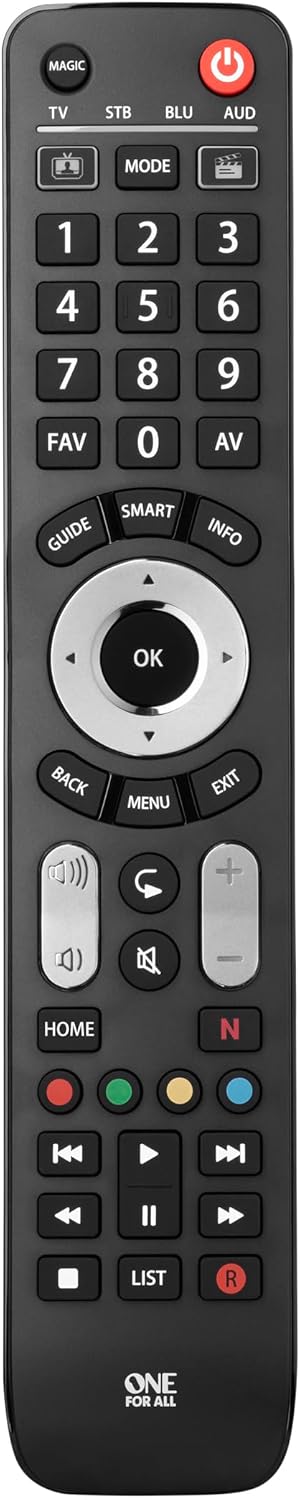
Image: The One For All Evolve 4 remote positioned on a white table in front of a television, demonstrating its use in a typical home entertainment setup.
Maintenance
Proper care will ensure the longevity of your One For All Evolve 4 remote control.
- Cleaning: Use a soft, dry cloth to clean the remote. Do not use abrasive cleaners or solvents.
- Battery Replacement: Replace batteries when the remote's response becomes sluggish or the LED indicator behaves erratically. Always replace both batteries at the same time with new AAA batteries.
- Storage: Store the remote in a cool, dry place away from direct sunlight and extreme temperatures.
Troubleshooting
If you encounter issues with your One For All Evolve 4 remote, try the following troubleshooting steps:
- Remote Not Responding:
- Check if the batteries are inserted correctly and are not depleted. Replace if necessary.
- Ensure there are no obstructions between the remote and the device's infrared receiver.
- Verify that you have selected the correct device mode (TV, STB, BLU, AUD).
- Device Not Responding to Commands:
- Re-program the device using the SimpleSet code entry or the Learning Function.
- Ensure your original remote is working correctly if using the Learning Function.
- Specific Buttons Not Working After Learning:
- Repeat the learning process for the problematic button, ensuring a strong signal from the original remote.
- Ensure the original remote's battery is not low during the learning process.
For further assistance, please refer to the comprehensive online manual or contact One For All customer support.
Specifications
| Feature | Detail |
|---|---|
| Brand | One For All |
| Model | URC7145 |
| Manufacturer | One For All |
| Model Year | 2016 |
| Part Number | URC7145 |
| Compatible Devices | Television, Set-Top Box, Blu-ray/DVD Player, Audio Device |
| Special Features | Universal, Learnable, Activity Modes |
| Battery Description | AAA |
| Batteries Required | Yes (2 AAA batteries) |
| Batteries Included | No |
| Connector Type | Infrared |
| Product Dimensions | 2 x 7 x 25 cm; 300 g |
| ASIN | B01NA9M3V4 |
| Colour | Black |
| Max Number of Supported Devices | 4 |
Warranty and Support
For information regarding product warranty, please refer to the documentation included with your purchase or visit the official One For All website. For technical support, troubleshooting assistance, or further inquiries, please contact One For All customer service through their official channels.
Documents and downloads
Ask a question about this manual
Ask about setup, troubleshooting, compatibility, parts, safety, or missing instructions. Manuals+ will review the question and use this page’s manual context to help answer it.