1. Introduction
This manual provides essential information for the proper installation, operation, and maintenance of the Lenel LNL-1320 Access Control Dual Reader Interface Module Series 2. The LNL-1320 is designed to enhance security systems by providing robust control and monitoring capabilities for access points.
2. Safety Information
Observe all local and national electrical codes during installation. Disconnect power before performing any wiring or maintenance. This device should be installed by qualified personnel only. Do not expose the module to moisture or extreme temperatures. Ensure proper grounding to prevent electrical hazards.
3. Product Overview
The Lenel LNL-1320 is a dual-card reader interface panel offering on-board flexibility for connecting various security devices. It provides the necessary input/output (I/O) for controlling two doors, along with auxiliary point control and monitoring. Each LNL-1320 unit can connect two card readers, monitor eight general-purpose input points, and control six relays. It is designed for seamless integration with Lenel series intelligent controllers.
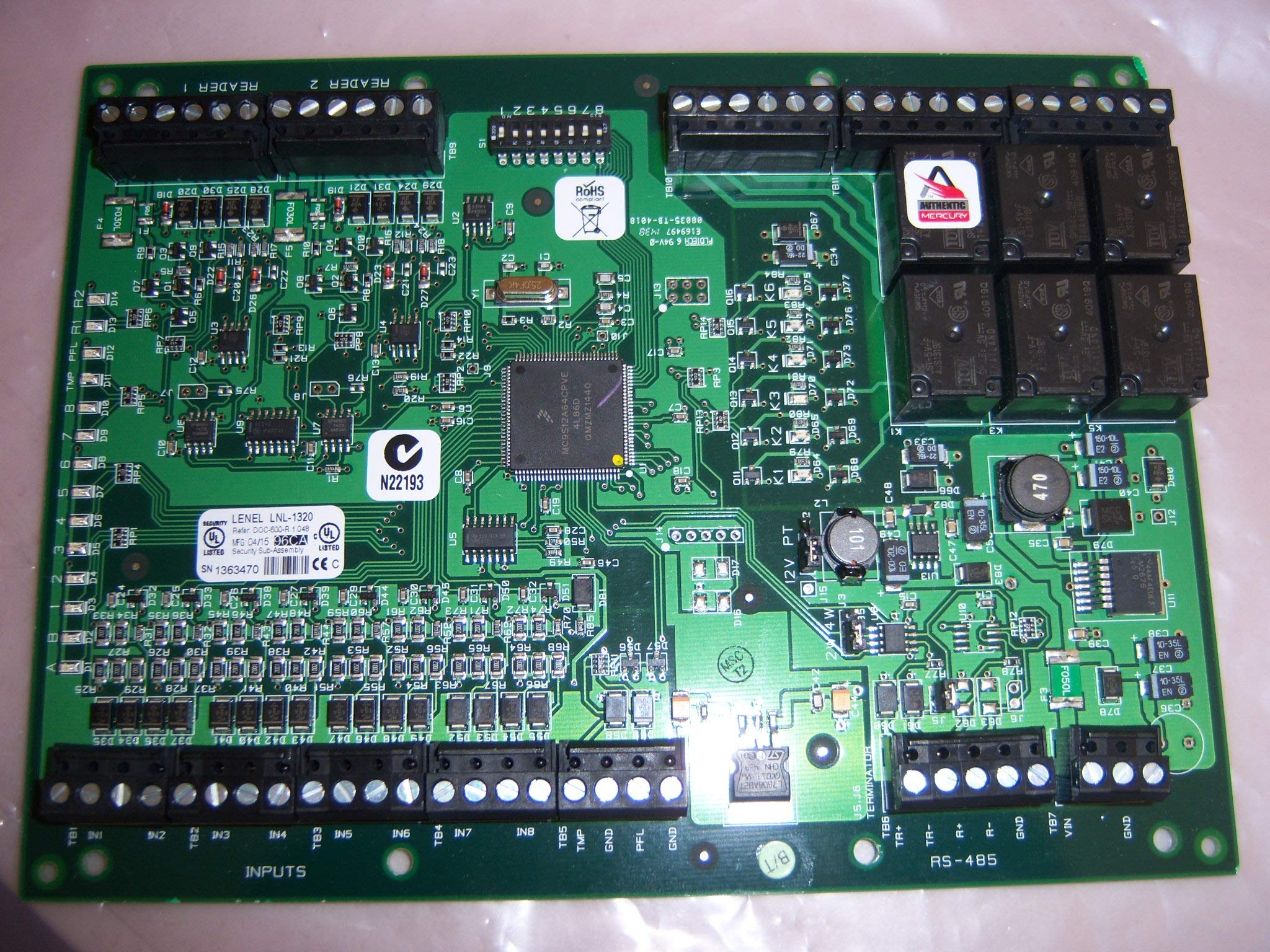
Figure 3.1: Lenel LNL-1320 Access Control Dual Reader Interface Module. This image shows the overall view of the module, highlighting its compact design and various connection points.

Figure 3.2: Close-up view of the relays on the LNL-1320 circuit board. These relays are crucial for controlling external devices such as door locks and alarms.

Figure 3.3: Detailed view of the product label on the LNL-1320 circuit board, showing the model number, serial number, and compliance markings.

Figure 3.4: Rear view of the LNL-1320 circuit board, illustrating the solder points and traces for internal connections.
4. Setup and Installation
The LNL-1320 module is designed for screw-in installation. Detailed assembly instructions are provided with the product for DIY installation. Ensure all connections are secure and correctly wired according to the system design.
4.1 Power Connection
The module operates on a 12-volt corded electric power source. Connect the power supply according to the wiring diagram provided in the separate assembly instructions.
4.2 Device Connectivity
The LNL-1320 uses wired connectivity for integration with access control devices and Lenel intelligent controllers. Connect card readers, input points, and relays to the designated terminals as per the system's wiring specifications. The module supports RFID sensor technology for card readers.
5. Operating Instructions
Once installed and powered, the LNL-1320 module functions as an interface between card readers, input sensors, output relays, and the main Lenel intelligent controller. Operation is managed through the connected access control system software.
- Card Reader Control: The module processes data from two connected card readers to grant or deny access based on programmed credentials.
- Input Monitoring: It monitors up to eight general-purpose input points, detecting events such as door status (open/closed) or alarm triggers.
- Relay Control: Six control relays can be activated by the system to manage door locks, alarms, or other auxiliary devices.
- Control Method: The overall access control system typically uses a touch interface for configuration and management.
6. Maintenance
The LNL-1320 module requires minimal maintenance. Keep the unit clean and free from dust. Periodically inspect all wiring connections for security and integrity. Do not attempt to repair the module yourself; refer all servicing to qualified technicians.
7. Troubleshooting
If the LNL-1320 module or connected devices are not functioning as expected, consider the following basic troubleshooting steps:
- No Power: Verify that the 12V power supply is connected correctly and providing power. Check all power connections.
- Communication Issues: Ensure all wired connections to the Lenel intelligent controller are secure. Check network cables if applicable to your system configuration.
- Reader Malfunction: Confirm card readers are properly wired and configured within the access control software.
- Input/Output Errors: Check wiring for all input points and relays. Verify their status and configuration in the system software.
For persistent issues, consult the detailed documentation for your Lenel intelligent controller or contact Lenel technical support.
8. Specifications
| Feature | Specification |
|---|---|
| Brand | Lenel |
| Model Number | LNL-1320 |
| Power Source | Corded Electric |
| Voltage | 12 Volts |
| Connectivity Technology | Wired |
| Installation Type | Screw-In |
| Compatible Devices | Access Control Devices, Lenel Intelligent Controllers |
| Item Weight | 1.8 pounds (0.82 Kilograms) |
| Package Dimensions | 11.02 x 5.24 x 0.63 inches |
| Sensor Technology | RFID |
| Control Method | Touch (via integrated system) |
| Alert Type | Motion (via integrated system) |
| UPC | 039409427651 |
9. Warranty and Support
For warranty information and technical support, please refer to the documentation provided with your purchase or visit the official Lenel website. Keep your purchase receipt for warranty claims.


