
Introduction
The Rocketfish 4-Port 4K 60Hz HDMI Switch Box is designed to expand the HDMI input capabilities of your display, allowing you to connect up to four HDMI source devices to a single HDMI input on your TV or monitor. This device supports stunning 4K 60Hz video resolution, ensuring high-quality visual fidelity. It features seamless switching between connected devices, including an automatic detection function and a convenient remote control for manual selection. The switch box is HDCP 2.2 compatible, ensuring compatibility with protected content.

Figure 1: Front view of the Rocketfish 4-Port 4K 60Hz HDMI Switch Box, showing the HDMI input 1 port and selection buttons.
Package Contents
- Rocketfish 4-Port 4K 60Hz HDMI Switch Box
- Remote Control
- Power Adapter
- User Manual (this document)
Setup
Follow these steps to set up your HDMI Switch Box:
- Placement: Place the HDMI Switch Box on a stable, flat surface near your TV and source devices. Ensure adequate ventilation around the unit.
- Connect HDMI Output: Connect one end of an HDMI cable (not included) to the "OUTPUT" port on the back of the HDMI Switch Box. Connect the other end of this cable to an available HDMI input on your TV or display.
- Connect HDMI Inputs: Connect your HDMI source devices (e.g., Blu-ray player, game console, streaming device) to the "INPUT 1", "INPUT 2", "INPUT 3", and "INPUT 4" ports on the HDMI Switch Box using HDMI cables (not included). Input 1 is located on the front, while Inputs 2, 3, and 4 are on the back.
- Connect Power: Plug the included power adapter into the "DC 5V" port on the back of the HDMI Switch Box. Then, plug the power adapter into a standard electrical outlet.
- Power On: Power on your TV and all connected HDMI source devices. The HDMI Switch Box will power on automatically when connected to power.

Figure 2: Rear view of the Rocketfish 4-Port 4K 60Hz HDMI Switch Box, illustrating the HDMI output, input ports 2, 3, 4, and the DC 5V power input.

Figure 3: The HDMI Switch Box demonstrating universal compatibility with various devices such as satellite boxes, gaming consoles, and digital media players.
Operating Instructions
The Rocketfish HDMI Switch Box offers two methods for switching between connected devices:
Automatic Switching
The switch box is designed to automatically detect and switch to the most recently activated or powered-on HDMI source. For example, if you turn on your game console, the switch box should automatically switch to that input.
Manual Switching (Using Remote Control)
Use the included remote control to manually select your desired HDMI input.
- Power ON/OFF: Press the POWER ON/OFF button to turn the switch box on or off.
- Select Input: Press the numbered buttons (1, 2, 3, 4) corresponding to the HDMI input you wish to view.
- Select Modes: Alternatively, press the SELECT MODES button to cycle through the available inputs sequentially.
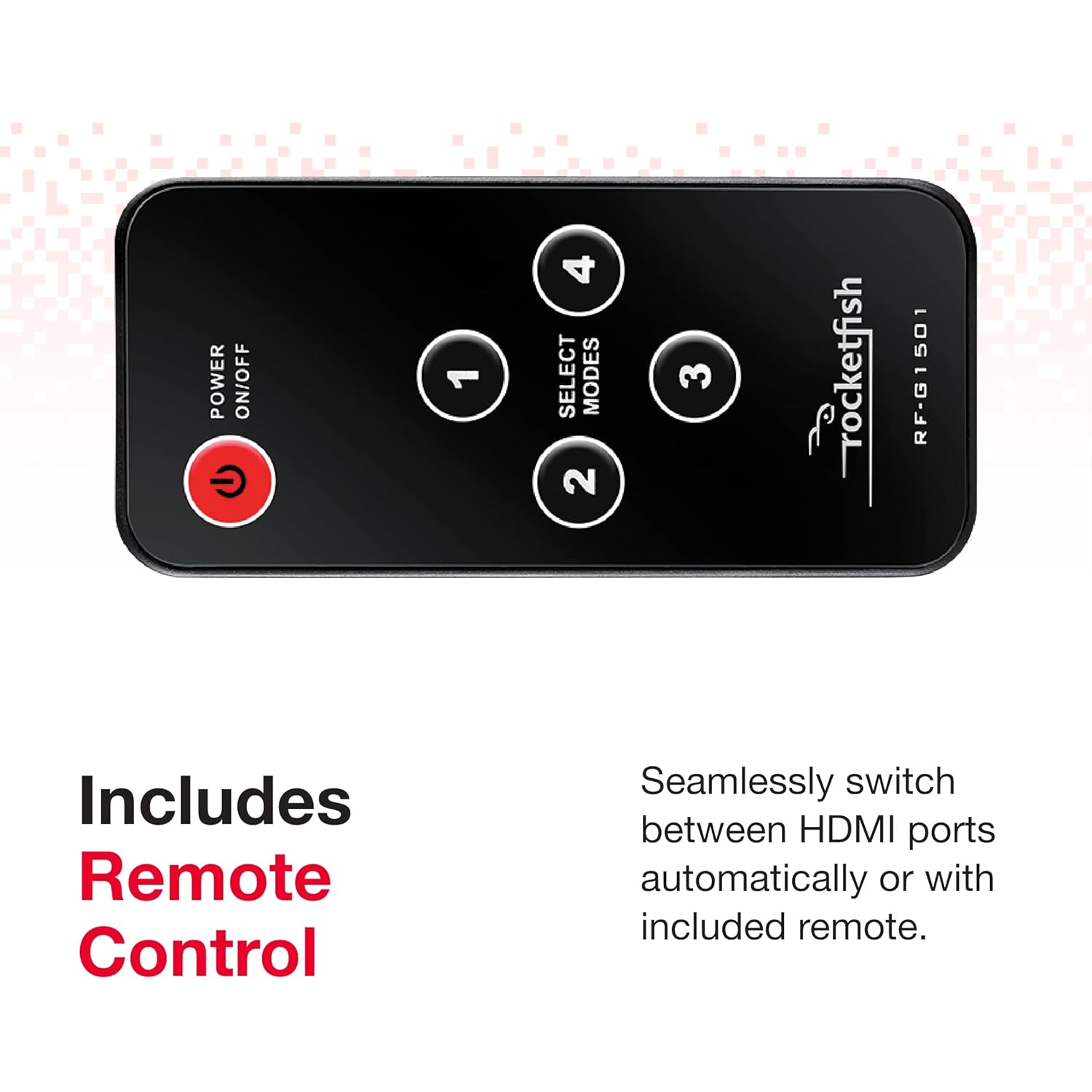
Figure 4: The remote control for the Rocketfish HDMI Switch Box, featuring power, numbered input selection, and mode selection buttons.
Manual Switching (Using Button on Unit)
You can also switch inputs directly on the unit:
- Press the SELECT POWER button on the top of the switch box to cycle through the inputs. Each press will advance to the next available input.
Maintenance
To ensure the longevity and optimal performance of your Rocketfish HDMI Switch Box:
- Cleaning: Use a soft, dry cloth to clean the exterior of the unit. Do not use liquid cleaners or aerosol sprays.
- Ventilation: Ensure the unit is placed in a well-ventilated area to prevent overheating. Do not block any ventilation openings.
- Storage: If storing the unit for an extended period, disconnect it from power and store it in a cool, dry place.
- Cable Management: Avoid excessive bending or kinking of HDMI cables to prevent damage.
Troubleshooting
If you encounter issues with your HDMI Switch Box, refer to the following common problems and solutions:
| Problem | Possible Cause | Solution |
|---|---|---|
| No picture or sound | Loose cable connections, incorrect input selected, power issue. |
|
| Remote control not working | Dead battery, obstructed signal, remote not aimed correctly. |
|
| Flickering or distorted image | Poor quality HDMI cable, signal interference, resolution incompatibility. |
|
| Automatic switching not working | Device power state, CEC conflicts. |
|
Specifications
| Feature | Detail |
|---|---|
| Brand | Rocketfish |
| Model Number | 4330123596 |
| Color | Black |
| Connector Type | HDMI |
| Compatible Devices | Television, Blu-ray Player, Gaming Console |
| Cable Type | HDMI |
| Supported Resolution | Up to 4K @ 60Hz |
| HDCP Compatibility | HDCP 2.2 |
| Number of HDMI Inputs | 4 |
| Number of HDMI Outputs | 1 |
| Package Dimensions | 10.16 x 4.09 x 1.54 inches |
| Item Weight | 15.2 ounces |
Warranty and Support
For warranty information and technical support, please refer to the official Rocketfish website or contact their customer service directly. Keep your purchase receipt for warranty claims.