Introduction
Thank you for purchasing the Brookstone Big Blue Bluetooth Amplifier. This manual provides essential information for the safe and efficient operation of your device. Please read these instructions thoroughly before use and retain them for future reference.
Important Safety Information
- Do not expose the device to water or moisture.
- Avoid extreme temperatures.
- Do not attempt to disassemble or repair the unit yourself. Refer all servicing to qualified personnel.
- Use only the provided charging cable and adapter.
- Keep out of reach of children.
- Prolonged listening at high volume levels may cause hearing damage.
Package Contents
Verify that all items are present in the package:
- Brookstone Big Blue Bluetooth Amplifier
- USB Charging Cable
- Audio Cable (3.5mm)
- User Manual (this document)
Product Overview
Familiarize yourself with the components of your Brookstone Big Blue Bluetooth Amplifier.
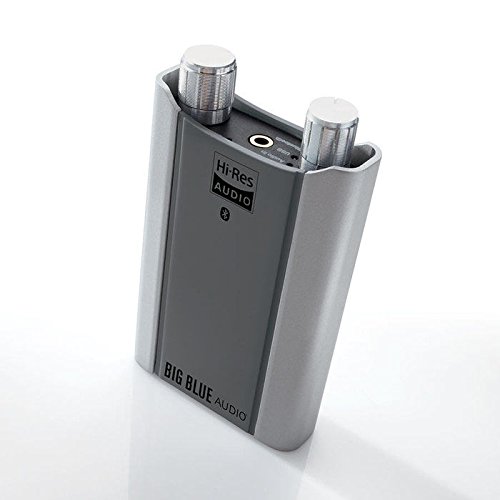
Image: Front view of the Brookstone Big Blue Bluetooth Amplifier, showing the main controls and input/output ports.
Component Identification:
- Power Button: Press and hold to turn the device on or off.
- Volume Control Dial: Rotate to adjust the audio output volume.
- Bluetooth Indicator LED: Shows Bluetooth pairing status.
- Charging Port (Micro USB): For connecting the USB charging cable.
- Audio Input (3.5mm AUX): For connecting non-Bluetooth audio sources.
- Headphone Output (3.5mm): For connecting headphones.
Setup
1. Charging the Amplifier
Before initial use, fully charge the amplifier.
- Connect the small end of the USB charging cable to the amplifier's charging port.
- Connect the large end of the USB charging cable to a USB power adapter (not included) or a computer's USB port.
- The charging indicator LED will illuminate during charging and turn off when fully charged.
2. Powering On/Off
- To power on, press and hold the Power Button for approximately 3 seconds until the indicator light illuminates.
- To power off, press and hold the Power Button for approximately 3 seconds until the indicator light turns off.
Operating Instructions
1. Bluetooth Pairing
To connect your amplifier to a Bluetooth-enabled device:
- Ensure the amplifier is powered on. The Bluetooth indicator LED will flash, indicating it is in pairing mode.
- On your audio source device (e.g., smartphone, tablet), enable Bluetooth and search for available devices.
- Select "Brookstone Big Blue" from the list of found devices.
- Once paired, the Bluetooth indicator LED on the amplifier will glow solid blue.
- Connect your headphones to the 3.5mm headphone output port on the amplifier.
Note: The amplifier will automatically attempt to reconnect to the last paired device when powered on.
2. Using with an Audio Cable (AUX Input)
To connect a non-Bluetooth audio source:
- Connect one end of the 3.5mm audio cable to the audio input port on the amplifier.
- Connect the other end of the 3.5mm audio cable to the headphone jack or audio output of your audio source device.
- Connect your headphones to the 3.5mm headphone output port on the amplifier.
- The amplifier will automatically switch to AUX input mode when a cable is detected.
3. Adjusting Volume
Rotate the Volume Control Dial clockwise to increase volume and counter-clockwise to decrease volume.
Maintenance
- Clean the amplifier with a soft, dry cloth. Do not use liquid cleaners or aerosols.
- Store the device in a cool, dry place when not in use.
- Avoid dropping the device or subjecting it to strong impacts.
Troubleshooting
| Problem | Possible Cause | Solution |
|---|---|---|
| No power | Battery is depleted. | Charge the amplifier using the provided USB cable. |
| Cannot pair via Bluetooth | Amplifier is not in pairing mode; Bluetooth is off on source device; device is too far. | Ensure amplifier is powered on and LED is flashing; enable Bluetooth on source device; move devices closer (within 10 meters). |
| No sound | Volume is too low; headphones not connected; incorrect input mode. | Increase volume; ensure headphones are securely connected; verify correct input (Bluetooth or AUX). |
| Sound distortion or crackling | Low battery; interference; poor connection. | Charge the amplifier; move away from other wireless devices; ensure Bluetooth connection is stable or AUX cable is fully inserted. |
Specifications
- Model Name: Big Blue
- Brand: Brookstone
- Connectivity Technology: Wireless (Bluetooth), Wired (3.5mm AUX)
- Wireless Communication Technology: Bluetooth 4.0, aptX
- Compatible Devices: Bluetooth-enabled Devices
- Item Weight: 7.2 ounces
- Product Dimensions: 4.02 x 1.5 x 6.46 inches
- Battery: 1 Lithium Ion battery (included)
Warranty and Support
For warranty information or technical support, please refer to the documentation included with your purchase or visit the official Brookstone website. Keep your proof of purchase for warranty claims.


