
Kobalt 87
Contents
Kobalt 24-Volt Max 1/2-inch Drive Cordless Impact Wrench
Model: 87
Introduction
The Kobalt 24-Volt Max 1/2-inch Drive Cordless Impact Wrench is a powerful and versatile tool designed for various fastening applications. It features a highly-efficient brushless motor, variable-speed trigger, and an integrated LED work light for enhanced visibility. This manual provides essential information for the safe and effective operation, maintenance, and troubleshooting of your impact wrench.

Figure 1: Kobalt 24-Volt Max 1/2-inch Drive Cordless Impact Wrench, including the tool, battery, charger, and soft carrying bag.
Safety Information
Always read and understand all safety warnings and instructions before operating this power tool. Failure to follow the warnings and instructions may result in electric shock, fire, and/or serious injury.
- Work Area Safety: Keep work area clean and well lit. Cluttered or dark areas invite accidents.
- Electrical Safety: Do not expose power tools to rain or wet conditions. Water entering a power tool will increase the risk of electric shock.
- Personal Safety: Always wear eye protection. Use hearing protection when operating the tool for extended periods.
- Tool Use and Care: Do not force the power tool. Use the correct power tool for your application.
- Battery Tool Use and Care: Recharge only with the charger specified by the manufacturer.
Package Contents
Verify that all items listed below are included in your package:
- Kobalt 24-Volt Max 1/2-inch Drive Cordless Impact Wrench
- 24-Volt Max 4.0-Ah Li-ion Battery
- Battery Charger
- Soft Carrying Bag
Setup
1. Charging the Battery
Before first use, fully charge the 24-Volt Max 4.0-Ah Li-ion battery. The battery features a built-in fuel gauge to indicate its charge level.
- Connect the charger to a standard power outlet.
- Slide the battery onto the charger until it clicks into place.
- The charger's indicator lights will show the charging status. Refer to the charger's specific instructions for light patterns.
- Once fully charged, remove the battery from the charger.

Figure 2: The 24-Volt Max Li-ion battery being charged on its dedicated charger. The charger has indicator lights to show charging status.
2. Installing the Battery
- Align the battery with the battery port on the base of the impact wrench.
- Slide the battery into the tool until it locks securely into place. Ensure it is fully seated to prevent accidental dislodgement during operation.
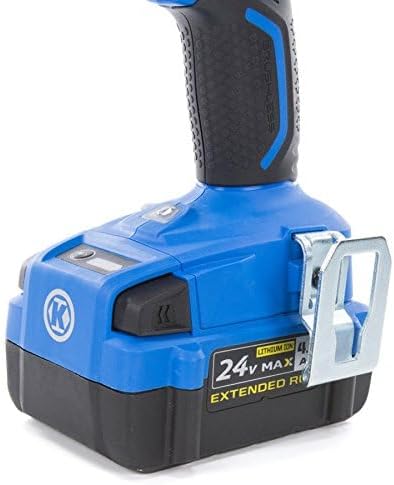
Figure 3: Close-up view of the 24-Volt Max battery securely attached to the base of the impact wrench, showing the fuel gauge buttons.
3. Attaching Sockets
The impact wrench features a 1/2-inch drive anvil for attaching compatible sockets.
- Select the appropriate 1/2-inch drive impact-rated socket for your application.
- Push the socket firmly onto the square drive anvil until it clicks into place.
- To remove, pull the socket off the anvil.

Figure 4: Detailed view of the 1/2-inch square drive anvil on the impact wrench, where sockets are attached.
Operating Instructions
1. Powering On/Off and Direction Control
The tool is activated by the variable-speed trigger. A forward/reverse selector switch controls the direction of rotation.
- To turn on, press the variable-speed trigger. The tool speed increases with increased trigger pressure.
- To turn off, release the variable-speed trigger.
- To select forward rotation (tightening), push the selector switch to the left.
- To select reverse rotation (loosening), push the selector switch to the right.
- Ensure the selector switch is in the center position (locked) when not in use to prevent accidental starting.
2. Variable Speed and Torque
The variable-speed trigger generates 0-1,900 RPM no-load speed and 2,400 IPM (Impacts Per Minute) for efficient application speed. The brushless motor provides up to 650 ft-lbs of breakaway torque.
- Apply light pressure to the trigger for lower speeds and greater control.
- Apply full pressure for maximum speed and torque.
- When loosening fasteners, the tool's intelligent design may reduce power once the fastener breaks loose to prevent it from spinning wildly.
3. LED Work Light
A built-in LED work light illuminates dimly lit work spaces, improving visibility during operation.
- The LED light activates automatically when the trigger is pressed.
- It will remain on for a short period after the trigger is released.
Maintenance
Regular maintenance ensures the longevity and optimal performance of your impact wrench.
- Cleaning: Keep the tool's ventilation openings clean and free of debris. Use a soft, damp cloth to clean the exterior. Do not use harsh chemicals or abrasive cleaners.
- Battery Care: Store batteries in a cool, dry place away from direct sunlight and extreme temperatures. Do not store batteries in a discharged state for extended periods.
- Inspection: Periodically inspect the tool for any signs of damage, loose fasteners, or worn parts. Do not operate a damaged tool.
- Lubrication: This tool is designed for maintenance-free operation. No internal lubrication is required.
Troubleshooting
| Problem | Possible Cause | Solution |
|---|---|---|
| Tool does not start | Battery not charged or improperly installed. | Ensure battery is fully charged and properly seated in the tool. |
| Reduced power or performance | Low battery charge. Overheating. | Recharge battery. Allow tool to cool down if it has been used continuously. |
| LED light not working | Tool malfunction. | Ensure battery is charged. If problem persists, contact customer support. |
| Socket does not stay on anvil | Incorrect socket type or worn anvil. | Use only 1/2-inch drive impact-rated sockets. Inspect anvil for damage. |
Specifications
| Feature | Specification |
|---|---|
| Model Number | 87 |
| Voltage | 24 Volts Max |
| Drive Size | 1/2-inch Square |
| Motor Type | Brushless |
| Breakaway Torque | 650 ft-lbs |
| No-Load Speed | 0-1,900 RPM |
| Impacts Per Minute (IPM) | 2,400 IPM |
| Battery Type | Lithium Ion (4.0-Ah) |
| Item Weight | 7.6 Pounds |
| Material | Alloy Steel |
| Color | Blue |
| UPC | 692042006463 |
Warranty
This Kobalt product is covered by a manufacturer's warranty. Please refer to the warranty card included with your purchase or visit the official Kobalt website for detailed warranty terms and conditions. Keep your proof of purchase for warranty claims.
Support
For technical assistance, replacement parts, or service, please contact Kobalt Customer Support. Have your model number and purchase date available when contacting support.
Website: www.kobalttools.com
Phone: Refer to your product packaging or the official website for regional contact numbers.
Documents and downloads
Ask a question about this manual
Ask about setup, troubleshooting, compatibility, parts, safety, or missing instructions. Manuals+ will review the question and use this page’s manual context to help answer it.