1. Product Overview
The ROGER M20/340 is an irreversible electromechanical actuator operating on 230V AC, specifically designed for swing gates with individual leaves up to 3 meters in length. This robust actuator features an on-board encoder for precise control, integrated electrical limit switches, and a mechanical stop for the open position. The product includes standard accessories such as three short series brackets for welding (KT206) and one mechanical stop (MC779).
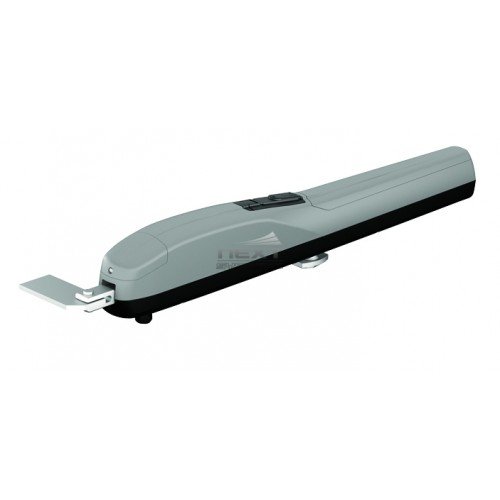
Figure 1: Front view of the ROGER M20/340 Electromechanical Actuator. The image shows the elongated grey body of the actuator with a black base, and a silver mounting bracket extending from one end.
2. Specifications
| Feature | Detail |
|---|---|
| Model Reference | M20/340 |
| Power Supply | 230V AC |
| Gate Type | Swing gates |
| Max Gate Leaf Length | 3 meters |
| Encoder | On-board |
| Limit Switches | Electrical |
| Mechanical Stop | Included (for open position) |
| Standard Accessories | 3 short series brackets (KT206), 1 mechanical stop (MC779) |
| Manufacturer | ROGER |
| ASIN | B01N9CWASI |
3. Setup and Installation
Installation of the ROGER M20/340 actuator should be performed by qualified personnel in accordance with local regulations and safety standards. Ensure the power supply is disconnected before beginning any installation work.
- Mounting Brackets: Weld the provided short series brackets (KT206) to the gate post and gate leaf according to the specific gate dimensions and opening requirements. Ensure the brackets are level and securely attached.
- Actuator Mounting: Attach the actuator to the welded brackets using appropriate fasteners. Verify that the actuator is aligned correctly with the gate's pivot points to ensure smooth operation.
- Electrical Connections: Connect the 230V AC power supply to the actuator's terminal block. Connect the control unit, safety devices (e.g., photocells, safety edges), and any other accessories as per the wiring diagram provided in the full installation manual. Ensure all connections are secure and properly insulated.
- Encoder and Limit Switch Adjustment: Adjust the on-board encoder and electrical limit switches to define the gate's open and closed positions. This step is crucial for proper gate operation and safety.
- Mechanical Stop Installation: Install the mechanical stop (MC779) in the open position to provide a physical limit for the gate's travel.
- Initial Testing: After completing all connections and adjustments, restore power and perform initial functional tests. Observe the gate's movement, ensuring it opens and closes smoothly and stops correctly at the defined limits.
4. Operating Instructions
The ROGER M20/340 actuator operates in conjunction with a compatible control unit. Refer to the control unit's manual for specific programming and remote control instructions.
- Automatic Operation: Once programmed, the gate can be opened or closed using a remote control, push button, or other access control devices connected to the control unit.
- Safety Features: The integrated encoder and electrical limit switches contribute to safe operation by precisely controlling gate movement and stopping. Ensure all external safety devices (e.g., photocells) are functional.
- Manual Release: In case of power failure or malfunction, the actuator is equipped with a manual release mechanism. Locate the release lever or key slot on the actuator, engage it as per the full manual's instructions, and manually move the gate. Remember to re-engage the actuator after restoring power or resolving the issue.
5. Maintenance
Regular maintenance is essential to ensure the longevity and reliable operation of your ROGER M20/340 actuator. Perform these checks periodically:
- Visual Inspection: Annually inspect the actuator, mounting brackets, and gate hinges for any signs of wear, corrosion, or damage. Check for loose fasteners.
- Lubrication: Periodically lubricate moving parts of the gate and actuator as recommended in the comprehensive maintenance guide. Use lubricants suitable for outdoor use.
- Electrical Connections: Check all electrical connections for tightness and signs of corrosion. Ensure cables are not frayed or damaged.
- Safety Devices: Regularly test all safety devices, such as photocells and safety edges, to ensure they are functioning correctly and preventing gate closure when an obstruction is detected.
- Limit Switch Functionality: Verify that the gate consistently stops at the programmed open and closed positions. Readjust if necessary.
- Cleaning: Keep the actuator free from dirt, debris, and insect nests, which can impede its operation.
6. Troubleshooting
This section provides basic troubleshooting steps for common issues. For complex problems, consult a qualified technician or ROGER support.
- Gate Not Moving:
- Check if the power supply is active.
- Verify that the manual release is not engaged.
- Inspect safety devices (e.g., photocells) for obstructions or misalignment.
- Check for blown fuses in the control unit.
- Gate Stops Mid-Cycle:
- An obstruction might be detected by safety devices. Clear the path.
- Check for excessive friction or mechanical binding in the gate's movement.
- Verify encoder functionality; recalibration might be needed.
- Gate Not Reaching Full Open/Closed Position:
- Readjust the electrical limit switches.
- Ensure the mechanical stop is correctly positioned.
- Check for any physical obstructions preventing full travel.
- Unusual Noises:
- Inspect for loose components or worn parts.
- Lubricate moving parts if necessary.
7. Warranty Information
Warranty terms for the ROGER M20/340 actuator are typically provided at the point of purchase or can be found on the official ROGER website. Please retain your proof of purchase for warranty claims. The warranty generally covers manufacturing defects under normal use conditions.
8. Support
For further assistance, technical support, or spare parts, please contact your authorized ROGER dealer or visit the official ROGER website. Provide your product model (M20/340) and ASIN (B01N9CWASI) when seeking support.
ROGER Official Website: www.rogertechnology.com


