
1. Introduction
The TC Helicon DUPLICATOR is a compact vocal effects stompbox designed to enhance your live vocal performance with studio-quality doubling, reverb, and automatic pitch correction. This manual provides essential information for setting up, operating, and maintaining your DUPLICATOR unit.
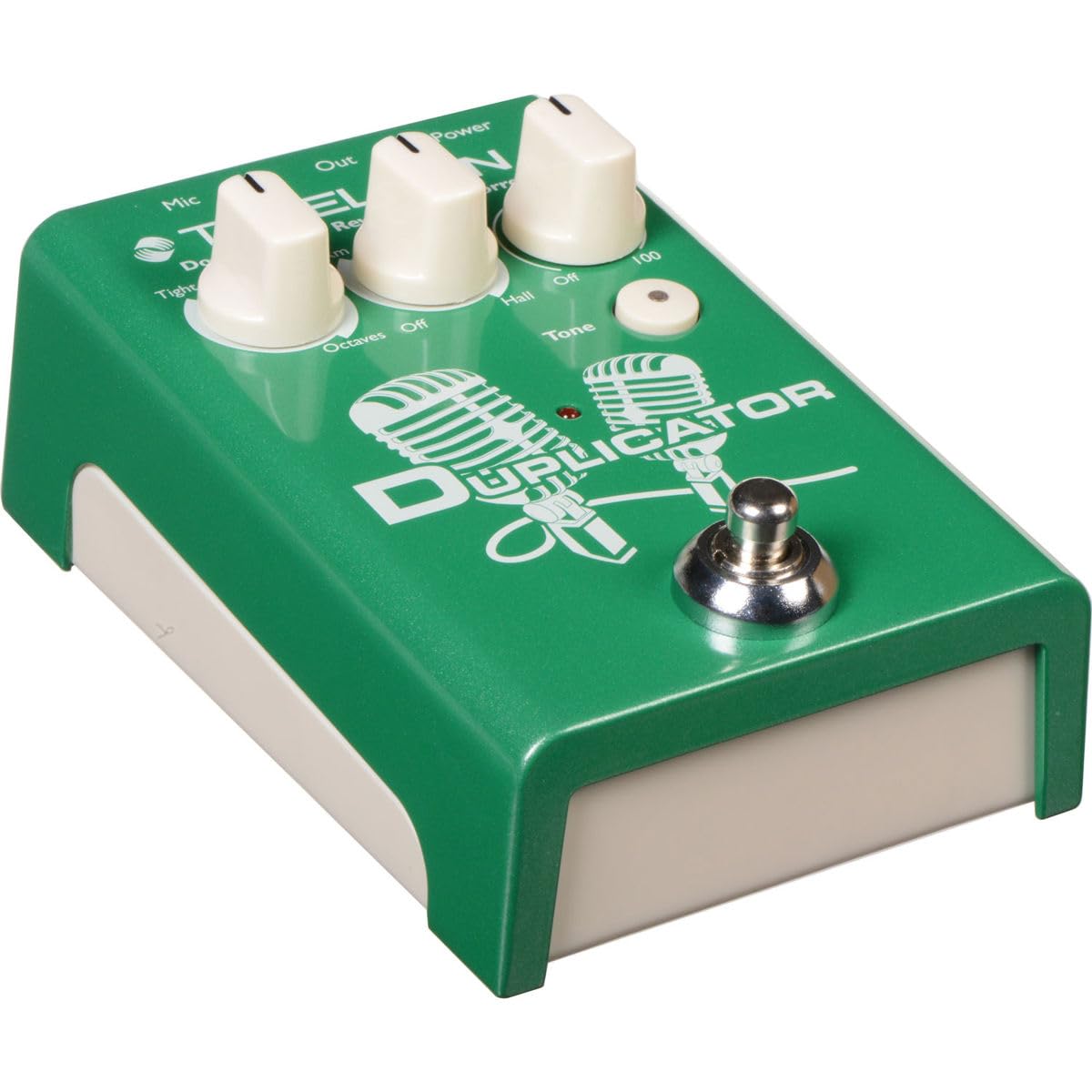
Image 1.1: The TC Helicon DUPLICATOR vocal effects stompbox, showcasing its compact design and control knobs.
2. Setup
Follow these steps to connect and power on your DUPLICATOR unit.
2.1 Power Supply
The DUPLICATOR can be powered by either AA batteries (not included) or a 9V DC power adapter (not included). Ensure the power source meets the specifications to prevent damage.
- Battery Installation: Open the battery compartment on the underside of the unit and insert four AA batteries, observing correct polarity.
- Power Adapter: Connect a compatible 9V DC, center-negative power adapter to the 'POWER' input jack.

Image 2.1: Example of a 9V DC power adapter. A compatible adapter is required for external power.
2.2 Connections
Connect your microphone and audio output as follows:
- Microphone Input: Connect your microphone to the 'MIC' XLR input on the rear panel. The DUPLICATOR automatically sets the microphone gain.
- Audio Output: Connect the 'OUT' XLR output to your mixer, audio interface, or PA system.
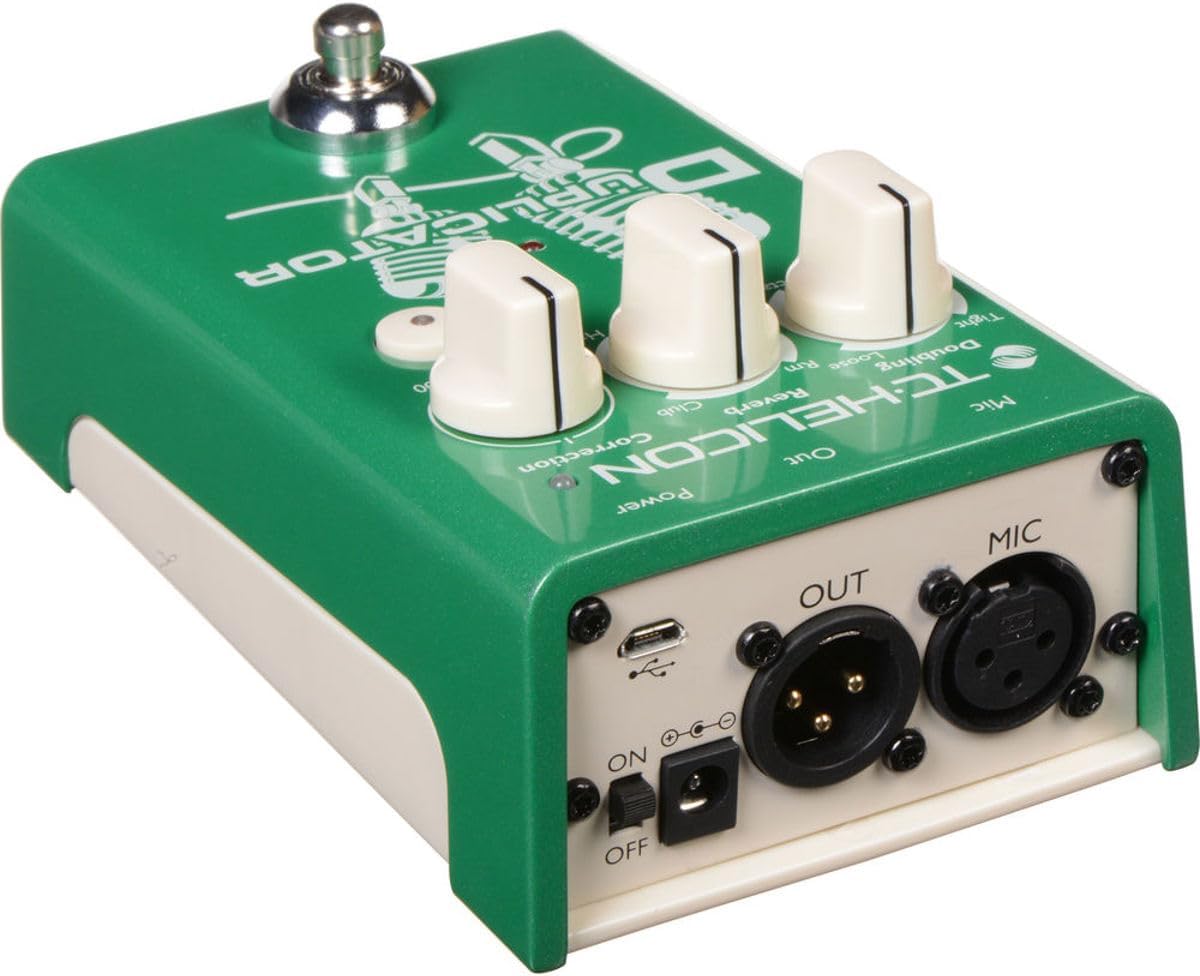
Image 2.2: Rear panel connections of the DUPLICATOR, including MIC input, OUT output, power, and USB port.
3. Operating Instructions
The DUPLICATOR features intuitive controls for vocal effects. Familiarize yourself with the knobs and footswitch functionality.

Image 3.1: Front panel controls of the DUPLICATOR, including effect knobs and footswitch.
3.1 Controls
- Doubling Knob: Selects the type of vocal doubling effect. Options include Tight, Loose, and Octave Up/Down. Rotate the knob to choose your desired doubling style.
- Reverb Knob: Adjusts the reverb type and intensity. Options include Room, Club, and Hall. The 'Off' position disables reverb.
- Correction Knob: Controls the amount of automatic pitch correction applied to your vocals, from 'Off' to '100' (maximum correction). Start with a lower setting and adjust to taste to avoid an unnatural sound.
- Tone Button: Engages the adaptive tone feature, which applies automatic EQ, compression, de-essing, and gating for a polished vocal sound. The LED illuminates when active.
3.2 Footswitch Functionality
The single footswitch on the DUPLICATOR controls multiple functions:
- Single Click: Toggles the Doubling effect on or off.
- Long Press: Toggles the Reverb effect on or off.
This allows for dynamic control over your vocal effects during a performance.
4. Maintenance
Proper maintenance ensures the longevity and optimal performance of your DUPLICATOR.
4.1 Cleaning
Wipe the unit with a soft, dry cloth. Avoid using abrasive cleaners or solvents, which can damage the finish and internal components.
4.2 Battery Replacement
If using batteries, replace them when the power indicator light dims or the unit behaves erratically. Always replace all four AA batteries simultaneously with new ones.
4.3 Storage
When not in use for extended periods, disconnect the power adapter and remove the batteries. Store the unit in a cool, dry place away from direct sunlight and extreme temperatures.
5. Troubleshooting
If you encounter issues with your DUPLICATOR, refer to the following common problems and solutions:
| Problem | Possible Cause | Solution |
|---|---|---|
| No sound output | Incorrect connections, no power, output level too low. | Check all XLR cable connections. Ensure power is supplied (batteries or adapter). Verify the mixer/PA input is active and volume is up. |
| Noisy signal | Faulty cables, ground loop, low battery. | Try different cables. Ensure all equipment is properly grounded. Replace batteries or use a power adapter. |
| Effects not engaging | Footswitch mode, knob set to 'Off'. | Ensure the Doubling and Reverb knobs are not set to 'Off'. Check footswitch operation (single click for doubling, long press for reverb). |
| Pitch correction sounds unnatural | Correction knob set too high. | Reduce the 'Correction' knob setting. |
If the problem persists after attempting these solutions, contact TC Helicon customer support.
6. Specifications
- Model: DUPLICATOR
- Item Weight: 14.8 ounces (0.42 Kilograms)
- Product Dimensions: 5.25 x 3.25 x 2.25 inches (13.34 x 8.26 x 5.72 cm)
- Body Material: Durable materials (Metal, Plastic)
- Power Source: 9V DC Power Adapter (not included) or 4x AA Batteries (not included)
- Connector Type: XLR (MIC In, OUT)
- Hardware Interface: 1/4-inch Audio (Note: Product description mentions 1/4-inch, but images show XLR. Prioritizing images for primary connections, but noting the specification discrepancy.)
- Signal Format: Analog
7. Warranty and Support
The TC Helicon DUPLICATOR comes with a manufacturer's warranty. For detailed warranty information, product registration, or technical support, please visit the official TC Helicon website or contact their customer service department.
Online Resources: For the most up-to-date information, FAQs, and additional resources, refer to the TC Helicon support pages.

