1. Introduction
The UGREEN USB to Audio Jack Sound Card Adapter (Model: 30724) is designed to provide an external audio solution for devices lacking a dedicated audio port or for upgrading existing audio capabilities. This adapter converts a USB port into dual 3.5mm audio jacks, supporting both headphone/speaker output and microphone input. It features a high-resolution DAC chip for enhanced sound quality and is built for broad compatibility and ease of use.

Figure 1: UGREEN USB to Audio Jack Sound Card Adapter, showing the USB-A connector and the two 3.5mm audio jacks (green for headphone/speaker, red for microphone).
2. Key Features
- Enhanced Sound Quality: Integrates a high-resolution Digital-to-Analog Converter (DAC) chip for superior audio performance, supporting up to 16bit/48kHz output with noise reduction.
- Plug and Play Operation: Requires no additional drivers or external power supply for most compatible operating systems.
- Dual Audio Jacks: Provides separate 3.5mm ports for stereo audio output (green) and mono microphone input (red).
- Wide Compatibility: Compatible with various operating systems including Windows (11/10/98SE/ME/2000/XP/Server 2003/Vista/7/8), Mac OS X, Linux, Chrome OS, and devices such as PCs, Laptops, PS5, PS4, Google Chromebook, Windows Surface Pro 3, and Raspberry Pi. Note: Not compatible with PS3.
- Compact and Durable Design: Constructed with robust ABS material, making it portable and resistant to wear.
- Flexible Cable Length: Features a 15cm (0.49ft) cable for convenient connection without excessive cable clutter.
3. Setup Guide
Setting up the UGREEN USB to Audio Jack Sound Card Adapter is a straightforward process due to its plug-and-play design.
3.1 Connecting the Adapter
- Identify a USB-A Port: Locate an available USB-A port on your computer, laptop, game console (PS5, PS4, Switch), or other compatible device.
- Insert the Adapter: Plug the USB-A connector of the UGREEN adapter firmly into the identified USB-A port.
- Connect Audio Devices:
- For headphones or speakers, connect their 3.5mm audio jack into the green port on the UGREEN adapter.
- For a microphone, connect its 3.5mm audio jack into the red port on the UGREEN adapter.

Figure 2: The UGREEN USB Sound Card Adapter connected to a laptop, demonstrating the connection of headphones and the compatibility with various microphone jack types (TS, TRS, TRRS).

Figure 3: Illustrates connecting a microphone to the pink port and headphones/speakers to the green port of the UGREEN adapter.
3.2 System Recognition
Upon connection, your operating system should automatically detect the UGREEN USB Audio Device. No specific drivers are typically required for basic functionality on supported systems.
- Windows: The device will appear in "Sound, video and game controllers" in Device Manager and as a playback/recording device in Sound settings.
- Mac OS: The device will be listed in "Sound" preferences under System Settings.
- Linux: The device should be recognized by ALSA or PulseAudio.
4. Operating Instructions
Once the adapter is connected and recognized by your system, you can begin using it for audio input and output.
4.1 Audio Output (Headphones/Speakers)
- Select Output Device: In your operating system's sound settings, ensure the UGREEN USB Audio Device is selected as the default playback device.
- Adjust Volume: Control the output volume using your system's volume controls or any inline controls on your connected headphones/speakers.

Figure 4: The UGREEN USB Sound Card Adapter is designed to deliver high-fidelity audio, enhancing your listening experience.
4.2 Microphone Input
- Select Input Device: In your operating system's sound settings, ensure the UGREEN USB Audio Device is selected as the default recording device.
- Adjust Microphone Level: Adjust the microphone input level through your system's sound settings to prevent distortion or low volume.
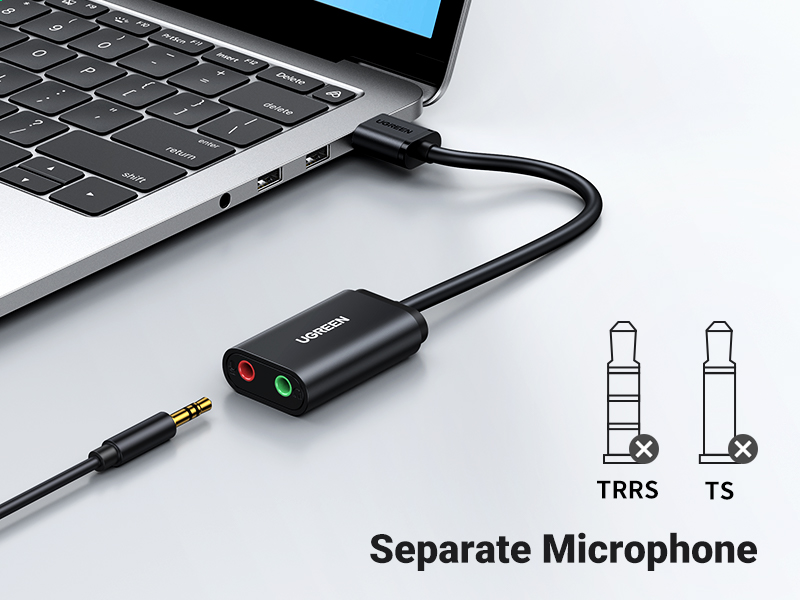
Figure 5: The adapter supports a separate microphone connection, allowing for dedicated audio input.
4.3 Simultaneous Use
The UGREEN adapter allows for simultaneous use of both headphone output and microphone input, making it suitable for communication, gaming, and recording.

Figure 6: The adapter enables users to listen to audio and chat simultaneously, ideal for online communication or gaming.
5. Maintenance and Care
To ensure the longevity and optimal performance of your UGREEN USB to Audio Jack Sound Card Adapter, follow these simple maintenance guidelines:
- Cleaning: Use a soft, dry cloth to wipe the adapter. Avoid using liquid cleaners, aerosols, or harsh chemicals.
- Storage: Store the adapter in a cool, dry place away from direct sunlight and extreme temperatures.
- Handling: Avoid bending or twisting the cable excessively. Do not pull the adapter out by the cable; always grasp the USB connector.
- Protection: Keep the adapter away from water and other liquids.
6. Troubleshooting
If you encounter issues with your UGREEN USB to Audio Jack Sound Card Adapter, refer to the following common troubleshooting steps:
6.1 No Sound Output
- Check Connections: Ensure the adapter is fully inserted into the USB port and your headphones/speakers are securely plugged into the green audio jack.
- Verify System Sound Settings:
- On Windows, go to Sound Settings > Playback tab and select "UGREEN USB Audio Device" as the default device.
- On Mac, go to System Settings > Sound > Output and select "UGREEN USB Audio Device".
- Adjust Volume Levels: Ensure system volume is not muted and is set to an audible level. Check any physical volume controls on your headphones/speakers.
- Test with Another USB Port: Try plugging the adapter into a different USB port on your device.
- Test with Another Device: If possible, test the adapter on another computer or compatible device to rule out an issue with your primary device.
6.2 Microphone Not Working
- Check Connection: Ensure your microphone is securely plugged into the red audio jack on the adapter.
- Verify System Sound Settings:
- On Windows, go to Sound Settings > Recording tab and select "UGREEN USB Audio Device" as the default device. Adjust the microphone level.
- On Mac, go to System Settings > Sound > Input and select "UGREEN USB Audio Device". Adjust the input volume.
- Microphone Type: Ensure your microphone is a standard 3.5mm TRS (Tip-Ring-Sleeve) or TS (Tip-Sleeve) type. TRRS (Tip-Ring-Ring-Sleeve) microphones (common on smartphone headsets) may not be fully compatible for input on this adapter's microphone port, though the headphone output will work.
- Application Permissions: Ensure the application you are using (e.g., video conferencing software, game) has permission to access the microphone.
6.3 Poor Sound Quality / Noise
- Check Cable Quality: Ensure your connected audio cables (headphones/microphone) are not damaged.
- Reduce Interference: Keep the adapter and connected cables away from strong electromagnetic interference sources.
- System Audio Settings: Verify that audio enhancements or effects are not enabled in your system's sound settings, as these can sometimes introduce issues.
7. Specifications
| Attribute | Detail |
|---|---|
| Model Number | 30724 |
| Brand | UGREEN |
| Hardware Interface | USB-A |
| Audio Output Mode | Stereo |
| Audio Input | 3.5mm Microphone Jack (Red) |
| Audio Output | 3.5mm Headphone/Speaker Jack (Green) |
| Cable Length | 15 cm (0.49 ft) |
| Color | Black |
| Item Weight | 0.64 ounces |
| Product Dimensions | 1.97 x 1.18 x 1.97 inches |
| Compatible Operating Systems | Windows (98SE/ME/2000/XP/Server 2003/Vista/7/8/10/11), Mac OS X, Linux, Chrome OS |
| Compatible Devices | PC, Laptops, PS5, PS4, Google Chromebook, Windows Surface Pro 3, Raspberry Pi (Not PS3) |
8. Warranty and Support
UGREEN products are designed for reliability and performance. For warranty information and technical support, please refer to the official UGREEN website or contact their customer service directly.
- Official Website: www.ugreen.com
- Customer Service: Refer to the "Contact Us" section on the official website for support channels (email, phone, etc.).
Please retain your proof of purchase for warranty claims.