
1. Introduction
The Auna Belle Epoque 1906 is a nostalgic stereo system designed to bridge the gap between classic aesthetics and modern audio technology. It features an MP3-compatible CD player, a USB port for MP3 playback and direct encoding, and an FM radio tuner. The system is housed in a solid MDF cabinet with a textile speaker cover, complemented by an LCD display and remote control for convenient operation.

Figure 1: Front view of the Auna Belle Epoque 1906 Retro Stereo System.
2. Safety Instructions
- Read all instructions carefully before operating the device.
- Keep the manual for future reference.
- Do not expose the unit to rain or moisture to prevent fire or electric shock.
- Ensure proper ventilation. Do not block any ventilation openings.
- Place the unit on a stable, flat surface.
- Disconnect the power plug from the wall outlet during lightning storms or when unused for long periods.
- Do not open the casing. Refer all servicing to qualified personnel.
3. Package Contents
Please check that all items are present and in good condition:
- 1 x Auna Belle Epoque 1906 Stereo System
- 1 x Remote Control (with 1 x CR2025 battery included)
- 1 x User Manual (German and English versions)
4. Product Overview
4.1 Front Panel Controls

Figure 2: Detailed front panel view.
- USB Port: For connecting USB storage devices.
- POWER Button: To turn the unit on or off.
- RECORD FUNCTION Buttons: For initiating and controlling recording to USB.
- VOLUME Knob: Adjusts the audio output level.
- LCD Display: Shows current mode, track information, and radio frequency.
- CD Tray: For inserting audio CDs.
- TUNING Knob: For manual radio station selection.
- Function Buttons (UKW, MW, CD/USB, AUX IN): Selects the desired audio source.
4.2 Remote Control
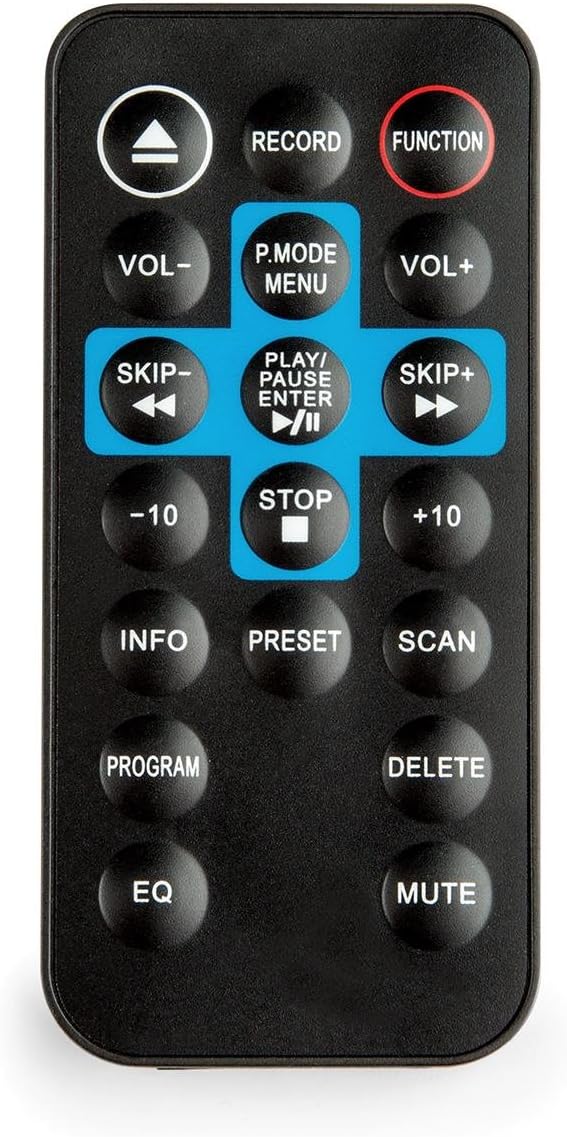
Figure 3: Remote control for the stereo system.
The remote control allows access to all functions of the stereo system from a distance. It requires one CR2025 battery (included).
5. Setup
5.1 Power Connection
- Ensure the unit is placed on a stable surface.
- Connect the AC power cord to the power inlet on the rear of the unit.
- Plug the other end of the power cord into a standard 230V, 50Hz AC wall outlet.
5.2 Antenna Connection
For optimal FM radio reception, extend the included wire antenna fully. Position it for the best signal quality. For MW (AM) reception, the unit has a built-in antenna; rotating the unit may improve reception.
6. Operating Instructions
6.1 Basic Operation
- Power On/Off: Press the POWER button on the front panel or remote control.
- Volume Adjustment: Rotate the VOLUME knob on the front panel or use the VOL+ / VOL- buttons on the remote control.
- Source Selection: Press the corresponding function button (UKW, MW, CD/USB, AUX IN) on the front panel or the FUNCTION button on the remote control to cycle through input sources.
6.2 Radio Operation (FM/MW)
- Press the UKW (FM) or MW (AM) button to select the desired radio band.
- Rotate the TUNING knob to manually search for radio stations. The frequency will be displayed on the analog frequency band and LCD screen.
- For automatic scanning, press the SCAN button on the remote control. The system will search and stop at the next strong station.
- To save a station as a preset, tune to the desired station, then press the PRESET button on the remote control. Use the skip buttons to select a preset number, then press PRESET again to confirm.
6.3 CD Player Operation

Figure 4: CD tray in open position.
The system is compatible with CD, CD-R, CD-RW, and MP3-CD formats.
- Press the CD/USB button to select CD mode.
- Gently insert a CD into the CD tray. The tray will automatically pull the disc in.
- Playback will start automatically. If not, press the PLAY/PAUSE button.
- Use the SKIP buttons (◀◀ / ▶▶) to skip tracks.
- Press the STOP button to end playback.
- Repeat Function: Press the REPEAT button on the remote control to repeat the current track or all tracks.
- Program Function: Press the PROGRAM button on the remote control to create a custom playback order for tracks.
6.4 USB Playback and MP3 Encoding

Figure 5: Detail of the USB port and power button.
- USB Playback: Insert a USB storage device into the USB Port. Press the CD/USB button to select USB mode. Playback of MP3 files will begin automatically.
- Direct MP3 Encoding (CD to USB):
a. Insert an audio CD and a USB storage device.
b. Select CD mode.
c. Press the RECORD button on the front panel or remote control. The system will begin encoding the current CD track to MP3 format and saving it to the USB device.
d. To stop recording, press the STOP button.
6.5 AUX Input
Connect external audio devices (e.g., MP3 players, smartphones) to the AUX IN port using a 3.5mm audio cable (not included). Press the AUX IN button to select this input source.
7. Maintenance
- Cleaning: Use a soft, dry cloth to clean the exterior of the unit. Do not use abrasive cleaners or solvents.
- CD Player: Keep the CD tray clean. Avoid touching the lens inside the CD compartment.
- Storage: If not using the unit for an extended period, unplug it from the power outlet and store it in a cool, dry place.
8. Troubleshooting
| Problem | Possible Cause | Solution |
|---|---|---|
| No power | Power cord not connected; Power outlet not active. | Check power cord connection; Try a different outlet. |
| No sound | Volume too low; Incorrect source selected; Mute function active. | Increase volume; Select correct source; Deactivate mute. |
| CD not playing | CD inserted incorrectly; CD is dirty or scratched; CD format not supported. | Reinsert CD correctly; Clean or replace CD; Ensure CD is compatible (CD, CD-R, CD-RW, MP3-CD). |
| Poor radio reception | Antenna not extended or poorly positioned; Interference. | Extend and adjust the wire antenna; Reposition the unit to reduce interference. |
| Remote control not working | Battery depleted; Obstruction between remote and unit. | Replace CR2025 battery; Remove any obstructions. |
9. Specifications
- Brand: AUNA
- Model: RM1-Belle Epoque1906
- Hardware Interface: USB
- Compatible Devices: MP3 player, PC, Smartphone, Tablet
- Special Features: FM radio tuner with analog frequency band display and manual station search, MP3-compatible CD player, direct USB MP3 encoding function from CD to USB, retro design with solid MDF housing and textile speaker cover.
- Supported Audio Formats: MP3, CD
- Speaker Configuration: 2.0 Stereo
- Wattage: 20 watts
- Power Source: AC 230 V, 50 Hz
- Batteries Required (Remote): 1 x CR2025 (included)
- Material: Wood
- Media Type: CD, CD-R, CD-RW, MP3-CD
- Bluetooth Compatibility: No
- Product Dimensions (W x H x D): 45.01 x 24 x 24.99 cm
- Weight: 6.6 kg
10. Warranty and Support
For warranty information and technical support, please refer to the documentation provided with your purchase or contact your retailer. Keep your proof of purchase for any warranty claims.


