
1. Introduction
The Korenix JetPort 5201 is a compact, industrial-grade RS-232 Ethernet solution designed to connect serial devices to an Ethernet network. This device facilitates remote access and management of serial equipment, enhancing operational efficiency. This manual provides detailed instructions for the installation, configuration, and operation of your JetPort 5201.
2. Key Features
- Compact industrial 1-port RS-232 Ethernet solution.
- High-speed serial communication, supporting up to 460.8 Kbps.
- Multiple serial operation options: Virtual Com, Serial Tunnel, TCP Server, TCP Client, and UDP.
- Supports up to 5 simultaneous serial connections.
- Flexible configuration via Windows utility, Web interface, or Telnet.
- Event notification capabilities through Email, SNMP Trap, and Syslog.
- Includes Virtual COM driver support for Windows 2000/XP/2003/Vista operating systems.
3. Product Overview
The JetPort 5201 features a robust design suitable for various industrial environments. Below is an image illustrating the device's physical components and interfaces.
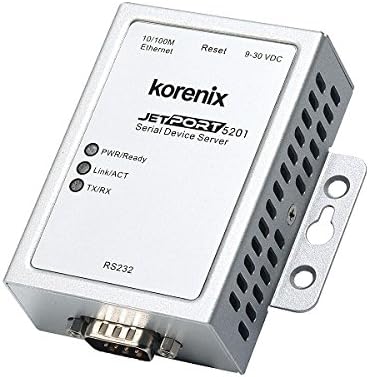
Figure 1: JetPort 5201 Front and Side View. This image displays the Korenix JetPort 5201 Serial Device Server. Visible components include the 10/100M Ethernet port, Reset button, 9-30 VDC power input, PWR/Ready, Link/ACT, and TX/RX LED indicators, and an RS232 DB9 serial port. The device is silver-colored with ventilation slots on the side and a mounting bracket.
3.1. Interfaces and Indicators
- 10/100M Ethernet (RJ-45): One RJ-45 port with Auto MDI/MDI-X support for network connection.
- RS-232 (DB9): One DB9 serial port for connecting serial devices.
- Power Input (9-30 VDC): Terminal block for DC power supply.
- PWR/Ready LED: Indicates power status and device readiness.
- Link/ACT LED: Indicates Ethernet link status and activity.
- TX/RX LED: Indicates serial data transmission and reception activity.
- Reset Button: Used to reset the device to factory defaults or reboot.
4. Setup and Installation
4.1. Hardware Installation
- Mounting: Securely mount the JetPort 5201 using its integrated mounting bracket to a stable surface or DIN rail.
- Connect Ethernet: Connect an Ethernet cable from your network switch or router to the 10/100M Ethernet port (RJ-45) on the JetPort 5201.
- Connect Serial Device: Connect your RS-232 serial device to the DB9 serial port on the JetPort 5201 using an appropriate serial cable.
- Apply Power: Connect a 9-30V DC power supply to the power input terminal block. Ensure correct polarity. The PWR/Ready LED should illuminate, indicating power is supplied.
4.2. Initial Configuration
The JetPort 5201 can be configured via a Windows utility, web browser, or Telnet. For initial setup, the Windows utility or web interface is recommended.
4.2.1. Using the Windows Utility
- Install the Korenix JetPort utility software on a Windows PC connected to the same network segment as the JetPort 5201.
- Launch the utility. It should automatically discover the device on the network.
- Follow the on-screen wizard for device configuration, including IP address settings and serial port parameters.
4.2.2. Using the Web Interface
- Ensure the JetPort 5201 has an IP address accessible from your PC. If the IP address is unknown, use the Windows utility to assign or discover it.
- Open a web browser and enter the IP address of the JetPort 5201 in the address bar.
- Log in using the default credentials (refer to the device's documentation for default username/password).
- Navigate through the web interface to configure network settings, serial port modes, and other operational parameters.
5. Operating Modes
The JetPort 5201 supports various operating modes to suit different application requirements:
- Virtual Com: This mode maps the physical serial port to a virtual COM port on a host PC, allowing legacy serial applications to communicate over Ethernet without modification.
- Serial Tunnel: Establishes a direct serial-to-serial connection between two JetPort devices over an IP network, creating a transparent serial link.
- TCP Server: In this mode, the JetPort 5201 listens for incoming TCP connections from client applications, acting as a server for serial data.
- TCP Client: The JetPort 5201 initiates a TCP connection to a specified TCP server, sending serial data to the server.
- UDP: Data is transmitted and received using the User Datagram Protocol (UDP), suitable for broadcast or multicast applications where connectionless communication is preferred.
6. Maintenance
- Firmware Updates: Periodically check the official Korenix website for firmware updates. Applying updates can improve performance, add features, and enhance security. Always follow the provided instructions carefully during the update process.
- Cleaning: Keep the device clean and free from dust and debris. Use a soft, dry cloth for cleaning. Avoid using liquid cleaners, solvents, or abrasive materials, as these can damage the device.
- Environmental Conditions: Ensure the device operates within the specified temperature and humidity ranges. Extreme conditions can affect performance and longevity.
7. Troubleshooting
- No Power: Verify the power supply connection and ensure it provides the correct voltage (9-30V DC). Check if the PWR/Ready LED is illuminated.
- No Network Link: Check the Ethernet cable connection between the JetPort 5201 and your network device. Ensure the Link/ACT LED is illuminated. Verify network settings such as IP address, subnet mask, and gateway.
- Serial Communication Issues: Double-check all serial cable connections. Verify that the baud rate, data bits, parity, and stop bits settings on both the JetPort 5201 and the connected serial device match. Observe the TX/RX LED for data activity.
- Cannot Access Web Interface: Ensure the device has a valid IP address and that your PC is on the same network segment. Try pinging the device's IP address from your PC. Clear your web browser's cache or try a different browser.
- Device Unresponsive: If the device becomes unresponsive, press and hold the Reset button for a few seconds to reboot it. If issues persist, performing a factory reset may be necessary (refer to the full product manual for specific instructions on factory reset procedures).
8. Specifications
| Category | Specification |
|---|---|
| Model | JetPort 5201 |
| Interfaces | 1 x 10/100BASE-TX (RJ-45, Auto MDI/MDI-X), 1 x RS-232 (DB9) |
| Power Input | 9-30V DC, 2.6W |
| Dimensions (H x W x D) | 29.2mm x 78.5mm x 79.6mm |
| Operating Temperature | 0°C to 60°C |
| Storage Temperature | -40°C to 85°C |
| Serial Speed | Up to 460.8 Kbps |
| Certifications | EMI: FCC Class A, CE Class A, EN61000 |
9. Warranty and Support
For detailed warranty information, technical support, and additional resources, please refer to the official Korenix website or contact your authorized local distributor. It is recommended to retain your purchase receipt for any warranty claims.
Official Korenix Website: www.korenix.com