
1. Product Overview
The LGIDTECH FUT066 is a 12W RGB+CCT LED Recessed Ceiling Downlight designed for indoor use. It offers a wide range of color options (RGB) and adjustable white color temperature (CCT) from warm white (2700K) to cool white (6500K). This downlight requires a separate controller or gateway for full functionality, as it cannot be controlled directly by a smartphone without a WL-Box2 gateway.

Figure 1: LGIDTECH FUT066 12W RGB+CCT LED Recessed Ceiling Downlight with its integrated driver unit.
Key Features:
- RGB Color Changing: Access over 16 million colors for diverse lighting environments.
- CCT Color Temperature Adjustable: Adjust white light from 2700K (warm white) to 6500K (cool white).
- Brightness Control: Dimmable to suit various lighting needs.
- Memory Function: Retains the last color, brightness, and mode settings upon power cycle.
- Compatibility: Works with MiBoxer remote controllers (FUT092, FUT089, B4, B8) and DMX512 console via a FUTD01 transmitter (all sold separately).
- Smartphone Control: Requires a WL-Box2 gateway (sold separately) for smartphone app control.
2. Specifications
| Model Number | FUT066 |
| Power | 12W |
| Input Voltage | AC 100-240V / 50-60Hz |
| Color Temperature (CCT) | 2700K-6500K |
| Luminous Flux | 1100LM |
| Luminous Efficiency | 88LM/W |
| Color Rendering Index (CRI) | >80 |
| Power Factor (PF) | >0.5 |
| Beam Angle | 120° |
| Control Frequency | 2.4GHz RF |
| Control Distance | 30 meters (98 ft) |
| Material | Aluminum + PC Cover |
| Product Size | Φ180mm * 40mm |
| Hole Size Required | Φ145-150mm (approx. 6 inches) |
| Indoor/Outdoor Usage | Indoor |
| Installation Type | Flush Mount |
| Item Weight | 0.141 ounces (4 grams) - Note: This weight seems unusually low and might refer to a component. The actual product weight is likely higher. |

Figure 2: Detailed view of the downlight's components, highlighting the efficient transmitting cover, aluminum housing, stainless steel spring snap, and the 12W constant current driver.
3. Safety Information
Please read all safety instructions before installation and use. Failure to follow these instructions may result in electric shock, fire, or other hazards.
- Electrical Safety: Always disconnect power at the circuit breaker before installing or servicing the downlight.
- Qualified Electrician: Installation should be performed by a qualified electrician or in accordance with local electrical codes.
- Voltage Compatibility: Ensure the supply voltage (AC 100-240V) matches the downlight's requirements.
- Indoor Use Only: This product is designed for indoor use and is not water-resistant. Avoid installation in damp or wet locations.
- Proper Ventilation: Ensure adequate air circulation around the fixture to prevent overheating.
- No User Serviceable Parts: Do not attempt to open or repair the downlight or its driver. This will void the warranty and may cause electric shock.
4. Installation
The LGIDTECH FUT066 downlight is designed for flush mounting in ceilings. Follow these steps for proper installation:
- Power Disconnection: Turn off the main power supply at the circuit breaker before beginning installation.
- Prepare Hole: Cut a circular hole in the ceiling with a diameter of approximately 145-150mm (about 6 inches).
- Wiring: Connect the bare wires from the downlight's driver to your AC power supply wires (Live and Neutral) according to local electrical codes. Ensure all connections are secure and insulated. Note: The driver wires end with bare wire; no plug or socket is included.
- Insert Downlight: Fold the spring clips on the sides of the downlight upwards. Carefully push the downlight into the prepared ceiling hole. The spring clips will secure the fixture in place.
- Restore Power: Once the downlight is securely installed, restore power at the circuit breaker.

Figure 3: Dimensional drawing of the downlight (Φ180mm diameter, 40mm height) and its packaging, indicating a required hole size of Φ145-150mm.
5. Operation
The FUT066 downlight offers versatile control options for color, brightness, and color temperature. Please note that a separate controller or gateway is required for operation.
Control Methods:
- MiBoxer Remote Controllers: Compatible with various MiBoxer 2.4GHz RF remote controllers such as FUT092, FUT089, B4, and B8 (each sold separately). These remotes allow for direct control of color, brightness, and CCT.
- Smartphone App Control: To control the downlight via a smartphone app, the WL-Box2 gateway (sold separately) is required. This gateway enables app control and integration with third-party voice control systems like Amazon Alexa and Google Assistant.
- DMX512 Console: For advanced control, the downlight can be integrated with a DMX512 console using a FUTD01 DMX512 transmitter (sold separately).
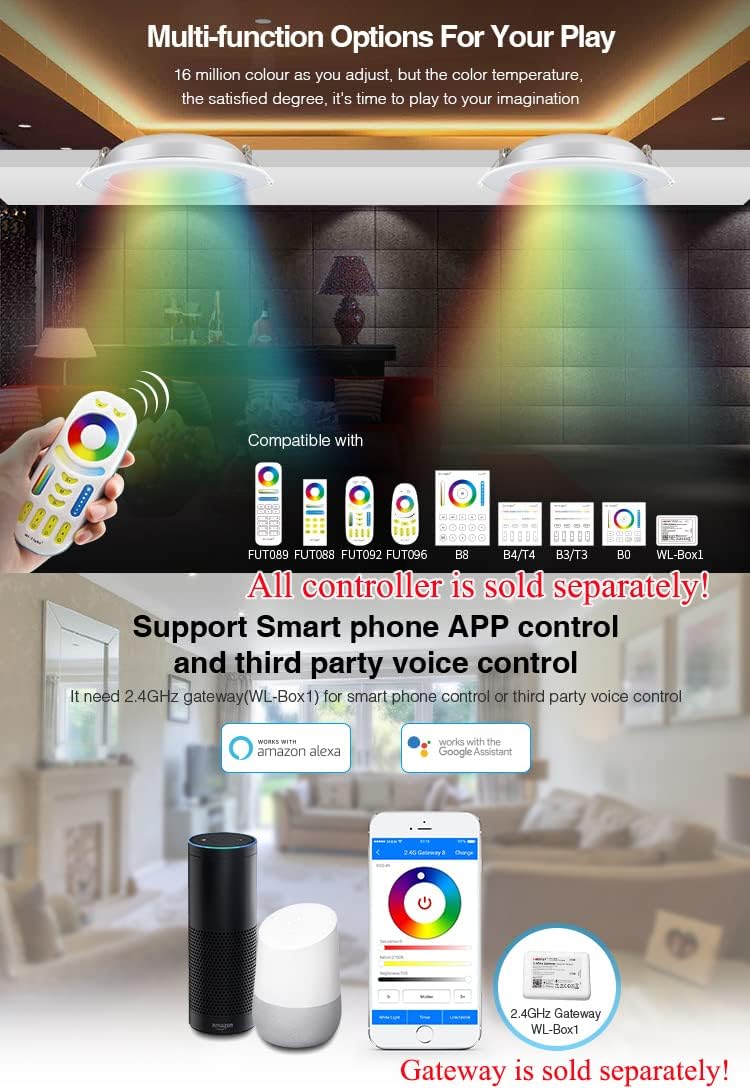
Figure 4: Overview of compatible MiBoxer remote controllers and the smartphone app interface (requires WL-Box2 gateway).
Signal Transmitting & Modes Synchronization:
One downlight can transmit control signals to another downlight within 30 meters. This allows for extended remote control distance and synchronization of multiple downlights, even if they are started at different times, provided they are controlled by the same remote and within the 30-meter range.

Figure 5: Illustration of how downlights can relay signals to each other, extending the control range and enabling synchronized operation.
6. DMX512 Function (with FUTD01 Transmitter)
To use the DMX512 function, you will need the FUTD01 DMX512 LED Transmitter (sold separately). This transmitter allows you to link and unlink the downlight to specific zones for DMX control.
Linking/Unlinking Procedure:
- Choose Zone: On the DMX512 LED Transmitter, select the desired zone for the light by pressing the "+" or "-" buttons.
- Link:
- Switch off the downlight.
- After 10 seconds, switch the downlight on again.
- When the light is on, short press the "SET" button on the transmitter 3 times within 3 seconds.
- The light will blink slowly 3 times, indicating successful linking.
- Unlink:
- Switch off the downlight.
- After 10 seconds, switch the downlight on again.
- When the light is on, short press the "SET" button on the transmitter 5 times within 3 seconds.
- The light will blink quickly 10 times, indicating successful unlinking.
Important: If linking or unlinking fails, repeat the steps carefully.
DMX512 LED Transmitter Connection Diagram:
Figure 6: Diagram illustrating the connection of the DMX512 Transmitter to a DMX512 Control Panel and its wireless signal transmission to multiple downlight zones.
7. Maintenance
The LGIDTECH FUT066 LED downlight requires minimal maintenance. Follow these guidelines to ensure longevity and optimal performance:
- Cleaning: Ensure the power is off before cleaning. Use a soft, dry cloth to wipe the surface of the downlight. Do not use abrasive cleaners, solvents, or harsh chemicals, as these can damage the finish or electronic components.
- Inspection: Periodically inspect the downlight and its wiring for any signs of damage, loose connections, or wear. If any issues are found, disconnect power and consult a qualified electrician.
- No Disassembly: Do not attempt to disassemble the downlight. It contains no user-serviceable parts.
8. Troubleshooting
If you encounter issues with your LGIDTECH FUT066 downlight, refer to the following troubleshooting guide:
| Problem | Possible Cause | Solution |
|---|---|---|
| Light does not turn on. | No power supply; Loose wiring; Faulty driver. | Check circuit breaker and wall switch. Verify all wiring connections are secure. If issues persist, consult a qualified electrician. |
| Light does not respond to remote/app. | Not linked to controller/gateway; Controller/gateway issue; Out of range. | Ensure the downlight is properly linked to the remote or gateway (refer to Section 5 & 6). Check battery in remote. Ensure downlight is within 30m control range. Verify gateway is powered and connected to network. |
| Colors/CCT are incorrect or inconsistent. | Linking issue; Controller malfunction. | Try unlinking and relinking the downlight to the controller/gateway. If using a remote, ensure it's the correct type and functioning properly. |
| Light flickers or dims unexpectedly. | Unstable power supply; Loose connection; Overheating. | Check power supply stability. Inspect wiring for loose connections. Ensure adequate ventilation around the fixture. |
9. Warranty and Support
For warranty information and customer support regarding your LGIDTECH FUT066 Miboxer 12W RGB+CCT LED Recessed Ceiling Downlight, please contact the seller or manufacturer directly. Keep your purchase receipt as proof of purchase.
- Brand: LGIDTECH
- Manufacturer: Mi.Light
- Model Number: FUT066