
1. Introduction
The Sengled Zigbee Smart Bulb A19 Soft White is an energy-efficient LED light bulb designed for smart home integration. It provides soft white light (2700K) equivalent to a 60-watt incandescent bulb, consuming only 9 watts. This smart bulb requires a compatible Zigbee hub for full functionality, enabling voice control, remote access, scheduling, and dimming capabilities.

Image 1.1: Sengled Zigbee Smart Bulb A19 Soft White.
Key features include:
- Hub Required: Compatible with Amazon Echo devices with built-in hub, SmartThings, Wink, Hubitat, or Sengled Hub.
- Stable Connection: Utilizes Zigbee protocol for reliable connectivity.
- Voice & Group Control: Control lights with Alexa, Echo, and Google Home Assistant. Group up to 64 bulbs with a Smart Hub.
- Dimmable & Remote Control: Adjust brightness from 1% to 100% and set schedules from anywhere.
- Energy Saving: 60-watt equivalent LED bulb, saving up to 80% energy.

Image 1.2: Key features and certifications of the Sengled Smart Bulb.
Video 1.1: Overview of Sengled Smart Light Bulb features and smart home integration.
2. Setup
To set up your Sengled Zigbee Smart Bulb, you will need a compatible Zigbee hub (e.g., Amazon Echo with built-in hub, SmartThings Hub, or Sengled Hub). Ensure your hub is connected to your home network.
2.1 Installation Steps
- Screw in the Bulb: Carefully screw the Sengled Smart Bulb into a standard E26 light socket.
- Power On: Turn on the light switch to power the bulb. The bulb should light up.
- Open App: Download and open the appropriate smart home app (e.g., Amazon Alexa app, SmartThings app, or Sengled Home app).
- Add Device: Follow the in-app instructions to add a new device. The app will guide you through the pairing process. For some hubs, you may need to scan a QR code on the bulb.
- Personalize: Once paired, you can name your bulb, assign it to a room, and set up scenes or schedules.

Image 2.1: Visual guide for the 4-step setup process.
2.2 Hub Compatibility
The Sengled Zigbee Smart Bulb is designed to work with various Zigbee-compatible hubs:
- Amazon Echo with Built-in Zigbee Hub: Devices like Echo Plus, Echo Studio, Echo Show, and newer Echo models.
- Samsung SmartThings Zigbee Hub: Integrate with your existing SmartThings ecosystem.
- Sengled Smart Hub: For dedicated Sengled smart home setups.
- Wink Hub: Compatible with Wink smart home systems.

Image 2.2: Setup with Amazon Echo devices.

Image 2.3: Setup with Samsung SmartThings Hub.

Image 2.4: Setup with Sengled Smart Hub.
Video 2.1: Information on Sengled Smart Hub compatibility and features.
3. Operating the Smart Bulb
Once your Sengled Smart Bulb is successfully paired with a compatible hub, you can control it using various methods.
3.1 Voice Control
Use voice commands with Amazon Alexa or Google Home Assistant to control your lights hands-free. Ensure your voice assistant device is linked to your smart home hub.
- "Alexa, turn on the living room lights."
- "Hey Google, dim the bedroom light to 50%."
- "Alexa, set reading time."

Image 3.1: Voice control with Alexa and Google Home.
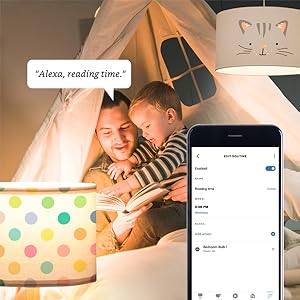
Image 3.2: Example of voice command for dimming lights.
Video 3.1: Demonstrates controlling Sengled Smart Light Bulb with Alexa and Google Assistant.
3.2 App Control & Scheduling
Use your smart home app to control individual bulbs or groups of bulbs. You can also set schedules and routines.
- Remote On/Off: Turn lights on or off from anywhere using the app.
- Dimming: Adjust brightness levels from 1% to 100%.
- Scheduling: Set lights to turn on/off at specific times, such as dusk or sunrise, or create wake-up/sleep routines.
- Group Control: Create groups of bulbs to control multiple lights simultaneously.
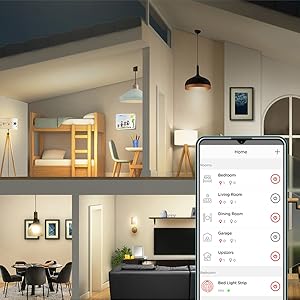
Image 3.3: Control your lights from anywhere, anytime.

Image 3.4: Set light schedules for gentle wake-up and sleep.

Image 3.5: Dimmable feature for adjusting light intensity.
4. Maintenance
Sengled Smart Bulbs are designed for long-lasting performance with minimal maintenance. Follow these guidelines to ensure optimal operation:
- Cleaning: Ensure the bulb is powered off and cool before cleaning. Wipe the bulb with a soft, dry cloth. Do not use liquid cleaners or abrasive materials.
- Placement: Install the bulb in a dry indoor environment. Avoid areas with high humidity or extreme temperatures, as this can affect performance and lifespan.
- Firmware Updates: Periodically check your smart home app for firmware updates for your Sengled bulbs and hub. Updates can improve performance, add features, and enhance security.
- Replacement: The bulb has an estimated lifespan of 25,000 hours. When it reaches the end of its life, replace it with another compatible smart LED bulb.
5. Troubleshooting
If you encounter issues with your Sengled Zigbee Smart Bulb, refer to the following common troubleshooting steps:
5.1 Bulb Not Responding / Not Pairing
- Check Power: Ensure the light switch is in the ON position and the bulb is receiving power.
- Hub Connection: Verify that your Zigbee hub is powered on and connected to your home network.
- Proximity: Make sure the bulb is within range of your Zigbee hub.
- Reset Bulb: To reset the bulb, turn it OFF for 1 second, then ON for 8 seconds. Repeat this cycle five times. The bulb will flash three times to indicate a successful reset.
- Re-pair: After resetting, attempt to pair the bulb again through your smart home app.
5.2 Voice Control Issues
- Check Voice Assistant: Ensure your Amazon Alexa or Google Home Assistant device is online and functioning correctly.
- Link Accounts: Confirm that your smart home hub account is correctly linked to your voice assistant app.
- Device Discovery: Ask your voice assistant to "Discover devices" to ensure it recognizes the bulb.
- Command Phrasing: Use clear and precise commands. Refer to your voice assistant's documentation for optimal phrasing.
6. Specifications
| Feature | Specification |
|---|---|
| Brand | Sengled |
| Model Name | E11-G13 |
| Bulb Shape Size | A19 |
| Bulb Base | E26 |
| Light Type | LED |
| Light Color | Soft White (2700 Kelvin) |
| Wattage | 9 watts |
| Incandescent Equivalent | 60 watts |
| White Brightness | 800 lumens |
| Voltage | 120 volts |
| Connectivity Protocol | Zigbee |
| Control Method | Voice, App (Amazon Alexa, Google Assistant, IFTTT, iOS, Android) |
| Indoor/Outdoor Usage | Indoor |
| Item Weight | 2.88 ounces |
| Item Dimensions (W x H) | 2.3"W x 4.5"H |
| Lifespan | 25,000 hours |
| Certifications | Energy Star, UL |

Image 6.1: Sengled A19 Bulb Dimensions.
7. Warranty and Support
Sengled provides a 3-year manufacturer's warranty for this product, covering defects in materials and workmanship under normal use. For warranty claims or technical assistance, please contact Sengled customer support.
Sengled offers U.S. based live customer service to assist with any questions or issues you may encounter.
For further information, visit the official Sengled website or refer to the documentation provided with your product.

Image 7.1: Sengled customer support and safety certifications.