
GreenTech Environmental PWDDRYER
Greentech Environmental pureWash Pro Desiccant Dryer Replacement Cartridge User Manual
Model: PWDDRYER | Brand: GreenTech Environmental
1. Product Overview
The Greentech Environmental pureWash Pro Desiccant Dryer Replacement Cartridge is an essential component for maintaining the efficiency and longevity of your pureWash Pro X2 ozone laundry system. This cartridge is designed to remove moisture from the air used by the pureWash Pro X2, which is crucial for the effective generation of activated oxygen for cleaning clothes.
The cartridge contains blue desiccant beads that absorb moisture. As the beads absorb moisture, they gradually change color from blue to pink, indicating that the cartridge needs replacement.

Figure 1: The pureWash Pro Desiccant Dryer Replacement Cartridge, filled with blue moisture-absorbing beads.
2. Installation Instructions
Replacing the desiccant dryer cartridge is a simple process that ensures your pureWash Pro X2 continues to operate at peak performance. Follow these steps for quick and easy installation:
- Remove the Old Cartridge: Locate the dryer door on the left side of your pureWash Pro X2 unit. Gently squeeze the two slides on the door and pull the entire dryer assembly outwards to remove it.
- Release the Cartridge: Use a small, flat-head screwdriver or a similar thin, stiff bladed tool to depress the locking tab located on the inside of the desiccant dryer door, directly under the cartridge.
- Slide Out the Old Cartridge: While holding the locking tab depressed, slide the old desiccant dryer cartridge upwards and out of the dryer door.
- Install the New Cartridge: Take the new replacement cartridge, ensuring it is filled with blue beads. Insert it into the desiccant dryer door, sliding it downwards until it clicks securely into place.
- Check Gasket and Reinstall Door: Verify that the small gasket is properly seated on the outlet of the new cartridge. Carefully reinsert the dryer door assembly back into the pureWash Pro X2 washing machine until it is fully seated and secure.

Figure 2: A hand demonstrating the removal of the desiccant dryer cartridge from the pureWash Pro X2 unit.

Figure 3: Visual guide detailing the five steps for replacing the desiccant dryer cartridge, from removal to reinstallation.
3. Operation and Function
The pureWash Pro Desiccant Dryer Replacement Cartridge plays a vital role in the overall operation of your pureWash Pro X2 system. The pureWash Pro X2 utilizes activated oxygen to clean laundry effectively without the need for traditional detergents.
For the pureWash Pro X2 to efficiently produce activated oxygen, the air it processes must have low humidity. The desiccant cartridge actively absorbs moisture from this air, ensuring that the ozone generation process is optimized. A properly functioning desiccant cartridge contributes directly to the system's ability to clean and freshen clothes effectively.
4. Maintenance and Replacement
The primary maintenance for the pureWash Pro Desiccant Dryer is its timely replacement. The desiccant beads within the cartridge are designed to change color as they absorb moisture, providing a clear visual indicator for when a replacement is needed.
- When to Replace: The blue desiccant beads will turn pink when they are saturated with moisture and can no longer effectively remove humidity from the air. This color change is your signal to replace the cartridge.
- Typical Lifespan: The typical lifespan of a cartridge is approximately one year. However, this can vary depending on the humidity levels in your laundry area and the frequency of use of your pureWash Pro X2 machine. In high-humidity environments or with very frequent washing, you may need to replace the cartridge more often.
- Importance of Replacement: Regular replacement ensures that your pureWash Pro X2 continues to produce activated oxygen efficiently, maintaining its cleaning performance and extending the life of the unit.
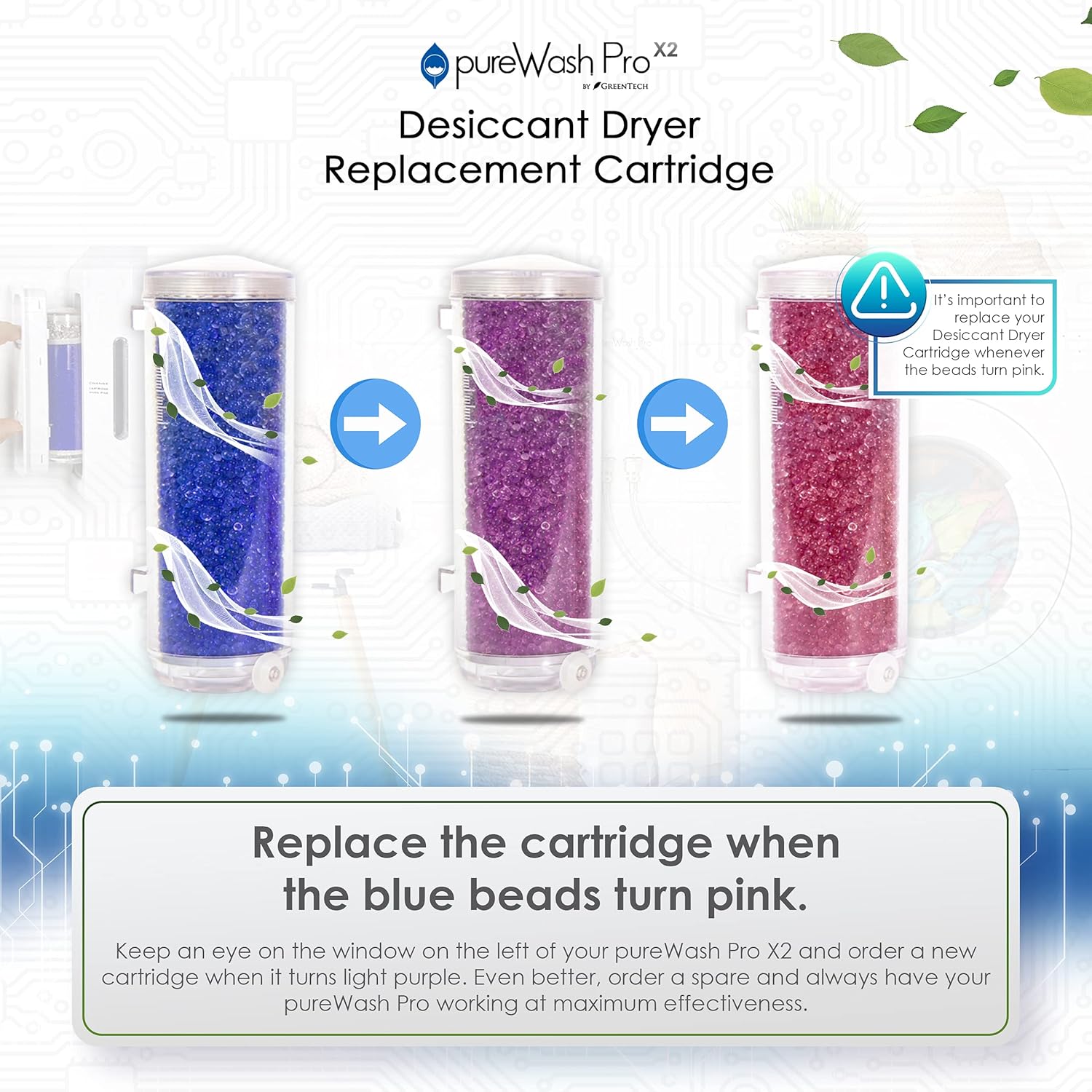
Figure 4: Illustration showing the desiccant beads transitioning from blue (active) to purple, and finally to pink (saturated), indicating the need for replacement.

Figure 5: A visual reminder to replace the desiccant dryer cartridge when the blue beads have turned pink, ensuring optimal performance.
5. Troubleshooting
While the desiccant cartridge is a passive component, issues related to its function can impact the pureWash Pro X2 system. Consider the following if you experience problems:
- Beads Turning Pink Quickly: If the desiccant beads change color to pink much faster than the typical one-year lifespan, it may indicate high humidity in your laundry room or very frequent use of the pureWash Pro X2. Ensure adequate ventilation in the laundry area if possible.
- Reduced Cleaning Performance: If your pureWash Pro X2 seems less effective at cleaning or freshening laundry, check the desiccant cartridge. A saturated (pink) cartridge will hinder the system's ability to generate activated oxygen efficiently. Replace the cartridge immediately if it is pink.
- Difficulty Installing/Removing Cartridge: Ensure the locking tab is fully depressed when removing or installing the cartridge. Do not force the cartridge; it should slide in and out smoothly when the tab is correctly engaged.
6. Specifications
| Feature | Detail |
|---|---|
| Brand Name | GreenTech Environmental |
| Model Name | PWDDRYER |
| Item Weight | 8 ounces |
| Material Type | Metal, Plastic |
| Included Components | Dryer (Cartridge) |
| ASIN | B01N7GJESP |
| First Available | December 9, 2016 |
7. Warranty and Support
For information regarding the warranty of your pureWash Pro X2 system or the replacement cartridge, please refer to the documentation provided with your original pureWash Pro X2 unit or visit the official GreenTech Environmental website.
If you require technical assistance, have questions about product performance, or need to purchase additional replacement cartridges, please contact GreenTech Environmental customer support. You can find contact information and additional resources on their official Amazon store page:
Related Documents - PWDDRYER
 |
pureAir 3000 Whole Home Air Purifier Owner's Manual Comprehensive owner's manual for the pureAir 3000 Whole Home Air Purifier by GreenTech Environmental, detailing setup, operation, cleaning, troubleshooting, and warranty information. |
 |
pureAir 50 Air Purifier Owner's Manual Comprehensive owner's manual for the pureAir 50 small room air purifier by GreenTech Environmental, covering setup, cleaning, maintenance, specifications, and warranty information. |
 |
pureAir 50 Air Purifier Owner's Manual | GreenTech Environmental Official owner's manual for the pureAir 50 small room air purifier by GreenTech Environmental. Learn about setup, cleaning, maintenance, specifications, and warranty. |
 |
pureAir 50 Air Purifier Owner's Manual | GreenTech Environmental Owner's manual for the pureAir 50 small room air purifier by GreenTech Environmental. Includes setup, cleaning, specifications, and warranty information for a cleaner living space. |
 |
pureAir 50 Air Purifier Owner's Manual | GreenTech Environmental Get started with your pureAir 50 air purifier. This manual from GreenTech Environmental covers setup, operation, cleaning, specifications, and warranty information for the GTEPA-50 model. |
 |
pureAir 50 Plug-In Ion Generator Air Purifier | GreenTech Environmental Discover the pureAir 50, a compact and powerful plug-in air purifier from GreenTech Environmental. Effectively reduces odors, bacteria, viruses, smoke, and mold with Activated Oxygen and Ionization. Ideal for bedrooms, bathrooms, and travel. |
Ask a question about this manual
Ask about setup, troubleshooting, compatibility, parts, safety, or missing instructions. Manuals+ will review the question and use this page’s manual context to help answer it.