
1. Introduction
The iBall Breathless BT49 is a 4.1 channel multimedia speaker system designed to provide an immersive audio experience. This system features multiple connectivity options, including Bluetooth, AUX, USB, SD/MMC, and FM radio. It also includes karaoke support and dynamic RGB light effects on the woofer. This manual provides detailed instructions for the proper setup, operation, and maintenance of your speaker system.
2. Package Contents
Please check the box for the following items:
- 1 x Woofer Unit
- 4 x Satellite Speakers
- 1 x Audio Cable
- 1 x Remote Control
- 1 x User Manual (this document)
3. Product Overview
Familiarize yourself with the components of your iBall Breathless BT49 speaker system.
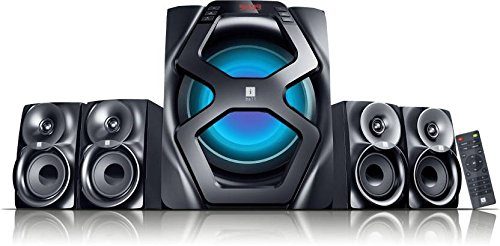
Figure 3.1: Front view of the iBall Breathless BT49 speaker system, showing the central woofer unit with illuminated LED and four satellite speakers, along with the remote control.
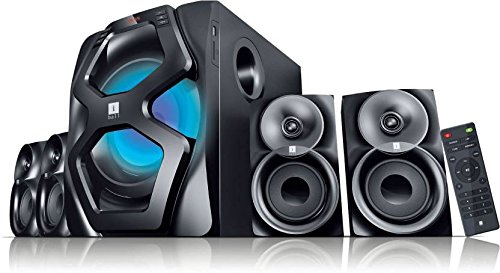
Figure 3.2: Side view of the iBall Breathless BT49 speaker system, illustrating the woofer unit and two satellite speakers, highlighting the overall design and connectivity panel on the side of the woofer.
4. Setup Instructions
Follow these steps to set up your speaker system:
- Placement: Place the woofer unit on a stable surface. Position the four satellite speakers around your listening area for optimal surround sound.
- Connect Satellite Speakers: Connect each satellite speaker cable to the corresponding output ports on the rear of the woofer unit. Ensure a secure connection.
- Power Connection: Connect the AC power cord to the woofer unit and then plug it into a standard wall outlet.
- Power On: Press the Power button on the woofer unit or the remote control to turn on the system. The LED display will illuminate.
- Initial Mode Selection: The system will typically start in the last used mode. Use the 'Mode' button on the unit or remote to switch between input sources (Bluetooth, AUX, USB, SD/MMC, FM).
5. Operating Instructions
5.1. Bluetooth Pairing
- Turn on the speaker system.
- Press the 'Mode' button until 'BT' appears on the LED display, indicating Bluetooth mode. The system will enter pairing mode automatically.
- On your Bluetooth-enabled device (smartphone, tablet, laptop), search for available Bluetooth devices.
- Select 'iBall Breathless BT49' from the list.
- Once paired, the system will confirm the connection, and you can now stream audio wirelessly.
5.2. AUX Input
- Connect one end of the provided audio cable to the AUX input port on the woofer unit.
- Connect the other end of the audio cable to the audio output (headphone jack) of your external device (e.g., TV, DVD player, computer).
- Press the 'Mode' button until 'AUX' appears on the LED display.
- Play audio from your connected device.
5.3. USB/SD/MMC Playback
- Insert a USB flash drive or an SD/MMC card (with audio files) into the respective slot on the woofer unit.
- The system will automatically switch to USB or SD/MMC mode and begin playing audio files. If not, press the 'Mode' button to select the correct input.
- Use the Play/Pause, Next, and Previous buttons on the unit or remote control to manage playback.
5.4. FM Radio
- Press the 'Mode' button until 'FM' appears on the LED display.
- Press and hold the Play/Pause button (or 'Auto Scan' on the remote) to automatically scan and save available FM stations.
- Use the Next and Previous buttons to navigate through the saved stations.
5.5. Karaoke Function
- Connect up to two wired microphones to the 6.3mm mic input jacks on the woofer unit.
- Ensure the speaker system is in an audio playback mode (e.g., Bluetooth, AUX, USB).
- Adjust the microphone volume using the dedicated controls on the unit or remote, if available.
5.6. Remote Control
The included remote control allows convenient operation of all functions from a distance. Refer to the remote control diagram (not provided in this manual) for specific button layouts. Key functions include Power, Mode selection, Volume control, Playback controls (Play/Pause, Next, Previous), FM scan, and direct track selection.
6. Maintenance
- Cleaning: Use a soft, dry cloth to clean the surfaces of the speakers. Do not use liquid cleaners or abrasive materials.
- Ventilation: Ensure proper ventilation around the woofer unit to prevent overheating. Do not block any ventilation openings.
- Storage: When not in use for extended periods, store the speaker system in a cool, dry place away from direct sunlight and extreme temperatures.
- Power Off: Always turn off the speaker system when not in use.
7. Troubleshooting
| Problem | Possible Cause | Solution |
|---|---|---|
| No power | Power cord not connected; Power switch off | Ensure power cord is securely plugged in; Turn on the power switch. |
| No sound | Volume too low; Incorrect input mode; Loose audio cables | Increase volume; Select correct input mode; Check all audio cable connections. |
| Bluetooth not connecting | Speaker not in pairing mode; Device Bluetooth off; Interference | Ensure speaker is in BT mode; Turn on device Bluetooth and search; Move closer to speaker, reduce interference. |
| USB/SD playback not working | Incorrect file format; Corrupted media; Incorrect mode | Ensure files are in supported format (e.g., MP3); Try another USB/SD card; Select correct input mode. |
| Remote control not working | Dead batteries; Obstruction; Out of range | Replace batteries; Remove obstructions between remote and speaker; Operate within effective range. |
8. Specifications
| Feature | Detail |
|---|---|
| Model Name | Breathless |
| Speaker Type | Woofer with 4 Satellite Speakers |
| Surround Sound Channel Configuration | 4.1 |
| Connectivity Technology | Bluetooth, AUX, USB, SD/MMC, Optical |
| Wireless Communication Technology | Bluetooth |
| Power Source | AC |
| Control Method | Remote |
| Compatible Devices | Desktop, Mobile, DVD Player |
| Special Features | Wireless, Karaoke Support (2 x 6.3mm mic inputs), RGB Light Effects, FM Radio |
| Material | Wood (for deep and pure sound) |
| Color | Black |
| Product Dimensions (LxWxH) | 36.3 x 25 x 13.3 cm |
| Item Weight | 8.1 kg |
| Manufacturer | iBall |
9. Warranty and Support
The iBall Breathless BT49 speaker system comes with a 1-Year Warranty from the date of purchase. Please retain your purchase receipt for warranty claims.
For technical support, service, or warranty inquiries, please contact iBall customer service through their official website or the contact information provided with your product packaging. Do not attempt to repair the unit yourself, as this may void the warranty.
