
Introduction
The Godox Thinklite TTL TT350S Mini Camera Flash is a compact and versatile lighting solution designed specifically for Sony Mirrorless and DSLR cameras. This manual provides detailed instructions for its proper use, ensuring you can effectively utilize its features for various photographic needs. Please read this manual thoroughly before operation to ensure safe and optimal performance.

Image: The Godox TT350S Mini Camera Flash, including a mini stand, protection bag, and diffuser.
Product Features
- TTL Autoflash Compatibility: Designed for Sony DSLR and Mirrorless cameras, supporting TTL autoflash for simplified shooting.
- Compact Design: Features a compact body for portability and ease of use.
- 2.4G Wireless Transmission: Offers 2.4G wireless transmission with a range of up to 30 meters.
- Master-Slave Functionality: Integrates with Godox 2.4G wireless X system, allowing the TT350S to function as both a master and slave unit.
- Full TTL Functions: Supports High-Speed Sync (HSS up to 1/8000s), front and rear curtain sync, Flash Exposure Compensation (FEC), multi-flash, and manual flash modes.

Image: The Godox TT350S flash unit, highlighting its compatibility with Sony cameras and 2.4GHz wireless capabilities.
Setup
1. Battery Installation
The TT350S flash unit operates on two AA batteries. For optimal performance and recycle times, Ni-MH batteries (recommended) or LR6 alkaline batteries can be used.
- Open the battery compartment cover located on the side of the flash unit.
- Insert two AA batteries according to the polarity indicators (+/-) inside the compartment.
- Close the battery compartment cover securely.
2. Mounting on Camera
Attach the TT350S to your Sony camera's hot shoe mount.
- Slide the flash unit's hot shoe onto the camera's hot shoe until it clicks into place.
- Tighten the locking ring or lever (if present) on the flash unit to secure it to the camera.
3. Powering On/Off
Press and hold the power button (usually marked with a power symbol) to turn the flash unit on or off.
4. Firmware Upgrade
The TT350S supports firmware upgrades via a USB port. This allows for performance improvements and compatibility updates.
- Connect the flash unit to a computer using a USB cable.
- Download the latest firmware from the official Godox website.
- Follow the instructions provided with the firmware update utility to complete the upgrade.

Image: The Godox TT350S showing the battery compartment and the USB port for firmware upgrades.
Operating Instructions
1. Convenient LCD Panel
The TT350S features an LCD panel for clear display and easy operation. Use the four function buttons to change various settings according to different situations. Turn the select dial to choose the amount of the settings.

Image: A detailed view of the TT350S LCD panel and control buttons for setting adjustments.
2. Flash Modes
- TTL Mode: Automatically adjusts flash output for correct exposure.
- Manual (M) Mode: Allows manual control over flash power output (1/1 to 1/128).
- Multi (Stroboscopic) Mode: Fires a series of rapid flashes during a single exposure to capture multiple movements of a subject.
3. Zoom Function
The flash coverage can be adjusted from 24mm to 105mm. This can be set automatically (Auto Zoom) to match the lens focal length or manually (Manual Zoom).
4. Sync Modes
- High-Speed Sync (HSS): Allows the flash to synchronize with shutter speeds up to 1/8000s, enabling wider apertures in bright conditions.
- Front Curtain Sync: The flash fires immediately after the shutter opens.
- Rear Curtain Sync: The flash fires just before the shutter closes, creating a trail of light behind moving subjects.
5. Flash Exposure Compensation (FEC)
Adjust the flash output from -3 to +3 stops in 1/3 stop increments to fine-tune exposure.
Master-Slave Flash Function
When using the Godox 2.4G wireless X system, the TT350S is fully compatible with other Godox products, functioning as both a master and a slave unit.
- As a Master Unit: The TT350S can control the following slave unit models: AD600, AD600M, AD360II-C, AD360II-N, V860IIS, V850II, TT685S, TT600.
- As a Slave Unit: The TT350S can be controlled by the following master unit models: X1T-S, V860IIS, V850II, TT685S, TT600.
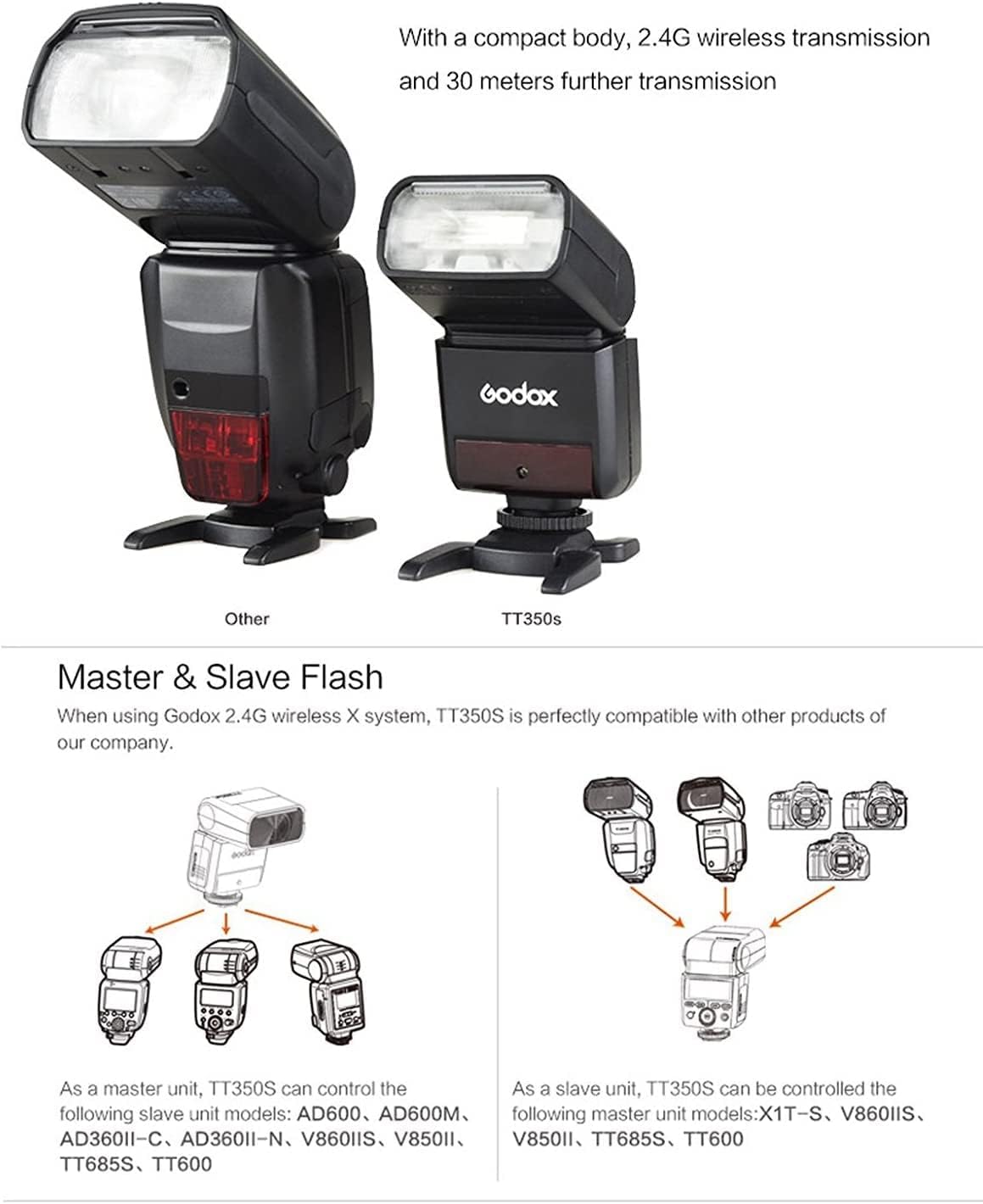
Image: Diagrams showing the TT350S acting as a master unit controlling multiple slave flashes, and as a slave unit being controlled by a master flash.
Full TTL Functions
The TT350S supports a comprehensive range of TTL functions to enhance your photography.
- High-Speed Sync (HSS): Maximum 1/8000s.
- Front & Rear Curtain Sync: For creative motion blur effects.
- Flash Exposure Compensation (FEC): Adjust flash output for desired brightness.
- Multi Flash: Stroboscopic flash for capturing multiple exposures.
- Manual Flash: Full control over flash power.
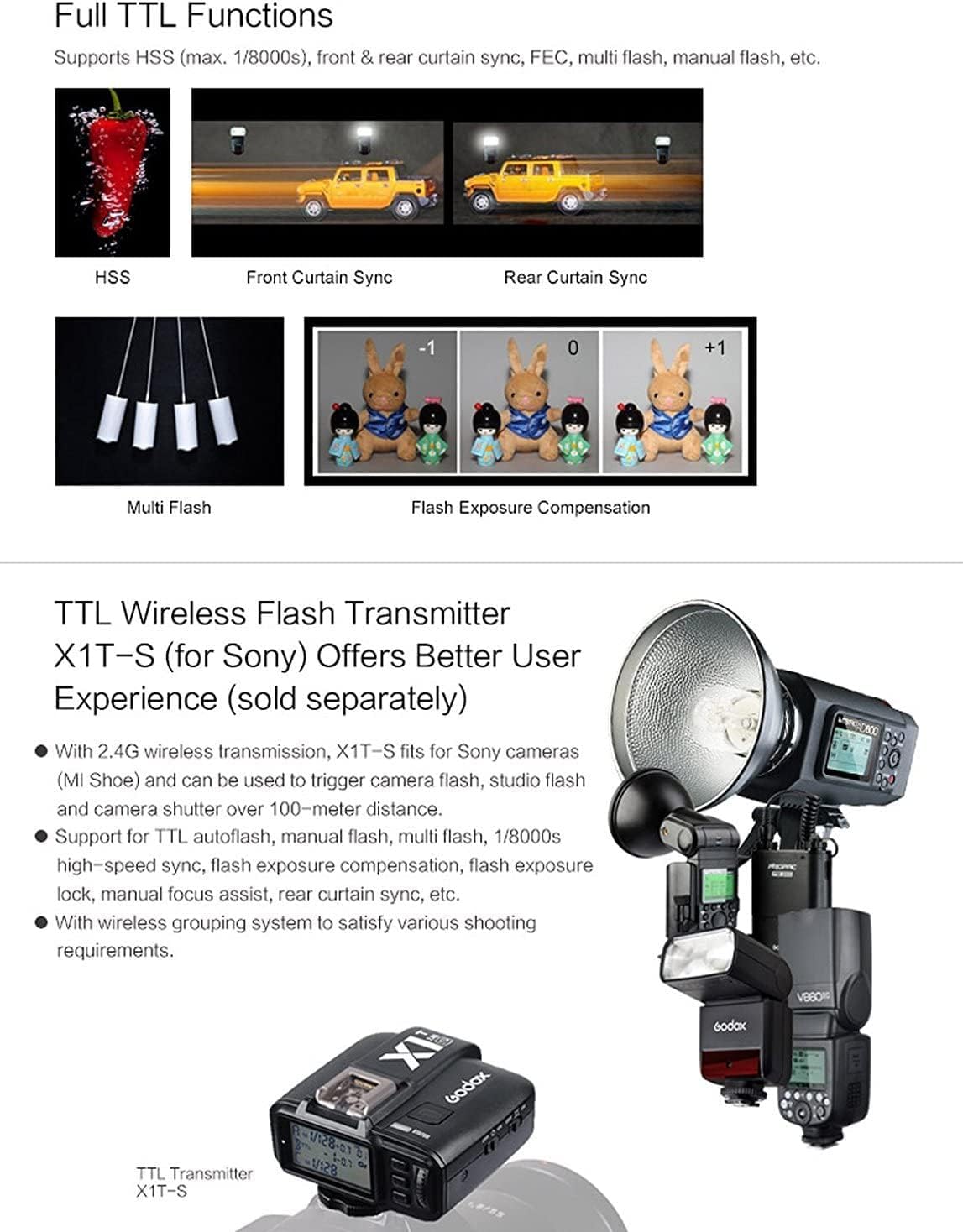
Image: Visual examples demonstrating the effects of High-Speed Sync, Front Curtain Sync, Rear Curtain Sync, Multi Flash, and Flash Exposure Compensation.
Compatible Camera Models
The Godox TT350S is compatible with various Sony camera models, including but not limited to:
- Sony a7RII
- Sony a7R
- Sony a99
- Sony ILCE6000L (A6000)
- Sony A7II
- Sony RX10 Series
- Sony A6500
- Sony A77II
For the most up-to-date compatibility list, please refer to the official Godox website or product documentation.
Maintenance
- Cleaning: Use a soft, dry cloth to clean the flash unit. Avoid using solvents or harsh chemicals.
- Battery Care: Remove batteries when the flash is not in use for extended periods to prevent leakage.
- Storage: Store the flash in a dry, cool place, away from direct sunlight and extreme temperatures.
- Protection: Use the provided protection bag to prevent scratches and damage during transport.
Troubleshooting
Flash Not Firing
- Ensure batteries are correctly inserted and have sufficient charge.
- Check that the flash is securely mounted on the camera's hot shoe.
- Verify that the flash is powered on.
- Confirm camera flash settings are enabled and compatible with the flash unit.
Incorrect Exposure
- Adjust Flash Exposure Compensation (FEC) settings.
- In Manual mode, adjust the power output.
- Ensure the flash head zoom matches the lens focal length or is set to Auto.
Wireless Communication Issues
- Ensure both master and slave units are set to the same channel and group.
- Check for obstructions between the master and slave units.
- Verify that the wireless system is enabled on both units.
Specifications (Technical Data)

Image: A table detailing the technical specifications of the Godox TT350S flash unit.
| Model | TT350S |
| Compatible Cameras | Sony Cameras (e.g., a7RII, a7R, a99, ILCE6000L, A7II, RX10 series) |
| Guide No. (1/1 output @ 105mm) | 36 (m ISO 100) |
| Flash Coverage | 24 to 105mm (Auto zoom, Manual zoom) |
| Swinging/Tilting Flash Head | 0 to 270° horizontally, -7° to 90° vertically |
| Flash Duration | 1/350 to 1/20000 seconds |
| Exposure Control System | TTL autoflash and Manual flash |
| Flash Exposure Compensation (FEC) | Manual. FEB: ±3 stops in 1/3 stop increments |
| Sync Mode | High-speed sync (up to 1/8000s), first-curtain sync, and second-curtain sync |
| Multi Flash | Provided (up to 90 times, 99Hz) |
| Wireless Flash (2.4G transmission) | Master, Slave, Off |
| Controllable Slave Groups | 3 (A, B and C) |
| Transmission Range (approx.) | ≤30m |
| Channels | 16 (1~16) |
| Auto Focus Assist Beam Effective Range (approx.) | Center: 0.6~4m / Periphery: 0.6~2.5m |
| Power Supply | Ni-MH batteries (recommended) or 2*LR6 alkaline batteries |
| Recycle Time | Approx. 0.1~2.2 seconds (eneloop Ni-MH batteries of Panasonic) |
| Full Power Flashes | Approx. 210 (2500mA Ni-MH batteries) |
| Power Saving | Power off automatically after approx. 90 seconds of idle operation. (60 minutes if set as slave) |
| Sync Triggering Mode | Hotshoe, Optic triggering |
| Dimensions (W x H x D) | 140*62*38 mm (5.51 x 2.44 x 1.5 inches) |
| Weight without battery | 200g (7.1 ounces) |
Warranty and Support
Godox products are covered by a limited warranty. For specific warranty terms and conditions, please refer to the warranty card included with your product or visit the official Godox website.
For technical support, troubleshooting assistance, or service inquiries, please contact Godox customer service or visit the GODOX Store on Amazon.