
1. Introduction
The Sony XDR-S41D is a portable digital radio designed for listening to DAB, DAB+, and FM broadcasts. It features a compact design, direct access preset buttons, a dual alarm clock, and can be powered by batteries or the included AC adapter. This manual provides essential information for the safe and efficient use of your radio.
2. Product Overview
Familiarize yourself with the components and controls of your Sony XDR-S41D digital radio.
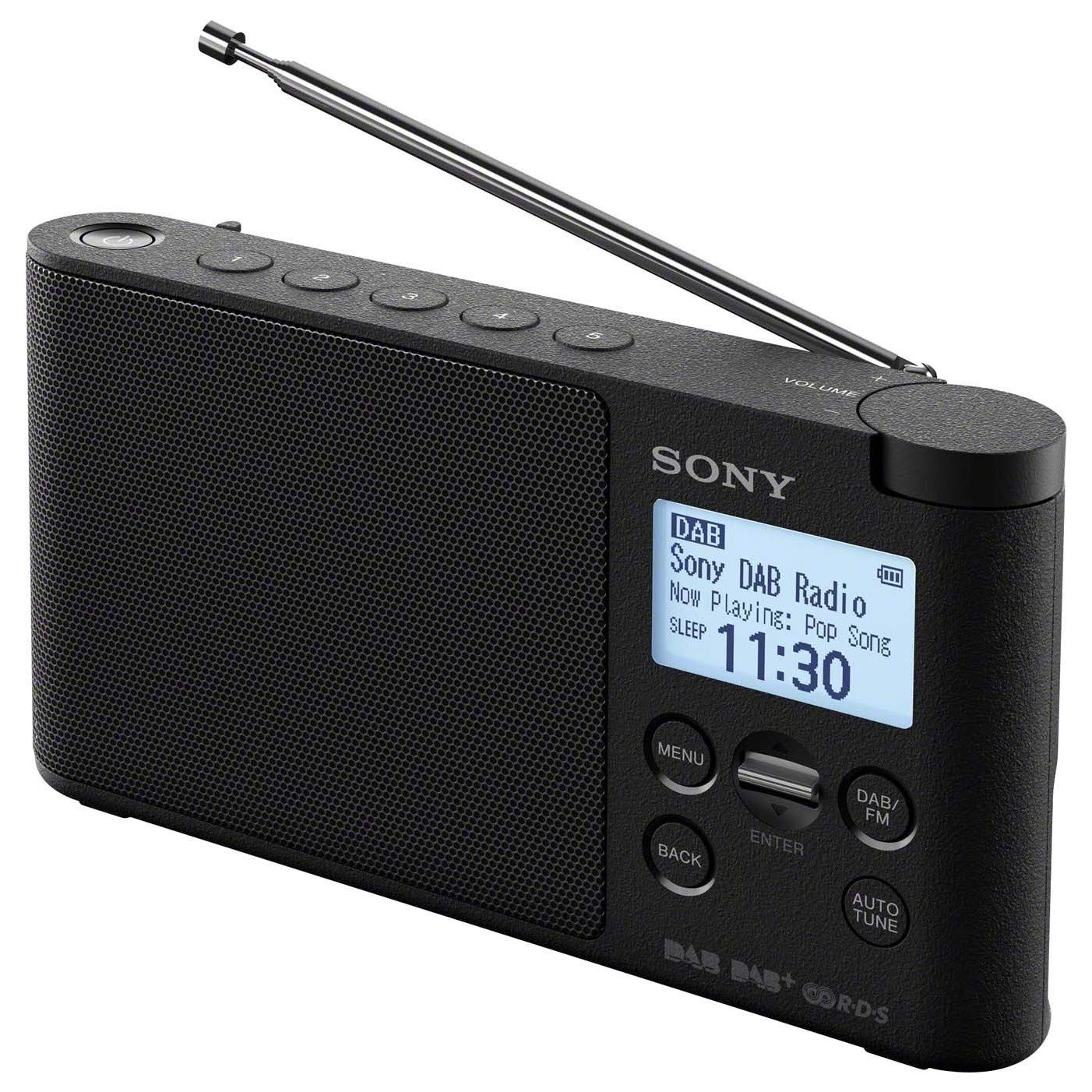
This image shows the front of the Sony XDR-S41D Digital Radio, highlighting its display, control buttons, and speaker grille.
Key Features:
- DAB, DAB+, and FM (RDS) digital radio tuner.
- 5-line LCD screen for displaying station information, time, and program details.
- 5 direct access preset buttons for both DAB and FM stations.
- Portable and lightweight design.
- Dual alarm clock and programmable sleep timer functions.
- Headphone output for private listening.
- Operates on 4 AA batteries or AC power.
3. Setup
3.1 Powering the Radio
Your XDR-S41D radio can be powered in two ways:
- AC Power: Connect the supplied AC adapter to the DC IN jack on the radio and then to a wall outlet.
- Battery Power: Open the battery compartment cover on the back of the radio. Insert four (4) AA-size batteries (not included), ensuring correct polarity (+/-). Close the cover securely.
When using batteries, the radio offers wireless operation, ideal for portability.
3.2 Initial Setup and Station Scan
Upon first power-on or after a factory reset, the radio will automatically perform a full scan for DAB/DAB+ stations. This process may take a few minutes. Once complete, the radio will display the first available station.
- Extend the telescopic antenna for optimal reception.
- Press the POWER button to turn on the radio.
- If prompted, select your region or perform an auto-scan for stations.
- The radio will automatically search for and store available DAB/DAB+ and FM stations.
4. Operating Instructions
4.1 Tuning to Stations
Use the MODE button to switch between DAB/DAB+ and FM modes.
- DAB/DAB+: In DAB mode, use the TUNE +/- buttons to navigate through the list of available stations.
- FM: In FM mode, use the TUNE +/- buttons to manually tune to frequencies. Press and hold TUNE +/- for automatic station seeking.
4.2 Storing and Recalling Presets
The radio allows you to store up to 5 DAB/DAB+ and 5 FM stations as presets for quick access.
- To Store: Tune to the desired station. Press and hold one of the PRESET (1-5) buttons until the display confirms the station has been saved.
- To Recall: Simply press the corresponding PRESET (1-5) button to instantly switch to the saved station.
4.3 Setting the Alarm Clock
The XDR-S41D features a dual alarm clock. You can set two independent alarms to wake up to your preferred radio station or a buzzer.
- Press the MENU button and navigate to the 'Alarm' option using the TUNE +/- buttons. Press ENTER.
- Select 'Alarm 1' or 'Alarm 2'.
- Set the alarm time, source (DAB/FM/Buzzer), and volume using the TUNE +/- and ENTER buttons.
- Confirm your settings. The alarm icon will appear on the display.
4.4 Using the Sleep Timer
The sleep timer allows the radio to automatically turn off after a set period.
- Press the SLEEP button repeatedly to cycle through the available sleep timer durations (e.g., 15, 30, 60, 90 minutes, Off).
- The selected duration will be displayed, and the radio will turn off automatically after that time.
4.5 Headphone Listening
Connect standard 3.5mm headphones to the headphone jack on the side of the radio for private listening. The internal speaker will be muted automatically.
5. Maintenance
5.1 Cleaning
To clean the radio, wipe the exterior with a soft, dry cloth. Do not use abrasive cleaners, waxes, or solvents as they may damage the finish.
5.2 Battery Care
If the radio will not be used for an extended period, remove the batteries to prevent leakage and corrosion. Dispose of used batteries responsibly according to local regulations.
6. Troubleshooting
If you experience issues with your radio, refer to the following common problems and solutions:
| Problem | Solution |
|---|---|
| No power | Check AC adapter connection or replace batteries. Ensure batteries are inserted with correct polarity. |
| Poor radio reception | Fully extend the telescopic antenna. Try repositioning the radio. Perform a full scan for DAB/DAB+ stations. |
| No sound | Adjust volume. Ensure headphones are not connected if you want to use the speaker. |
| Alarm does not sound | Ensure the alarm is activated and set correctly. Check alarm volume. |
7. Specifications
| Brand: | Sony |
| Model Number: | XDR-S41D |
| Part Number: | XDRS41DB.EU8 |
| Color: | Black |
| Product Dimensions (L x W x H): | 18 cm x 3.6 cm x 9.5 cm |
| Tuner Technology: | DAB, DAB+, FM (RDS) |
| Supported Radio Bands: | FM, DAB, DAB+ |
| Power Source: | Battery Powered (4x AA batteries required) / AC Adapter |
| Output Power: | 650mW |
| Display Technology: | LCD (5-line) |
| Water Resistance Level: | Water Resistant |
| Included Components: | Owner's Manual |
| Recommended Uses: | Music, Sports Broadcasts, News, Private Listening |
8. Warranty and Support
This product is covered by a manufacturer's warranty. Please refer to the warranty card included in the packaging for details on coverage and duration. For technical support, service, or further inquiries, please contact Sony customer service or visit the official Sony website.