
1. Introduction
The Garmin RV 770 NA LMT-S is an advanced navigation device specifically designed for recreational vehicles (RVs) and towable trailers. It features a large 6.95-inch edge-to-edge touchscreen display, custom routing capabilities based on vehicle size and weight, and a comprehensive directory of RV parks and services. This manual provides essential information for setting up, operating, and maintaining your device.
What's in the Box
- Garmin RV 770 Navigation Device
- Vehicle Suction Cup Mount
- Vehicle Power Cable
- USB Cable
- Quick Start Manual

Front view of the Garmin RV 770 NA LMT-S navigation device, showcasing its large 6.95-inch edge-to-edge touchscreen display. The device is black with a sleek design.
2. Setup
Mounting the Device
Attach the vehicle suction cup mount to a clean, smooth surface on your dashboard or windshield. Ensure the mount is securely fastened before attaching the RV 770 device. Position the device so it does not obstruct your view of the road.

The Garmin RV 770 NA LMT-S navigation device attached to its vehicle suction cup mount, ready for installation on a dashboard or windshield.
Powering On and Charging
Connect the vehicle power cable to the device and your vehicle's 12V power outlet. The device will automatically power on. For initial use, ensure the device is fully charged. You can also charge the device using the provided USB cable connected to a computer or a USB wall adapter (not included).
Initial Configuration
- Language and Region: Follow the on-screen prompts to select your preferred language and region settings.
- Wi-Fi Connection: Connect the device to a Wi-Fi network to enable map and software updates. Navigate to Settings > Wireless Networks > Wi-Fi and select your network.
- Smartphone Link App: Download the free Garmin Smartphone Link app to your compatible smartphone to access live traffic, basic weather forecasts, and LiveTrack features. Pair your smartphone with the RV 770 via Bluetooth.
- Vehicle Profile: Set up your RV or towable trailer profile by entering its height, weight, length, and other relevant dimensions. This allows for custom routing to avoid unsuitable roads.
3. Operating Instructions
Basic Navigation
- Entering a Destination: From the main menu, select Where To? and choose from options like Address, Points of Interest, or Favorites.
- Voice-Activated Navigation: Say the wake phrase (e.g., "Voice Command") and then speak your destination or command.
- Map View: The device displays a detailed map with your current location, route, and upcoming turns. You can zoom in/out and pan the map using touch gestures.
A screenshot of the Garmin RV 770 NA LMT-S display showing a detailed map with a highlighted route, indicating RV-specific points of interest and road warnings.
Custom RV Routing
Based on your vehicle profile, the RV 770 provides custom routes that consider road restrictions, low bridges, weight limits, and other RV-specific hazards. Road warnings for steep grades, sharp curves, and state/country borders are also provided.
RV Parks & Services Directory
Access a preloaded directory of RV parks and services. You can filter results by preferred amenities such as hookups, pet-friendly sites, or dump stations. This feature helps locate suitable stops along your route or at your destination.
Live Services and Connectivity
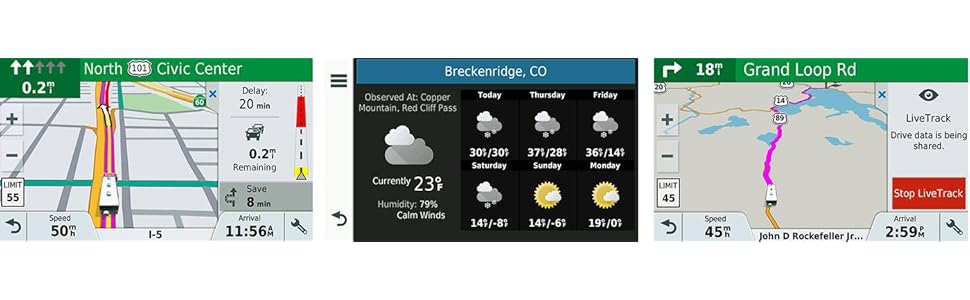
- Live Traffic and Weather: When paired with the Smartphone Link app, the device receives real-time traffic updates and basic weather forecasts.
- Bluetooth Hands-Free Calling: Connect your smartphone via Bluetooth to make and receive calls directly through the RV 770.
- Smart Notifications: Receive notifications from your paired smartphone directly on the device screen.
- LiveTrack: Share your location with friends or family so they can track your journey in real-time.
Map and Software Updates
The RV 770 features built-in Wi-Fi for easy map and software updates. Connect to a Wi-Fi network and navigate to Settings > Updates to check for and install available updates. No computer is needed for these updates.
4. Maintenance
Cleaning the Device
To clean the device, use a soft, lint-free cloth. For the screen, a screen cleaner designed for electronics can be used. Avoid abrasive cleaners or solvents that may damage the device.
Software and Map Updates
Regularly check for and install software and map updates via Wi-Fi to ensure optimal performance and the most current navigation data. Outdated maps may lead to inaccurate routing.
5. Troubleshooting
Common Issues and Solutions
- Device Not Powering On: Ensure the device is properly connected to a power source and fully charged. Check the vehicle power cable for damage.
- No GPS Signal: Ensure the device has a clear view of the sky. Avoid placing it near large metal objects that may interfere with the signal. Allow several minutes for the device to acquire satellites.
- Wi-Fi Connectivity Issues: Verify your Wi-Fi network is active and the password is correct. Try restarting both the device and your Wi-Fi router.
- Bluetooth Pairing Problems: Ensure Bluetooth is enabled on both the RV 770 and your smartphone. Make sure both devices are in pairing mode and within range.
- Inaccurate Routing: Verify your vehicle profile settings (height, weight, etc.) are correct. Ensure maps are up to date.
For further assistance, refer to the comprehensive user manual available on the Garmin support website or contact Garmin customer support.
6. Specifications
| Feature | Specification |
|---|---|
| Brand | Garmin |
| Model Name | 010-01768-00 |
| Screen Size | 6.95 Inches |
| Resolution | 1024 x 600 |
| Special Features | Bluetooth, Touchscreen |
| Connectivity Technology | Wi-Fi |
| Map Type | City Tour, Street |
| Battery Life | 1 Hour |
| Mounting Type | Dashboard Mount |
| Operating System | Android |
| Memory Storage Capacity | 16 GB |
| Human-Interface Input | Touchscreen |
| Supported Satellite Navigation System | GPS |
| Item Dimensions (L x W x H) | 6.8" x 0.7" x 3.9" |
| Item Weight | 0.6 Pounds |
7. Warranty and Support
Manufacturer's Warranty
The Garmin RV 770 NA LMT-S comes with a 365-day manufacturer's warranty. This warranty covers defects in materials and workmanship under normal use. For specific terms and conditions, please refer to the warranty information provided with your product or visit the official Garmin website.
Customer Support
For technical support, product registration, or warranty claims, please visit the Garmin support website or contact their customer service department. Contact information can typically be found in the quick start manual or on the official Garmin website.


