
1. Introduction
The WeightWorld Circulator is an advanced foot circulation machine designed to provide relief and improve circulation using two key technologies: Electrical Muscle Stimulation (EMS) and Transcutaneous Electrical Nerve Stimulation (TENS). This device sends low-frequency electrical impulses to stimulate muscles and nerves, making it suitable for everyday use for legs and other body parts.
The machine features 99 intensity levels, allowing for personalized comfort and effectiveness. Its lightweight and sleek design, coupled with a convenient remote control, ensures ease of use in various settings.
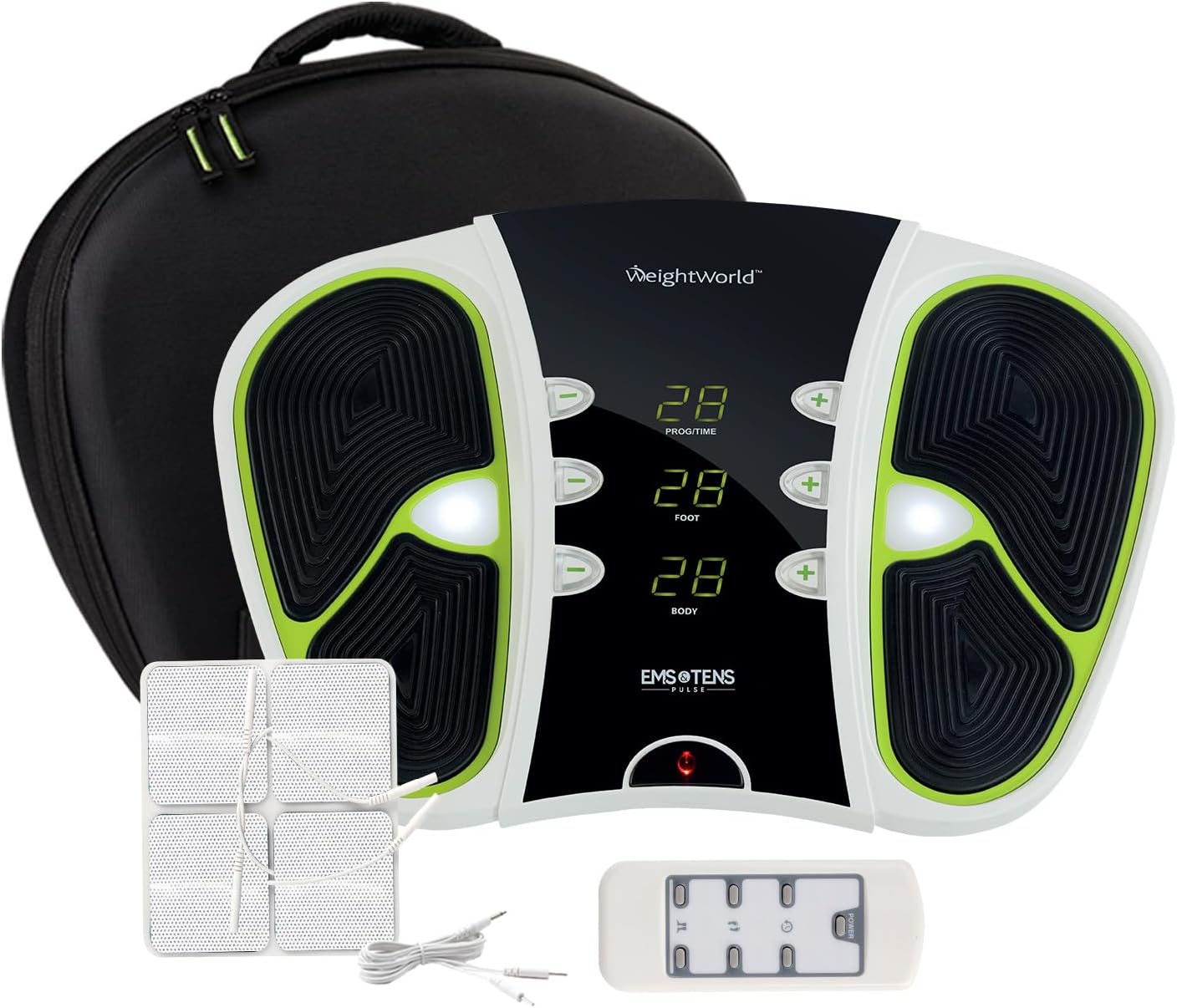
Image 1.1: The WeightWorld Circulator device and its included accessories.
2. Safety Information and Precautions
Before using the WeightWorld Circulator, please read and understand all safety instructions. This device is intended for general wellness and should not replace medical advice or treatment. Consult your doctor if you have any pre-existing medical conditions.
Who Should Not Use This Product:
- Pregnant Ladies: Do not use if pregnant.
- Persons with Pacemakers or Implanted Electronic Devices: Do not use if you have a pacemaker, implanted defibrillator, or any other implanted electronic medical device.
- Persons with Deep Vein Thrombosis (DVT): Do not use if you have DVT.
- Persons with a Cardiac Condition: Consult a medical professional before use if you have a heart condition.
- Persons with an Epileptic Condition: Consult a medical professional before use if you have epilepsy.
Important: Do not stand on the machine while in use. Always remain seated. Ensure your feet are bare and clean for optimal contact with the footpads.

Image 2.1: Visual guide to contraindications for using the WeightWorld Circulator.
3. What's in the Box
Upon opening your WeightWorld Circulator package, you should find the following components:
- WeightWorld Circulator Device
- Remote Control
- Electrode Patches (4 pieces)
- Electrode Patches Cable
- DC USB Cable (for power/charging)
- Circulator Travel Bag
- User Manual

Image 3.1: All components included in the WeightWorld Circulator package.
4. Setup
The WeightWorld Circulator is designed for quick and easy setup. Follow these steps to prepare your device for use:
- Unpack: Carefully remove all components from the packaging.
- Power Connection: Connect the DC USB Cable to the device and a suitable power source (e.g., USB wall adapter, computer USB port). The device can run for 4-5 hours on a full charge (8-10 sessions).
- Placement: Place the Circulator device on a flat, stable surface in a comfortable seated position.

Image 4.1: The device can operate for 4-5 hours on a single charge.
5. Operating Instructions - Foot Massager
To use the WeightWorld Circulator for foot massage:
- Sit Comfortably: Ensure you are seated in a comfortable position.
- Place Feet: Place your bare feet directly onto the footpads of the device. Ensure good contact for effective stimulation.
- Turn On: Press the Power button on the device or the remote control to turn it on.
- Choose Program: Use the 'Time/Program' button (P1/P2) on the device or remote to select your desired program. P1 typically refers to EMS (Electrical Muscle Stimulation) and P2 to TENS (Transcutaneous Electrical Nerve Stimulation).
- Adjust Intensity: Use the '+' and '-' buttons for 'Foot' intensity to adjust the stimulation level from 1 to 99. Start with a low setting and gradually increase until you feel a comfortable, yet effective, sensation.
- Session Duration: The device is designed for sessions of approximately 30 minutes and will auto-switch off after this time. It is recommended to use it twice a day.

Image 5.1: Simple steps for using the WeightWorld Circulator as a foot massager.

Image 5.2: The device display allows customization of routine with 99 intensity levels.

Image 5.3: The convenient remote control allows navigation from anywhere.
6. Operating Instructions - Electrode Patches
The WeightWorld Circulator also includes electrode patches for use on other body parts. Follow these steps:
- Prepare Skin: Clean and dry the body part where you intend to apply the patches.
- Connect Patches: Connect the electrode patches to the electrode patches cable.
- Plug In: Plug the electrode patches cable into the designated port on the side of the main Circulator device.
- Peel & Apply: Carefully peel off the protective membrane from the patches and apply them firmly to the skin.
- Adjust Intensity: Turn on the device and use the '+' and '-' buttons for 'Body' intensity to adjust the stimulation level from 1 to 99.
- Session Duration: Like the foot massager function, the electrode patches are designed for sessions of approximately 30 minutes, after which the device will auto-switch off.
- After Use: After your session, peel off the patches and place them back onto their protective membrane for storage.
Image 6.1: Detailed steps for effective use of the electrode patches.
7. Maintenance
Proper maintenance will ensure the longevity and optimal performance of your WeightWorld Circulator:
- Cleaning: The device is easy to clean. Use a soft, damp cloth to wipe down the surface of the unit and footpads after each use. Do not use abrasive cleaners or immerse the device in water.
- Electrode Patches: Ensure electrode patches are clean and stored properly on their protective membrane after each use to maintain their adhesive quality. Replace patches when they lose their stickiness.
- Storage: Store the device and all accessories in the provided travel bag in a cool, dry place, away from direct sunlight and extreme temperatures.
8. Troubleshooting
If you encounter any issues with your WeightWorld Circulator, refer to the following common troubleshooting tips:
| Problem | Possible Cause | Solution |
|---|---|---|
| No sensation or weak sensation | Poor contact with footpads/patches; Intensity too low; Device not powered on. | Ensure bare feet are fully on footpads or patches are firmly applied. Increase intensity gradually. Check power connection and turn on device. Moisturizing feet slightly can improve conductivity. |
| Device not turning on | Low battery; Power cable not connected properly; Device malfunction. | Charge the device fully using the provided DC USB cable. Ensure the power cable is securely connected. If the issue persists, contact customer support. |
| Remote control not working | Dead battery in remote; Obstruction between remote and device. | Replace the battery in the remote control. Ensure there is a clear line of sight between the remote and the device's sensor. |
| Device beeps and turns off quickly | Low battery; Overload protection. | Ensure the device is fully charged. If it continues, it might indicate an internal issue; contact customer support. |
If you experience any issues not covered here or if troubleshooting steps do not resolve the problem, please contact WeightWorld customer support for assistance.
9. Specifications
- Model Number: 5060287439202
- Dimensions: 52.4 x 13.49 x 42.8 cm
- Weight: 2.6 kg (2600 Grams)
- Power Source: Corded Electric (Rechargeable)
- Intensity Levels: 99 (for both Foot and Body modes)
- Technology: EMS (Electrical Muscle Stimulation) & TENS (Transcutaneous Electrical Nerve Stimulation)
- Material: Gel (for electrode patches)
- Color: Black, White
- Special Features: Remote Control, Rechargeable
- Certifications: CE-certified (meeting Electromagnetic Compatibility and Low Voltage Directive standards)
10. Warranty and Support
The WeightWorld Circulator is CE-certified, ensuring it meets relevant safety and quality standards. For any concerns, questions, or support needs regarding your device, please do not hesitate to reach out to WeightWorld customer service. Details for contacting support are typically found in the product packaging or on the official WeightWorld website.
Please retain your proof of purchase for any warranty claims.

