Introduction
This instruction manual provides essential information for the safe and efficient operation of your SONY CFD-S70 Portable CD Cassette Boombox. Please read this manual thoroughly before using the unit and retain it for future reference. This unit allows playback of CDs, CD-R/RW, MP3 CDs, cassette tapes, and features an FM/AM radio tuner.
Product Overview
The SONY CFD-S70 is a versatile portable audio system designed for various media playback. Below are images illustrating the unit's main components.
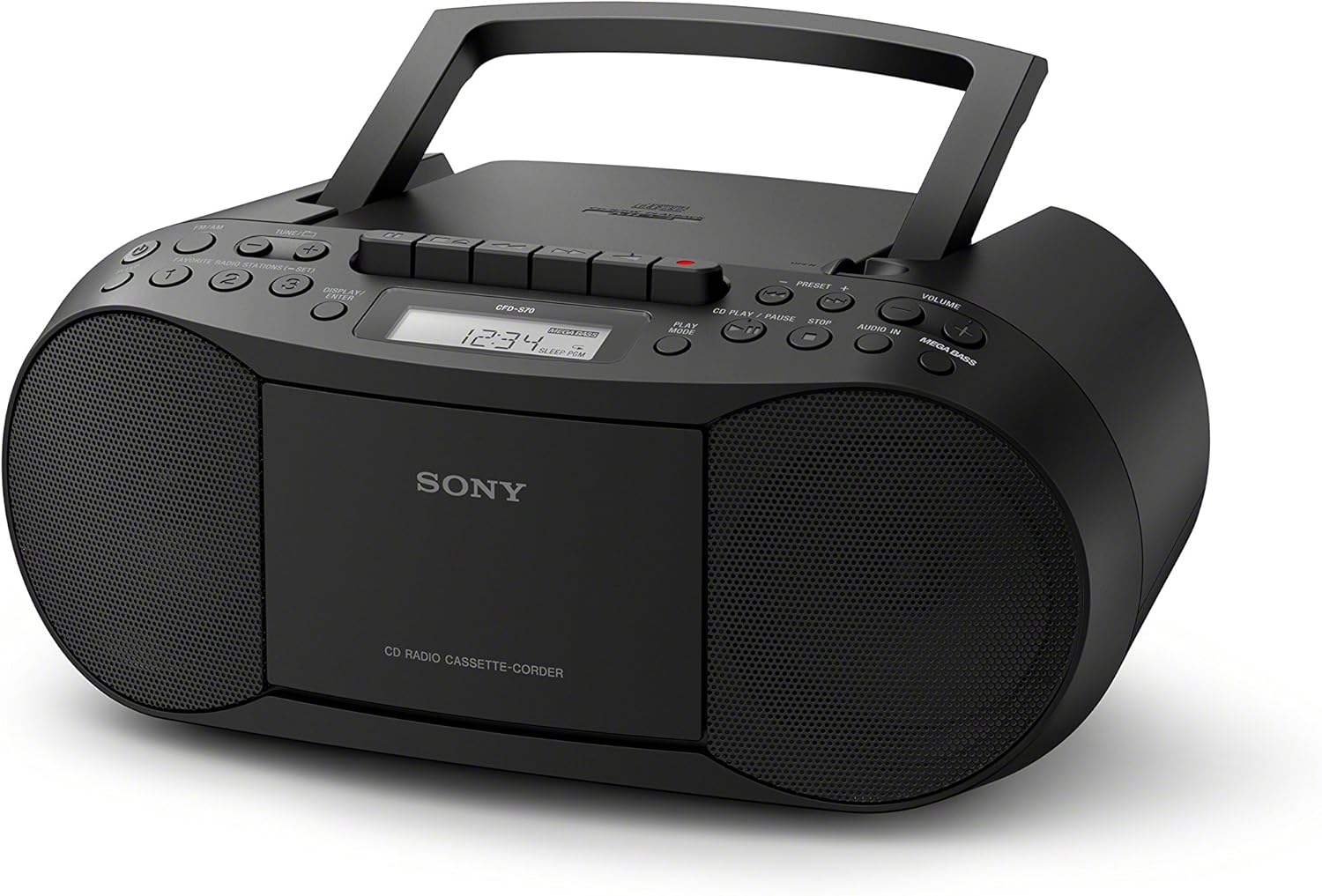
Figure 1: Front view of the SONY CFD-S70 Portable CD Cassette Boombox with the handle in the upright position. This image shows the CD compartment, cassette deck controls, radio tuner, volume knob, and speakers.

Figure 2: Front view of the SONY CFD-S70 Portable CD Cassette Boombox with the handle in the down position. This image provides a clear view of the control panel, including the display, function buttons, and speaker grilles.
Setup
1. Powering the Unit
The CFD-S70 can be powered using either AC power or batteries.
AC Power Connection:
- Ensure the unit is turned off.
- Connect the supplied AC power cord to the AC IN jack on the unit.
- Plug the other end of the AC power cord into a standard wall outlet.
Battery Installation:
The unit requires 6 C-size batteries (not supplied).
- Open the battery compartment cover located on the bottom of the unit.
- Insert 6 C-size batteries, ensuring correct polarity (+/-) as indicated inside the compartment.
- Close the battery compartment cover securely.
- Note: Remove batteries if the unit will not be used for an extended period to prevent leakage.
2. Antenna Adjustment
For optimal FM radio reception, extend the telescopic antenna. For AM reception, the unit has a built-in ferrite bar antenna; rotate the unit itself for best reception.
3. Connecting External Devices (AUX IN)
You can connect an external audio device (e.g., smartphone, MP3 player) to the unit using an audio cable (not supplied) with a 3.5mm stereo mini plug.
- Connect one end of the audio cable to the headphone jack or line-out jack of your external device.
- Connect the other end to the AUDIO IN jack on the CFD-S70.
- Select the AUDIO IN function on the boombox.
- Adjust the volume on both the boombox and the external device.
Operating Instructions
1. CD Playback
- Press the CD button to select the CD function.
- Open the CD compartment cover by pressing the OPEN/CLOSE button.
- Place a CD with the label side facing up into the compartment.
- Close the CD compartment cover. The total number of tracks will appear on the display.
- Press the PLAY/PAUSE button (►/⏸) to start playback.
- To pause, press PLAY/PAUSE again. Press it once more to resume.
- To stop playback, press the STOP button (⏹).
- To skip tracks, press the FORWARD (⏵) or BACKWARD (⏶) buttons.
- Program Play: While stopped, press the PROGRAM button to select tracks in a desired order.
- Shuffle Play: Press the SHUFFLE button to play tracks in a random order.
2. Cassette Playback and Recording
- Press the TAPE button to select the Cassette function.
- Open the cassette compartment door.
- Insert a cassette tape with the desired side facing forward.
- Close the cassette compartment door.
- Playback: Press the PLAY button (►).
- Fast Forward/Rewind: Press the FFWD or REW buttons. Press STOP/EJECT to stop.
- Stop/Eject: Press the STOP/EJECT button (⏹) to stop playback or eject the tape.
- Recording:
- Insert a blank cassette tape with the record-prevention tab intact.
- Select the desired source (CD, Radio, or AUX IN).
- Press the RECORD button (⏺). The PLAY button will also engage automatically.
- To stop recording, press the STOP/EJECT button.
3. Radio Operation
- Press the RADIO button to select the radio function.
- Press the BAND button to switch between FM and AM bands.
- Manual Tuning: Use the TUNE + or TUNE - buttons to manually tune to a station.
- Automatic Tuning: Press and hold TUNE + or TUNE - for a few seconds to automatically scan for the next available station.
- Preset Stations:
- To store a station: Tune to the desired station, then press and hold a numbered preset button (1-30) until the preset number flashes on the display.
- To recall a station: Press the corresponding numbered preset button briefly.
4. Sound Adjustment
- Volume: Rotate the VOLUME knob to increase or decrease the sound level.
- MEGA BASS: Press the MEGA BASS button to activate or deactivate the bass boost feature.
Maintenance
1. Cleaning the Unit
- Wipe the exterior of the unit with a soft, dry cloth.
- For stubborn stains, use a cloth lightly dampened with a mild detergent solution, then wipe dry.
- Do not use abrasive pads, scouring powder, or solvents such as alcohol or benzene, as they may damage the finish.
2. CD and Cassette Care
- Handle CDs by their edges to avoid fingerprints on the playing surface.
- Store CDs in their cases when not in use.
- Keep cassette tapes away from strong magnetic fields and direct sunlight.
- Periodically clean the cassette deck's head and pinch rollers with a cotton swab lightly moistened with tape head cleaner.
3. Battery Replacement
When the unit's performance degrades or the display dims during battery operation, replace all six C-size batteries with new ones. Do not mix old and new batteries, or different types of batteries.
Troubleshooting
If you experience problems with your boombox, refer to the following table for possible solutions.
| Problem | Possible Cause | Solution |
|---|---|---|
| No power | AC cord not connected; Batteries depleted or incorrectly inserted. | Ensure AC cord is securely plugged in. Replace batteries or check polarity. |
| CD does not play or skips | CD is dirty, scratched, or inserted incorrectly; Unit is subject to vibration. | Clean the CD with a soft cloth. Insert CD with label side up. Place unit on a stable surface. |
| Poor radio reception | Antenna not extended/adjusted; Interference from other devices. | Extend and adjust the FM telescopic antenna. Rotate the unit for AM reception. Move unit away from other electronic devices. |
| Cassette tape does not play or sounds distorted | Tape is tangled or damaged; Tape heads are dirty. | Check tape condition. Clean tape heads and pinch rollers. |
| No sound from AUX IN | Cable not connected properly; Incorrect function selected; Volume too low. | Ensure audio cable is fully inserted. Select AUDIO IN function. Increase volume on both boombox and external device. |
Specifications
| Feature | Detail |
|---|---|
| Model Number | CFD-S70 |
| Brand | Sony |
| Media Playback Supported | CD, CD-R/RW, MP3 CD, Cassette Tape |
| Tuner | FM/AM Digital Tuner with 30 Presets |
| Connectivity | Auxiliary Audio Input (3.5mm stereo mini jack) |
| Speaker Type | Dual Speaker |
| Sound Enhancement | MEGA BASS boost circuitry |
| Power Options | AC Power, 6 x C-size Batteries (up to 19 hours battery life) |
| Dimensions (L x W x H) | 13.68 x 6.12 x 9 inches (approx.) |
| Weight | 2.5 pounds (approx.) |
| Wireless Remote | No |
Warranty Information
This SONY CFD-S70 Portable CD Cassette Boombox comes with a 90-day limited warranty. For specific terms and conditions, please refer to the warranty documentation provided with your purchase or visit the official Sony support website.
Customer Support
For further assistance, technical support, or service inquiries, please visit the official Sony support website or contact their customer service hotline. Have your model number (CFD-S70) and purchase information ready when contacting support.
- Online Support: Visit www.sony.com/electronics/support
- Telephone Support: Refer to your product packaging or the Sony website for regional contact numbers.


