
Introduction
This manual provides detailed instructions for the installation, operation, and maintenance of the Pure Resonance Audio MA30BT 30 Watt 7-Channel Commercial Mixer Amplifier. This unit is designed for commercial audio applications requiring background music and public address capabilities, featuring 70V/100V or 4/8/16 ohm outputs, Bluetooth connectivity, and multiple input options.
Important Safety Instructions
- Read these instructions thoroughly before operating the unit.
- Keep these instructions for future reference.
- Heed all warnings on the unit and in the operating instructions.
- Follow all instructions.
- Do not use this apparatus near water.
- Clean only with a dry cloth.
- Do not block any ventilation openings. Install in accordance with the manufacturer's instructions.
- Do not install near any heat sources such as radiators, heat registers, stoves, or other apparatus (including amplifiers) that produce heat.
- Do not defeat the safety purpose of the polarized or grounding-type plug. A polarized plug has two blades with one wider than the other. A grounding-type plug has two blades and a third grounding prong. The wide blade or the third prong are provided for your safety. If the provided plug does not fit into your outlet, consult an electrician for replacement of the obsolete outlet.
- Protect the power cord from being walked on or pinched, particularly at plugs, convenience receptacles, and the point where they exit from the apparatus.
- Only use attachments/accessories specified by the manufacturer.
- Use only with the cart, stand, tripod, bracket, or table specified by the manufacturer, or sold with the apparatus. When a cart is used, use caution when moving the cart/apparatus combination to avoid injury from tip-over.
- Unplug this apparatus during lightning storms or when unused for long periods of time.
- Refer all servicing to qualified service personnel. Servicing is required when the apparatus has been damaged in any way, such as power-supply cord or plug is damaged, liquid has been spilled or objects have fallen into the apparatus, the apparatus has been exposed to rain or moisture, does not operate normally, or has been dropped.
Package Contents
Please check the package for the following items:
- Pure Resonance Audio MA30BT Mixer Amplifier
- Power Cord
- IR Remote Control
- User Manual (this document)
Product Overview
Front Panel

Image: Front panel of the MA30BT mixer amplifier, showing input level controls, media player controls, bass/treble adjustments, and master volume.
- M1 Input Level Control: Adjusts the volume for Microphone 1 input.
- M2/L1 Input Level Control: Adjusts the volume for Microphone 2 or Line 1 input.
- M3/L2 Input Level Control: Adjusts the volume for Microphone 3 or Line 2 input.
- L3 Input Level Control: Adjusts the volume for Line 3 input.
- L4 Input Level Control: Adjusts the volume for Line 4 input.
- T Input Level Control: Adjusts the volume for Telephone input.
- Bass Control: Adjusts the low-frequency response.
- Treble Control: Adjusts the high-frequency response.
- Master Volume Control: Adjusts the overall output volume of the amplifier.
- Power Switch: Turns the amplifier on or off.
- Status Indicators:
- ON: Indicates the unit is powered on.
- PROT: Indicates protection mode is active (e.g., due to overload or overheating).
- CLIP: Indicates signal clipping, suggesting input levels are too high.
- -30, -10, 0: Output level indicators.
- Media Player Controls: Includes TF card slot, USB port, display, and buttons for Mode, Play/Pause, Folder, Repeat, Previous/Volume Down, Next/Volume Up.
- IR Receiver: For the remote control.
Rear Panel

Image: Rear panel of the MA30BT mixer amplifier, showing power input, speaker outputs, telephone input, MOH output, RCA inputs, XLR input, and DIP switches for input configuration.
- AC Power Input: Connects to the main power supply.
- DC24V Input: Optional 24V DC power input.
- Speaker Outputs: Screw terminals for 4Ω, 8Ω, 16Ω, 70V, and 100V speaker connections. Connect speakers according to the desired impedance or voltage.
- TEL Input: Screw terminals for telephone paging input (600 ohm, 100 mV).
- MOH Output: Music On Hold output (600 ohm, 1 Volt).
- Input/Output Section:
- MIC2/LINE1, MIC3/LINE2: Combination XLR/1/4" TS inputs.
- LINE3, LINE4: RCA stereo inputs.
- OUT: RCA stereo line level output.
- MIC1: XLR input with phantom power switch.
- Control DIP Switches:
- MIC2/LINE1 SELECT: Switches between Microphone 2 and Line 1 input.
- MIC3/LINE2 SELECT: Switches between Microphone 3 and Line 2 input.
- PHANTOM POWER: Enables/disables phantom power for MIC1.
- PRIORITY: Configures input priority (e.g., TEL over MIC1, MIC1 over other inputs).
- FM Antenna Terminal: Connects to an external FM antenna for radio reception.
Remote Control
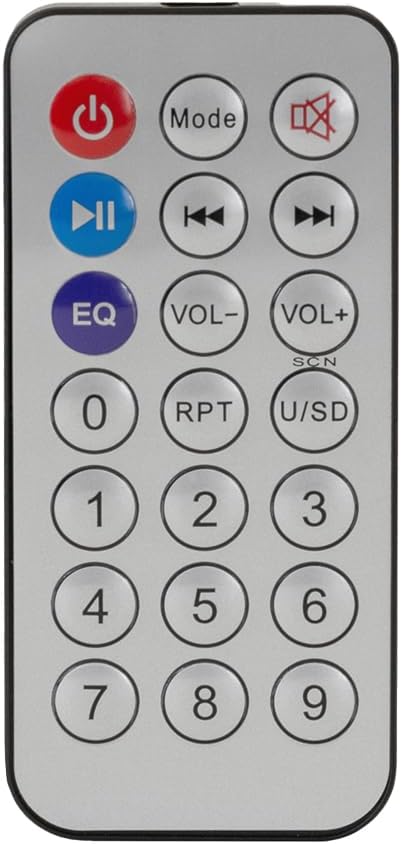
Image: Infrared remote control for the MA30BT, showing buttons for power, mode, mute, play/pause, track navigation, EQ, volume, repeat, and number pad.
The included IR remote control allows for convenient operation of the media player functions (USB, TF, Bluetooth, FM Radio) from a distance. Functions include power, mode selection, mute, play/pause, track navigation, equalizer settings, volume control, repeat modes, and direct track selection via the number pad.
Setup
- Placement: Place the amplifier on a stable, flat surface with adequate ventilation. Ensure no objects block the ventilation openings.
- Speaker Connection:
- For 70V/100V systems: Connect the positive (+) terminal of your speakers to the 70V or 100V terminal on the amplifier, and the negative (-) terminal to the COM terminal. Ensure the total wattage of connected speakers does not exceed the amplifier's output power (30W).
- For low impedance systems: Connect the positive (+) terminal of your speakers to the 4Ω, 8Ω, or 16Ω terminal matching your speaker's impedance, and the negative (-) terminal to the COM terminal.
- Input Connections:
- Microphones: Connect XLR microphones to MIC1, or XLR/1/4" TS microphones to MIC2/LINE1 or MIC3/LINE2. Adjust DIP switches on the rear panel to select MIC mode if using combination inputs. Enable phantom power for MIC1 if required by your microphone.
- Line Level Devices (CD players, media players): Connect RCA cables to LINE3 or LINE4. For MIC2/LINE1 or MIC3/LINE2, use 1/4" TS cables and ensure DIP switches are set to LINE mode.
- Telephone Paging: Connect the telephone system output to the TEL input screw terminals.
- Power Connection: Ensure the amplifier's power switch is in the OFF position. Connect the provided power cord to the AC power input on the rear panel and then to a suitable power outlet.
- Initial Power On: Turn on the amplifier using the front panel power switch. The "ON" indicator should illuminate.
Operating Instructions
Basic Operation
- Power On/Off: Use the front panel power switch.
- Master Volume: Adjust the MASTER knob to control the overall output volume. Start at a low level and gradually increase.
- Input Volume: Use the individual M1, M2/L1, M3/L2, L3, L4, T knobs to adjust the volume for each input source.
- Tone Control: Use the BASS and TREBLE knobs to adjust the low and high frequencies of the audio output.
Media Player Operation (USB/TF/Bluetooth/FM)
- Mode Selection: Press the "Mode" button on the front panel or remote to cycle through USB, TF, Bluetooth, and FM Radio modes.
- USB/TF Playback: Insert a USB drive or TF card into the respective slot. The player will automatically detect and begin playing supported audio files. Use the Play/Pause, Previous/Volume Down, Next/Volume Up, Folder, and Repeat buttons to control playback.
- Bluetooth Pairing:
- Switch the media player to Bluetooth mode. The display will show "BT".
- On your Bluetooth-enabled device (smartphone, tablet, PC), search for available devices.
- Select "MA30BT" from the list to pair. Once paired, you can stream audio wirelessly.
- FM Radio:
- Switch the media player to FM mode.
- Use the "Play/Pause" button to auto-scan and save FM stations.
- Use the "Previous" and "Next" buttons to navigate between saved stations.
Paging and Music On Hold (MOH)
- Telephone Paging: When a signal is detected on the TEL input, the amplifier's VOX (Voice Operated Switch) function will automatically mute background music and prioritize the telephone input for announcements.
- MOH Output: The MOH output provides a dedicated audio feed for Music On Hold systems, allowing background music to be routed to callers on hold.
Maintenance
- Cleaning: Clean the unit with a dry, soft cloth. Do not use liquid cleaners or aerosols.
- Ventilation: Ensure ventilation openings remain clear of dust and debris to prevent overheating.
- Power Cord: Regularly inspect the power cord for any damage. Replace if necessary.
- Storage: If storing the unit for an extended period, disconnect it from power and store in a cool, dry place.
Troubleshooting
| Problem | Possible Cause | Solution |
|---|---|---|
| No power | Power cord disconnected; Power switch off; Blown fuse. | Check power cord connection; Turn power switch on; Replace fuse (refer to qualified technician). |
| No sound output | Master volume too low; Input volume too low; Incorrect speaker wiring; Amplifier in protection mode. | Increase Master and input volumes; Verify speaker connections (COM, 70V/100V or impedance); Check PROT indicator, disconnect power, wait, then restart. |
| Distorted sound | Input level too high (clipping); Speaker impedance mismatch; Faulty cable. | Reduce input volume until CLIP indicator is off; Verify speaker impedance matches amplifier output; Check/replace cables. |
| Bluetooth not connecting | Amplifier not in Bluetooth mode; Device too far; Already paired to another device. | Ensure media player is in BT mode; Move device closer; Disconnect from other devices and try pairing again. |
| Paging not working | TEL input not connected; Priority DIP switch incorrect. | Verify TEL input wiring; Check rear panel DIP switch settings for priority. |
Specifications
| Feature | Detail |
|---|---|
| Brand | Pure Resonance Audio |
| Model | MA30BT |
| Rated Output Power | 30W |
| Number of Channels | 7 (6 inputs + Bluetooth media player) |
| Speaker Outputs | 70V, 100V, 4Ω, 8Ω, 16Ω |
| Connectivity Technology | Bluetooth, TF Card, USB, FM Tuner |
| Audio Inputs | XLR, 1/4" TS, RCA, Screw Terminal (TEL) |
| Audio Output | RCA (Line Out), Screw Terminal (MOH) |
| Frequency Response | 60 Hz (as per product data, likely lower end of range) |
| Noise Level | 85 Decibels (Signal-to-Noise Ratio) |
| Product Dimensions (D x W x H) | 8.27"D x 12.6"W x 3.54"H |
| Item Weight | 6.6 Pounds |
| Power Source | Corded Electric |
| Voltage | 70 Volts (referring to output option) |
Warranty Information
The Pure Resonance Audio MA30BT Mixer Amplifier comes with a 1-year manufacturer's warranty. This warranty covers defects in materials and workmanship under normal use. For warranty service or claims, please contact Pure Resonance Audio customer support with your proof of purchase.
Support
For technical assistance, troubleshooting beyond this manual, or general inquiries, please visit the Pure Resonance Audio official website or contact their customer support department. Please have your product model number (MA30BT) and purchase information ready when contacting support.


