
1. Setup
1.1 Unpacking and Placement
Carefully remove the oven from its packaging. Due to its substantial weight of 620 pounds, ensure adequate personnel and equipment are available for safe handling and placement. Position the oven on a level, stable surface, ensuring proper clearance from walls and other equipment for ventilation and maintenance access.
1.2 Electrical and Gas Connections
- Electrical Connection: This oven requires an electric power source for its controls and convection fan. Connect the oven to a dedicated, properly grounded electrical outlet as specified in the electrical requirements section of the full installation manual.
- Gas Connection: As a gas convection oven, it requires a natural gas or propane supply. A qualified technician must perform all gas connections in accordance with local and national codes. Ensure the gas supply line is properly sized and includes an accessible shut-off valve.
1.3 Initial Inspection
Before first use, inspect the oven for any shipping damage. Verify that all internal racks and components are present and correctly installed. Clean the interior with a mild detergent and water, then wipe dry.
2. Operating Instructions
2.1 Control Panel Overview
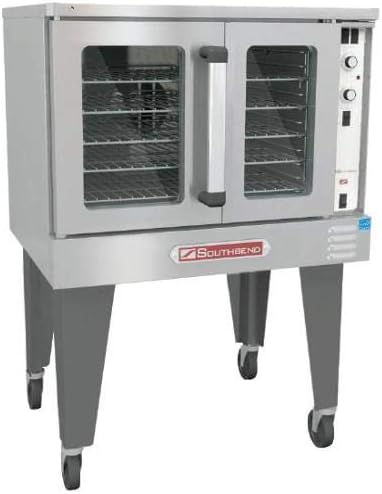
The control panel, located on the right side of the oven, features knob controls for temperature and timer settings, along with power switches. Familiarize yourself with the function of each control before operation.
2.2 Preheating the Oven
- Ensure the gas supply is open and the electrical power is connected.
- Turn the main power switch to the 'ON' position.
- Rotate the temperature control knob to the desired preheat temperature.
- Allow the oven to preheat until the indicator light signals that the set temperature has been reached. This typically takes 15-20 minutes, depending on the target temperature.
2.3 Cooking Procedures
- Loading Product: Open the dropdown doors and carefully place food items on the oven racks. Avoid overloading to ensure proper air circulation.
- Convection Feature: The convection fan circulates hot air for even cooking and faster baking times. Adjust cooking times and temperatures accordingly compared to conventional ovens.
- Timer Usage: Use the timer knob to set the desired cooking duration. An audible alert will sound upon completion.
- Monitoring: The glass doors allow for visual monitoring of cooking progress without opening the oven, which helps maintain internal temperature.
2.4 Shutting Down the Oven
After use, turn the temperature control knob to the 'OFF' position. Turn off the main power switch. For extended periods of non-use, it is recommended to close the main gas supply valve.
3. Maintenance
3.1 Daily Cleaning
- Allow the oven to cool completely before cleaning.
- Remove all racks and clean them separately with warm, soapy water.
- Wipe down the interior surfaces with a damp cloth and a mild, non-abrasive cleaner. Avoid harsh chemicals that could damage the stainless steel.
- Clean the exterior stainless steel surfaces with a stainless steel cleaner to maintain its finish.
3.2 Routine Checks
- Regularly inspect door gaskets for wear and tear. Damaged gaskets can lead to heat loss and inefficient operation.
- Check the condition of the casters and ensure they roll freely and lock securely.
- Periodically inspect gas connections for leaks (using a soapy water solution, never an open flame).
- Schedule professional maintenance annually to ensure optimal performance and safety.
4. Troubleshooting
This section addresses common operational issues. For problems not listed or if solutions do not resolve the issue, contact qualified service personnel.
- Oven Not Heating: Check power supply, gas supply, and ensure the main power switch is on. Verify temperature knob setting.
- Uneven Cooking: Ensure oven is preheated properly. Avoid overloading racks. Check for proper air circulation. Verify fan operation.
- Excessive Smoke/Odor: This may occur during initial use as manufacturing oils burn off. If persistent, ensure oven is clean and free of food debris. If gas odor is detected, immediately shut off gas supply and ventilate the area.
- Controls Not Responding: Check electrical connection and power switch. If issues persist, professional service may be required.
5. Specifications
| Feature | Specification |
|---|---|
| Brand | South Bend |
| Model Number | BGS/13SC |
| Special Feature | Convection |
| Control Type | Knob |
| Door Style | Dropdown Door |
| Included Components | Sheet Pan |
| Power Source | Electric (for controls/fan), Gas (for heating) |
| Item Weight | 620 pounds |
6. Warranty and Support
6.1 Warranty Information
For detailed warranty terms and conditions, please refer to the official documentation provided with your Southbend BGS/13SC Convection Oven or visit the manufacturer's official website. Warranty coverage typically includes defects in materials and workmanship for a specified period from the date of purchase.
6.2 Customer Support
Should you require technical assistance, parts, or service, please contact Southbend customer support directly. Have your model number (BGS/13SC) and serial number ready when contacting support to facilitate quicker service.
For general inquiries or to locate authorized service providers, please visit the official Southbend website: www.southbendnc.com


