
Introduction
This manual provides essential information for the safe and effective use of your Xprite Black Hawk Mini 18-inch Amber LED Strobe Light Bar. This high-end lighting module features TIR LED technology for maximum brightness output, with 10 modules each containing four 3W LEDs. Designed with a sleek, low-profile, and stealth design, it is fully weatherproof with completely sealed and encapsulated lightheads. Please read these instructions thoroughly before installation and operation.

Image: The Xprite Black Hawk Mini 18-inch Amber LED Strobe Light Bar, showcasing its compact design and amber LED modules.
Safety Information
- Ensure the vehicle's power is off before installation to prevent electrical shock.
- Verify local and provincial laws regarding the use of emergency warning lights on vehicles. Misuse may result in fines or legal action.
- Do not stare directly into the LED lights when operating, as this may cause eye strain or damage.
- Securely mount the light bar to prevent detachment during vehicle operation, especially at high speeds.
- Keep wiring away from hot engine parts or sharp edges to prevent damage and short circuits.
Package Contents
Verify that all items are present in the package:
- 1 x Xprite Black Hawk Mini 18-inch Light Bar
- 4 x Magnetic Mounts with Protective Rubber Feet
- 1 x Hard-wired Cigarette Plug with Control Switch (12-foot power cable)
- 1 x Instruction Manual (this document)
Specifications
| Feature | Detail |
|---|---|
| Dimensions | 18.5"L x 11.82"W x 2.76"H (46.99 x 30.02 x 7.01 cm) |
| Weight | 2.27 kg |
| Voltage | 12VDC - 24VDC |
| Wattage | 3 watts per LED (Total 40 LEDs) |
| LED Type | TIR Optics (CREE LEDs) |
| Number of LEDs | 40 (4 LEDs per lighthead, 10 lightheads) |
| Strobe Patterns | 17 different patterns |
| Cable Length | 12 feet (approximately 3.66 meters) |
| Material | Die-cast aluminum shell, PC lens |
| Weatherproof | Fully encapsulated electronics |
| Compatibility | All cars and trucks equipped with a 10 to 30 volt DC power source |

Image: Detailed product specifications including dimensions, voltage, and LED type.
Setup and Installation
The Xprite Black Hawk Mini light bar is designed for easy installation on any metal roof.
- Prepare the Mounting Surface: Ensure the vehicle's roof is clean, dry, and free of debris where the light bar will be placed.
- Position the Light Bar: Carefully place the light bar on the desired metal surface of the roof. The four heavy-duty magnetic mounts with protective rubber feet will secure it without requiring drilling.
- Route the Power Cable: Route the 12-foot power cable from the light bar into the vehicle's cabin. Ensure the cable is not pinched or exposed to sharp edges or excessive heat.
- Connect to Power: Insert the cigarette lighter plug into your vehicle's 12V cigarette lighter socket.

Image: Close-up view of the magnetic mounts and the light bar installed on a vehicle roof, demonstrating the secure, no-drill installation.

Image: The light bar mounted on a truck, illustrating its universal application for various vehicle types.
Operating Instructions
The light bar is operated via the control switch integrated into the cigarette lighter plug.
- Power On/Off: Plug the cigarette lighter adapter into the vehicle's 12V power outlet. Use the main switch on the control box to turn the light bar on or off.
- Change Strobe Patterns: The control switch features a secondary button to cycle through the 17 available strobe patterns. Press this button to select your desired pattern.
- Memory Function: The light bar includes a memory function that recalls the last pattern used, so it will resume with that pattern the next time it is powered on.
Available strobe patterns include, but are not limited to: Rotating, Flashing, Alternating Left to Right, Right to Left, and Traffic Advisor modes.

Image: The control switch with buttons for power and pattern selection, connected to the cigarette lighter plug.
Maintenance
To ensure the longevity and optimal performance of your Xprite Black Hawk Mini light bar, follow these maintenance guidelines:
- Cleaning: Regularly clean the light bar's lens and housing with a soft cloth and mild soap and water. Avoid abrasive cleaners or solvents that could damage the plastic lens or finish.
- Inspect Mounts: Periodically check the magnetic mounts for secure attachment and ensure the protective rubber feet are intact to prevent scratching the vehicle's paint.
- Cable Inspection: Inspect the power cable for any signs of wear, cuts, or damage. Replace if necessary to prevent electrical issues.
- Storage: If storing the light bar for an extended period, ensure it is clean and dry, and store it in a cool, dry place away from direct sunlight.
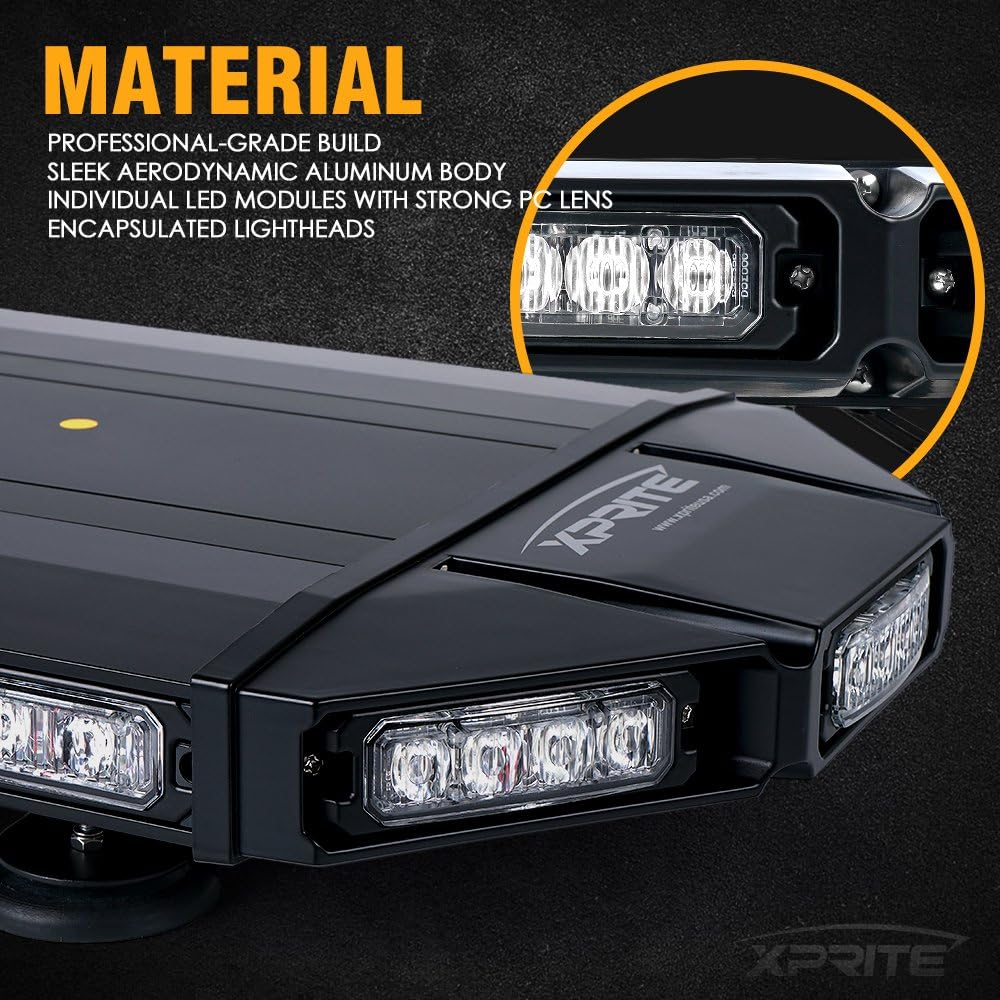
Image: A detailed view of the light bar's robust construction, highlighting the aluminum body and individual LED modules with strong PC lenses.
Troubleshooting
If you encounter issues with your light bar, refer to the following common problems and solutions:
- Light Bar Does Not Turn On:
- Ensure the cigarette lighter plug is fully inserted into the vehicle's 12V outlet.
- Check the vehicle's fuse for the 12V outlet. Replace if blown.
- Verify the main power switch on the control box is in the 'ON' position.
- Lights Flicker or Are Dim:
- Check for loose connections at the cigarette lighter plug.
- Ensure the vehicle's battery voltage is sufficient (10-30V DC).
- Inspect the power cable for any damage or corrosion.
- Cannot Change Strobe Patterns:
- Ensure the light bar is powered on.
- Press the pattern selection button firmly.
- Light Bar Detaches During Driving:
- Ensure the mounting surface is clean and flat.
- Verify the magnetic mounts are fully engaged with the metal roof.
- Avoid placing the light bar over non-metallic areas or areas with significant curvature.
Warranty
The Xprite Black Hawk Mini 18" Amber LED Strobe Light Bar comes with a 1-Year Limited Warranty from the date of purchase. This warranty covers manufacturing defects under normal use. It does not cover damage resulting from improper installation, accident, misuse, abuse, natural disaster, or unauthorized modification. Please retain your proof of purchase for warranty claims.
Support
For technical assistance, warranty claims, or further inquiries, please contact Xprite customer support.
- Manufacturer: Xprite
- Manufacturer Location: CHINO, CA, 91710 US
- Website: Visit the Xprite Store on Amazon
Please have your product model number (SL-B419-18IN-G1-Y) and proof of purchase ready when contacting support.