
One For All URC7115
One For All Evolve TV Universal Remote Control URC7115
Model: URC7115 | Brand: One For All
1. Introduction and Overview
The One For All Evolve TV Universal Remote Control URC7115 is designed as an ideal replacement for your original TV remote, offering seamless control over all types of televisions, including Smart TVs (LED, LCD, and Plasma). This remote is engineered for ease of use and broad compatibility, ensuring it works with all major TV brands.
Key Features:
- Optimised for Smart TV: Dedicated keys for enhanced control of your smart television functions.
- Ultra Wide Angle Infrared: Allows control of devices without needing precise aiming, thanks to its wide infrared angle.
- Learning Feature: Easily customise the remote by copying specific functions directly from your original remote control.
- 100% Compatible: Guaranteed to work with all television brands.
- Ergonomic Design: Comfortable to hold and use for extended periods.

Figure 1: Angled view of the One For All Evolve TV Universal Remote Control URC7115.
2. Product Contents
The One For All Evolve TV Universal Remote Control URC7115 package includes the following items:
- One For All Evolve TV Universal Remote Control (URC7115)
- Quick Setup Guide
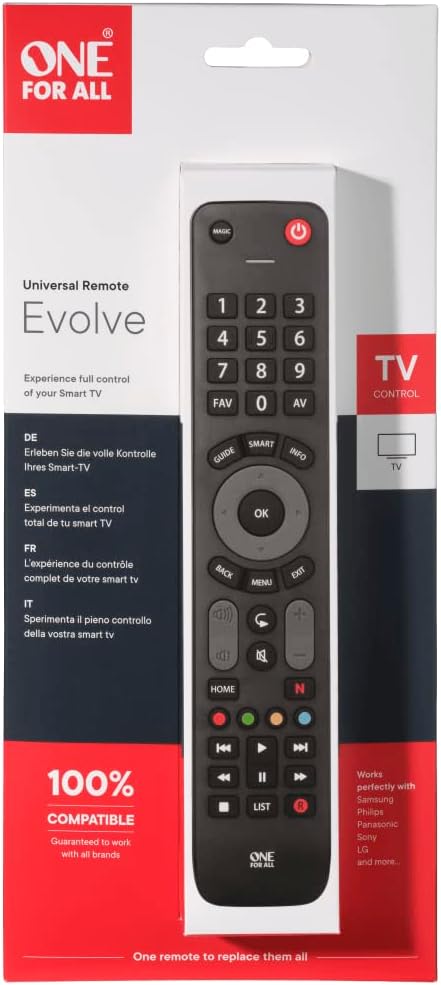
Figure 2: The One For All Evolve TV Universal Remote Control URC7115 packaging.
3. Setup Guide
3.1. Battery Installation
The URC7115 remote control requires 2 AAA batteries (not included) for operation.
- Locate the battery compartment on the back of the remote control.
- Slide open the battery cover.
- Insert two AAA batteries, ensuring the positive (+) and negative (-) terminals align correctly with the markings inside the compartment.
- Close the battery cover securely.
3.2. Initial Setup
The One For All Evolve TV remote is designed for quick and easy setup, typically in less than a minute. A detailed quick setup guide is included in the product packaging. Please refer to this guide for specific, step-by-step instructions to program your remote for your television brand.

Figure 3: Front view of the URC7115 remote control, showing button layout.
4. Operating Instructions
Once set up, the URC7115 remote provides full control over your television's functions. Its ergonomic design and intuitive button layout make it simple to navigate.
4.1. Basic Functions
- Power Button (⏻): Turns your TV on or off.
- Number Keys (0-9): Directly select channels.
- Volume Up/Down (+/-): Adjust the sound level.
- Channel Up/Down (CH+/CH-): Change television channels.
- Mute Button (🔇): Mutes or unmutes the TV sound.
- Navigation Pad (Up, Down, Left, Right, OK): Navigate menus and confirm selections.
- Back/Exit/Menu: Standard buttons for navigating TV interfaces.
- Smart TV Keys: Dedicated buttons for accessing smart TV features and streaming services (e.g., Netflix, YouTube, Home).
- Media Playback Controls: Play, Pause, Stop, Fast Forward, Rewind, Next, Previous for media content.
4.2. Ultra Wide Angle
The URC7115 features an ultra-wide infrared angle, which means you do not need to point the remote precisely at your television for it to receive commands. This provides greater flexibility and convenience during use.

Figure 4: The URC7115 remote control in a typical living room environment.
5. Learning Feature
The URC7115 remote control includes a learning feature, allowing you to copy specific functions directly from your original TV remote. This is particularly useful for functions not pre-programmed or for customising button assignments.
How to Use the Learning Feature:
- Place the URC7115 remote and your original remote on a flat surface, facing each other, about 1-2 inches apart.
- On the URC7115, press and hold the 'MAGIC' button until the LED light blinks twice and then stays lit.
- Press the button on the URC7115 that you wish to program (e.g., a specific function button). The LED will blink rapidly.
- On your original remote, press and hold the corresponding button you want to copy.
- The LED on the URC7115 will blink twice to confirm successful learning.
- Repeat steps 3-5 for any other buttons you wish to program.
- To exit learning mode, press the 'MAGIC' button again. The LED will turn off.

Figure 5: Top-down view of the URC7115 remote control.
6. Maintenance
6.1. Battery Replacement
When the remote control's performance degrades or the LED indicator does not light up, it is time to replace the batteries. Always replace both AAA batteries at the same time with new ones. Do not mix old and new batteries, or different types of batteries.
6.2. Cleaning
To clean your remote control, use a soft, dry cloth. Do not use abrasive cleaners, solvents, or harsh chemicals, as these can damage the remote's surface or internal components. Avoid getting moisture into any openings.
7. Troubleshooting
| Problem | Possible Cause | Solution |
|---|---|---|
| Remote does not control the TV. | Incorrect setup code; batteries are low or inserted incorrectly; remote is not pointed at the TV's IR receiver. | Verify battery orientation and charge. Re-enter the setup code for your TV brand. Ensure the remote is pointed towards the TV. |
| Some buttons do not work after setup. | The specific function is not supported by the TV or the remote's pre-programmed codes; learning feature not used for custom functions. | Use the learning feature to copy the function from your original remote. Consult your TV's manual for supported functions. |
| Learning feature is not working. | Original remote's batteries are low; remotes are too far apart or not aligned; ambient light interference. | Ensure original remote has fresh batteries. Place remotes 1-2 inches apart, directly facing each other. Perform learning in a well-lit but not overly bright room. |
| Remote LED does not light up. | Batteries are dead or inserted incorrectly. | Replace batteries with new AAA batteries. Check battery polarity. |
8. Technical Specifications
| Feature | Specification |
|---|---|
| Brand | One For All |
| Model | URC7115 |
| Compatible Devices | Television |
| Special Features | Wireless, ergonomic, universal |
| Number of Supported Devices | 1 |
| Display Technology | No Display |
| Battery Type | Alkaline |
| Batteries Required | 2 AAA batteries |
| Connector Type | Infrared |
| Product Dimensions | 2 x 7 x 25 cm |
| Item Weight | 200 Grams |
| Color | Black |
9. Warranty and Support
One For All is a world leader in universal remote controls, with over 25 years of experience in wireless technology. One For All universal remotes are designed for 100% compatibility and are guaranteed to work with all major TV brands.
For further assistance, troubleshooting beyond this manual, or specific warranty inquiries, please refer to the official One For All website or contact their customer support directly. Keep your purchase receipt as proof of purchase.
Related documentsURC7115


Ask a question about this manual
Ask about setup, troubleshooting, compatibility, parts, safety, or missing instructions. Manuals+ will review the question and use this page’s manual context to help answer it.