
1. Introduction
Thank you for purchasing the Candy X-Range CMXG20DS Microwave with Grill. This manual provides essential information for the safe and efficient operation of your appliance. Please read these instructions carefully before using the microwave oven and retain them for future reference.
Important Safety Instructions
- Do not attempt to operate this oven with the door open as this can result in harmful exposure to microwave energy.
- Do not place any object between the oven front face and the door or allow soil or cleaner residue to accumulate on sealing surfaces.
- Do not operate the oven if it is damaged. It is particularly important that the oven door closes properly and that there is no damage to the: (1) door (bent), (2) hinges and latches (broken or loosened), (3) door seals and sealing surfaces.
- The oven should not be adjusted or repaired by anyone except properly qualified service personnel.
- Ensure the appliance is properly earthed.
- Do not heat liquids or other foods in sealed containers since they are liable to explode.
- Only use utensils that are suitable for use in microwave ovens.
- When heating food in plastic or paper containers, keep an eye on the oven due to the possibility of ignition.
2. Product Overview
The Candy X-Range CMXG20DS is a 20-liter microwave oven with an integrated grill function, designed for versatile cooking. It features a digital display, multiple power levels, and automatic programs.
Components
- Microwave Oven Unit
- Glass Turntable (25.5 cm diameter)
- Turntable Ring
- Grill Rack
- Instruction Manual
Appliance Diagram
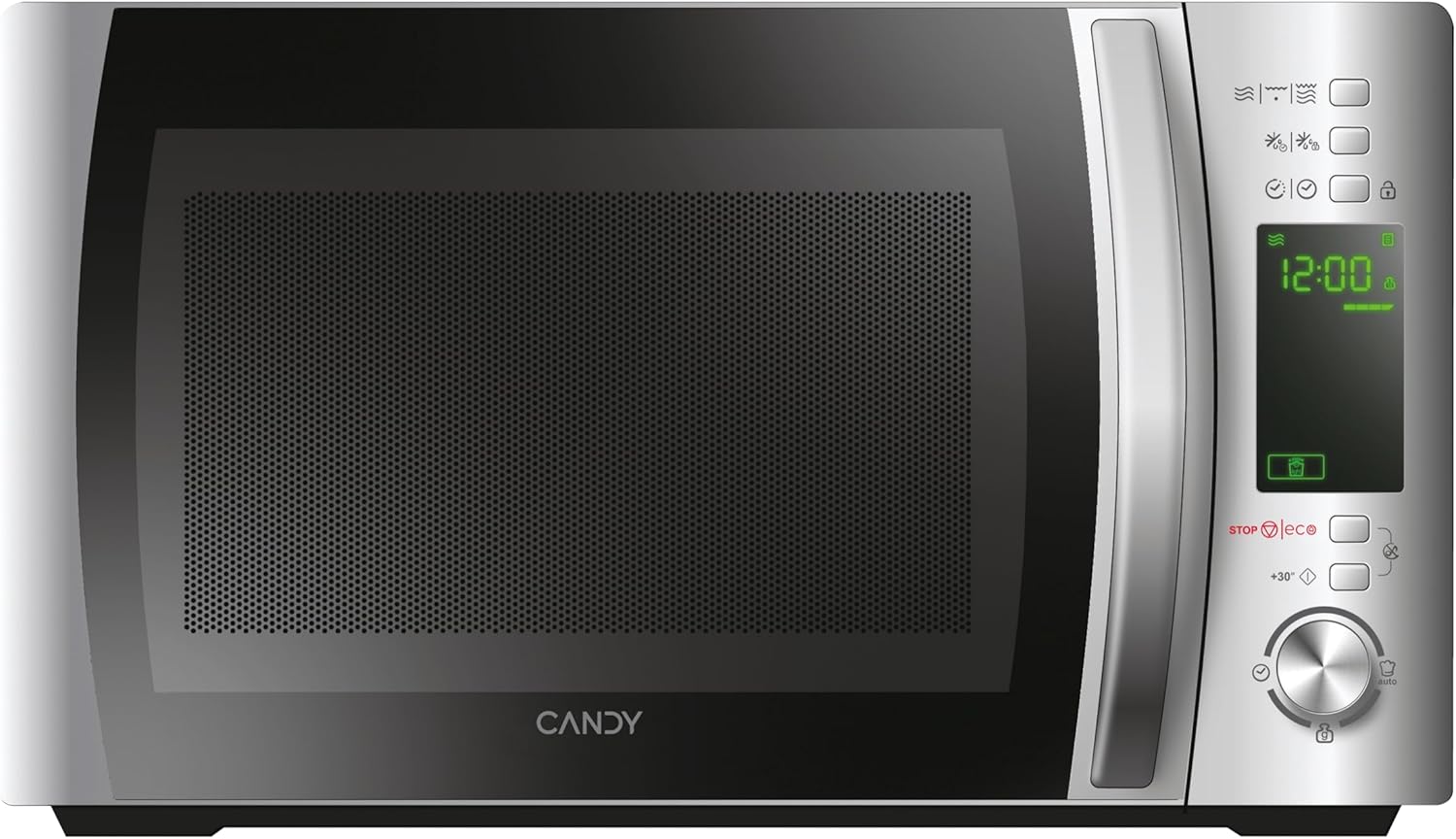

Control Panel
The control panel features a digital display and various buttons and a dial for setting cooking functions, time, and power levels. Specific functions include:
- Digital Display: Shows time, power level, and program indicators.
- Power Level Buttons: Adjust microwave power.
- Grill Function Button: Activates the grill.
- Defrost Button: For defrosting by weight or time.
- Automatic Programs Button: Accesses pre-set cooking programs.
- Safety Lock Button: Engages/disengages child lock.
- STOP/ECO Button: Stops cooking or activates Eco mode.
- +30 Seconds Button: Quick start or adds 30 seconds to cooking time.
- Rotary Dial: Adjusts time, weight, or program selection.
- Start Button: Initiates cooking.
3. Setup
Unpacking and Placement
- Remove all packaging materials from the oven cavity and accessories.
- Inspect the oven for any damage such as dents or a misaligned door. Do not operate if damaged.
- Place the microwave oven on a stable, level surface strong enough to hold the oven and the food being cooked.
- Ensure adequate ventilation. Maintain a minimum clearance of 20 cm above the oven, 10 cm at the rear, and 5 cm on both sides. Do not block any ventilation openings.
- Do not place the oven near heat sources or in a damp environment.

Electrical Connection
- Plug the power cord into a properly installed and earthed wall socket.
- Ensure the voltage matches the rating label on the appliance.
Initial Setup: Setting the Clock
- When the microwave is first plugged in, the display will show "0:00".
- Press the "Clock" button (if available, otherwise consult specific model instructions for clock setting, often combined with a time setting button).
- Rotate the dial to set the hour. Press the "Clock" button again.
- Rotate the dial to set the minutes. Press the "Clock" button to confirm.
4. Operating Instructions
4.1. Basic Microwave Cooking
- Place food in a microwave-safe container on the glass turntable. Close the door.
- Press the "Microwave" button (or equivalent power level button) repeatedly to select the desired power level (e.g., 700W, 500W, etc.). The display will show the selected power.
- Rotate the dial to set the cooking time.
- Press the "Start" button to begin cooking.
4.2. Grill Function
- Place food on the grill rack, then place the rack on the turntable.
- Press the "Grill" button. The display will show "G".
- Rotate the dial to set the grilling time.
- Press the "Start" button.
4.3. Combination Cooking (Microwave + Grill)
- Place food in a suitable container on the turntable or grill rack.
- Press the "Combi" button (or press Microwave/Grill buttons in sequence to select a combination mode, e.g., C-1, C-2).
- Rotate the dial to set the cooking time.
- Press the "Start" button.
4.4. Defrost Function
The CMXG20DS offers defrosting by weight or by time.
Defrost by Weight:
- Place the frozen food on the turntable.
- Press the "Defrost" button once. The display will show "dEF1" (or similar for weight defrost).
- Rotate the dial to set the weight of the food.
- Press the "Start" button.
Defrost by Time:
- Place the frozen food on the turntable.
- Press the "Defrost" button twice. The display will show "dEF2" (or similar for time defrost).
- Rotate the dial to set the defrosting time.
- Press the "Start" button.

4.5. Express Cooking (+30 Seconds)
For quick heating at full power, simply press the "+30 Seconds" button. Each press adds 30 seconds to the cooking time. This function can also be used to extend cooking time during operation.
4.6. Automatic Programs (40 Programs)
The microwave features 40 pre-set automatic cooking programs for various food types. These programs are designed to simplify cooking by automatically setting the optimal time and power.
- Press the "Auto Program" button. The display will show "A-1" (or similar).
- Rotate the dial to select the desired program (e.g., A-1 for pizza, B-1 for vegetables). A list of programs and their corresponding codes is typically found on the inside of the microwave door or in a separate section of this manual.
- Press the "Start" button.

4.7. Timer Function
The microwave can be used as a kitchen timer without cooking.
- Ensure the oven is not in cooking mode.
- Press the "Timer" button (or a dedicated clock/timer button).
- Rotate the dial to set the desired countdown time.
- Press the "Start" button. The timer will count down without activating the microwave function.
4.8. Safety Lock (Child Lock)
To prevent unintended operation, especially by children:
- To Activate: Press and hold the "Safety Lock" button (often indicated by a lock icon) for 3 seconds. A lock indicator will appear on the display.
- To Deactivate: Press and hold the "Safety Lock" button again for 3 seconds. The lock indicator will disappear.
4.9. Eco Mode
The Eco mode turns off the display to save energy when the microwave is not in use.
- To Activate: Press the "STOP/ECO" button once when the microwave is idle. The display will turn off.
- To Deactivate: Press any button or open the door. The display will reactivate.
4.10. simply-Fi App Integration
The simply-Fi app provides additional functionality, including access to recipes, cooking tips, and product information. Refer to the app's instructions for pairing and usage.

5. Maintenance and Cleaning
Regular cleaning and maintenance will ensure the longevity and optimal performance of your microwave oven.
General Cleaning
- Always unplug the appliance from the power outlet before cleaning.
- Clean the oven cavity after every use with a damp cloth. For stubborn stains, a mild detergent can be used.
- The outer surfaces should be cleaned with a damp cloth. Prevent water from seeping into the ventilation openings.
- The door and door seals should be cleaned regularly to ensure proper closing and operation.
Cleaning Accessories
- The glass turntable and turntable ring can be washed in warm soapy water or in a dishwasher.
- The grill rack should be cleaned with warm soapy water and a non-abrasive sponge.
- Ensure all parts are completely dry before reassembling and using the microwave.
6. Troubleshooting
If you encounter issues with your microwave oven, refer to the following table for common problems and solutions.
| Problem | Possible Cause | Solution |
|---|---|---|
| Oven will not start | Power cord not securely plugged in. Door not closed properly. Fuse blown or circuit breaker tripped. | Ensure power cord is plugged in. Close door securely. Check household fuse or reset circuit breaker. |
| Food not heating | Incorrect cooking time or power level set. Microwave-safe dish not used. | Adjust cooking time and power level. Use appropriate microwave-safe cookware. |
| Sparking inside oven | Metal or foil in the oven. Food residue on cavity walls. | Remove any metal objects. Clean the oven cavity thoroughly. |
| Turntable not rotating | Turntable not properly placed on the ring. Obstruction under the turntable. | Ensure turntable and ring are correctly positioned. Remove any obstructions. |
| Display shows error code | Internal malfunction. | Unplug the oven for a few minutes, then plug it back in. If the error persists, contact customer support. |
If the problem persists after attempting these solutions, please contact customer support.
7. Technical Specifications
- Brand:
- Candy
- Model Number:
- CMXG20DS
- Color:
- Silver
- Product Dimensions (D x W x H):
- 44 x 29.5 x 26 cm
- Capacity:
- 20 Liters
- Microwave Power Output:
- 700 Watts
- Voltage:
- 230 Volts
- Material:
- Stainless Steel
- Noise Level:
- 44 dB
- Special Features:
- Control panel lock, Defrost, Eco mode, Turntable, Programmable, Quick access keys, Timer
- Turntable Diameter:
- 25.5 cm
- Weight:
- 12.2 kg
8. Warranty and Support
Warranty Information
This Candy appliance is covered by a standard manufacturer's warranty. Please refer to the warranty card included with your purchase for specific terms and conditions, including the duration of coverage and what is covered.
Customer Support
For technical assistance, spare parts, or service requests, please contact Candy customer support. Contact details can typically be found on the manufacturer's official website or on the warranty documentation.
When contacting support, please have your model number (CMXG20DS) and serial number ready.


