
1. Introduction
Thank you for purchasing the Nobsound NS-10G Mini Bluetooth 5.0 Digital Amplifier. This compact amplifier is designed to provide high-fidelity audio output for various home audio setups. It features multiple input options, including Bluetooth 5.0, USB, and AUX, making it versatile for connecting to different audio sources. Please read this manual carefully to ensure proper setup and operation of your device.
2. Safety Information
- Ensure the power supply voltage matches the requirements specified for the amplifier (DC 9V-24V).
- Do not expose the device to water, moisture, or extreme temperatures.
- Avoid placing the amplifier in direct sunlight or near heat sources.
- Do not attempt to open or repair the device yourself. Refer all servicing to qualified personnel.
- Keep the device away from children.
- Disconnect the power adapter during lightning storms or when unused for long periods.
3. Package Contents
Please check the package for the following items:
- 1x Nobsound NS-10G Amplifier
- 1x Power Adapter
- 1x 3.5mm Audio Cable
- 1x USB Cable
- 1x RCA Cable
- 1x User Manual
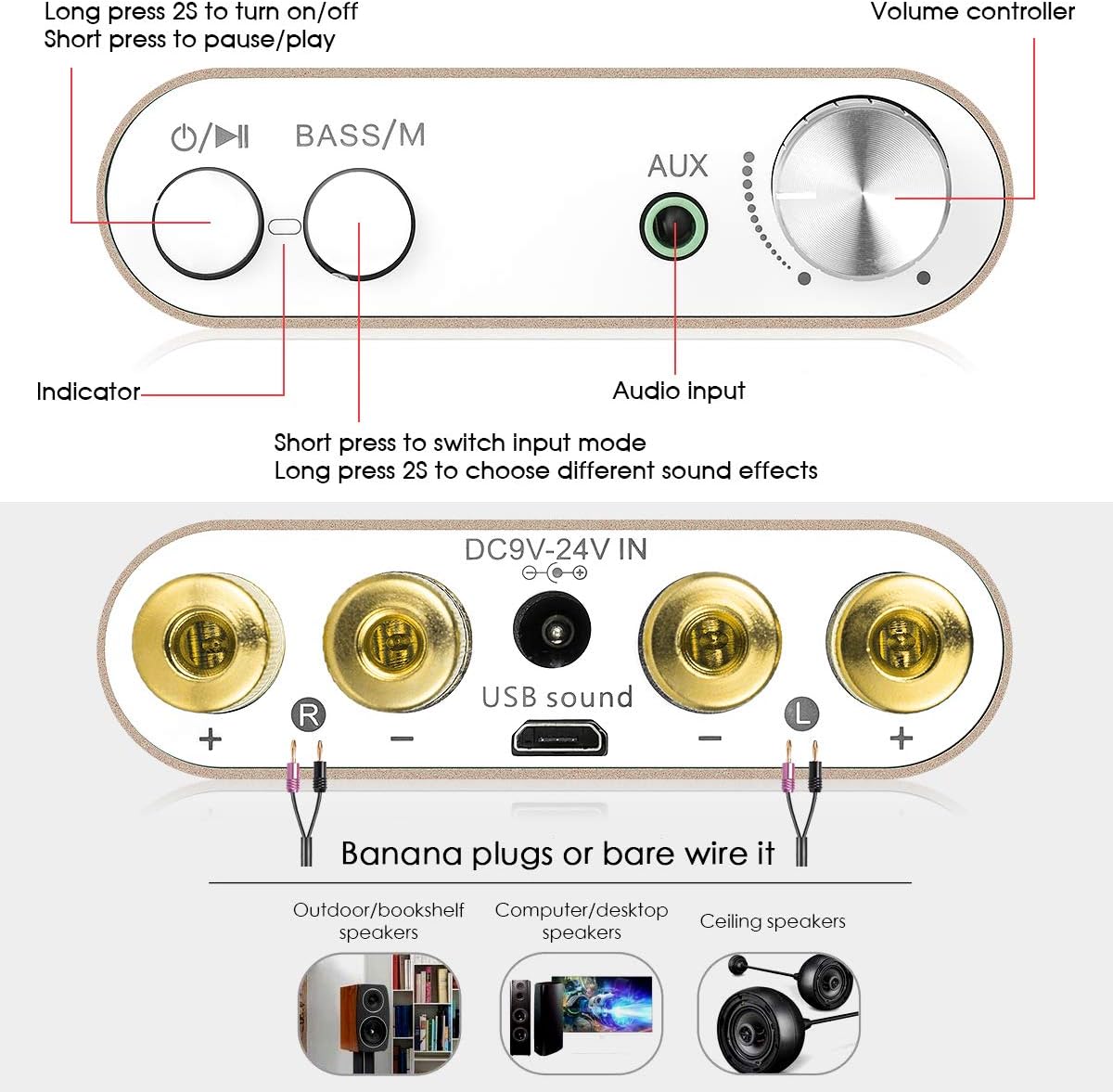
Image: Contents of the Nobsound NS-10G package, showing the amplifier, power adapter, various cables, and the user manual.
4. Product Overview
4.1 Front Panel

Image: Labeled diagram illustrating the front and rear panels of the Nobsound NS-10G amplifier.
- Power/Play/Pause Button: Long press to turn on/off. Short press to pause/play audio.
- Bass/Mode Button: Short press to switch input mode (Bluetooth, USB, AUX). Long press to choose different sound effects (e.g., bass boost).
- Indicator Light: Displays current status (e.g., power on, input mode).
- AUX Input: 3.5mm audio jack for connecting external audio devices.
- Volume Controller: Rotary knob to adjust the output volume.
4.2 Rear Panel
- Speaker Terminals (R+, R-, L+, L-): Connect your passive speakers using banana plugs or bare speaker wire. Ensure correct polarity.
- DC 9V-24V IN: Power input port. Connect the provided power adapter here.
- USB Sound Input: USB port for connecting to a computer or other USB audio source.
5. Setup
- Connect Speakers: Connect your passive speakers to the speaker terminals on the rear panel. Ensure the positive (+) terminal of the amplifier connects to the positive (+) terminal of the speaker, and the negative (-) to the negative (-). You can use banana plugs or bare speaker wire.
- Connect Audio Source:
- Bluetooth: No physical connection needed initially.
- USB: Connect the provided USB cable from the amplifier's USB Sound input to your computer's USB port.
- AUX: Connect an audio device (e.g., smartphone, tablet, CD player) to the 3.5mm AUX input on the front panel using the provided 3.5mm audio cable.
- Connect Power: Plug the provided power adapter into the DC 9V-24V IN port on the rear panel, then plug the adapter into a wall outlet.
6. Operating Instructions
6.1 Power On/Off
Long press the Power/Play/Pause button on the front panel for approximately 2 seconds to turn the amplifier on or off. The indicator light will illuminate when the device is powered on.
6.2 Input Selection
Short press the Bass/Mode button on the front panel to cycle through the available input modes: Bluetooth, USB, and AUX. The indicator light may change or flash to indicate the selected mode.
6.3 Bluetooth Pairing
- Switch the amplifier to Bluetooth input mode using the Bass/Mode button. The indicator light will typically flash, indicating it is in pairing mode.
- On your mobile device (smartphone, tablet, etc.), enable Bluetooth and search for available devices.
- Select "Nobsound NS-10G" or a similar name from the list of devices.
- Once paired, the indicator light on the amplifier will typically become solid, and you will hear a confirmation tone.
6.4 USB Audio Input
When connected to a computer via the USB Sound input, the amplifier acts as an external sound card. Select the USB input mode on the amplifier. Your computer should automatically recognize the device without needing additional drivers. Select the amplifier as the audio output device in your computer's sound settings.
6.5 AUX Input
Connect your audio source to the 3.5mm AUX input on the front panel. Switch the amplifier to AUX input mode. Audio will be played directly from your connected device.
6.6 Bass Adjustment
Long press the Bass/Mode button to activate or deactivate the bass enhancement feature. This allows you to adjust the low-frequency output for a richer sound experience.

Image: The Nobsound NS-10G amplifier with the 'BASS/M' button circled, illustrating its function for bass enhancement.
6.7 Volume Control
Rotate the Volume Controller knob on the front panel clockwise to increase the volume and counter-clockwise to decrease it.
7. Maintenance
- Clean the amplifier with a soft, dry cloth. Do not use liquid cleaners or aerosols.
- Ensure proper ventilation around the device to prevent overheating.
- Store the amplifier in a cool, dry place when not in use.
8. Troubleshooting
| Problem | Possible Cause | Solution |
|---|---|---|
| No power | Power adapter not connected or faulty; power outlet not working. | Check power connections. Try a different power outlet. Ensure the power button is long-pressed to turn on. |
| No sound output | Incorrect input mode selected; speaker wires loose or incorrectly connected; volume too low; audio source issue. | Verify input mode. Check speaker wire connections and polarity. Increase volume. Test audio source with another device. |
| Bluetooth not connecting | Amplifier not in pairing mode; device too far; interference; incorrect device selected. | Ensure amplifier is in Bluetooth input mode and indicator is flashing. Move device closer. Restart both amplifier and Bluetooth device. Forget device on your phone and re-pair. |
| Distorted sound | Volume too high; poor audio source quality; faulty cables; speaker impedance mismatch. | Reduce volume. Use high-quality audio files. Replace cables. Ensure speakers are compatible with amplifier's output. |
9. Specifications
- Model: NS-10G
- Model Number: DZ027
- Brand: Douk Audio
- Output Power: 50W + 50W (Max 100W)
- Bluetooth Version: 5.0
- Input Voltage: DC 9V-24V
- Audio Inputs: Bluetooth, USB Sound, 3.5mm AUX
- Speaker Impedance: 4-8 Ohms (typical)
- Dimensions (L x W x H): Approximately 80mm x 53mm x 22mm (3.15 x 2.09 x 0.87 inches)
- Item Weight: Approximately 105g (0.23 lbs)
- Mounting Type: Surface Mount

Image: The Nobsound NS-10G amplifier positioned between two speakers, highlighting its maximum output power of 50W+50W.
10. Warranty and Support
For warranty information and technical support, please refer to the documentation provided with your purchase or contact Douk Audio customer service directly. Keep your purchase receipt as proof of purchase.


