Introduction
The La Crosse Technology 513-1417AL-INT Atomic Digital Clock provides accurate timekeeping and environmental monitoring. This clock features a large, easy-to-read LCD display showing time, date, indoor temperature, and outdoor temperature via a wireless sensor. It also includes an alarm with snooze function and moon phase display.
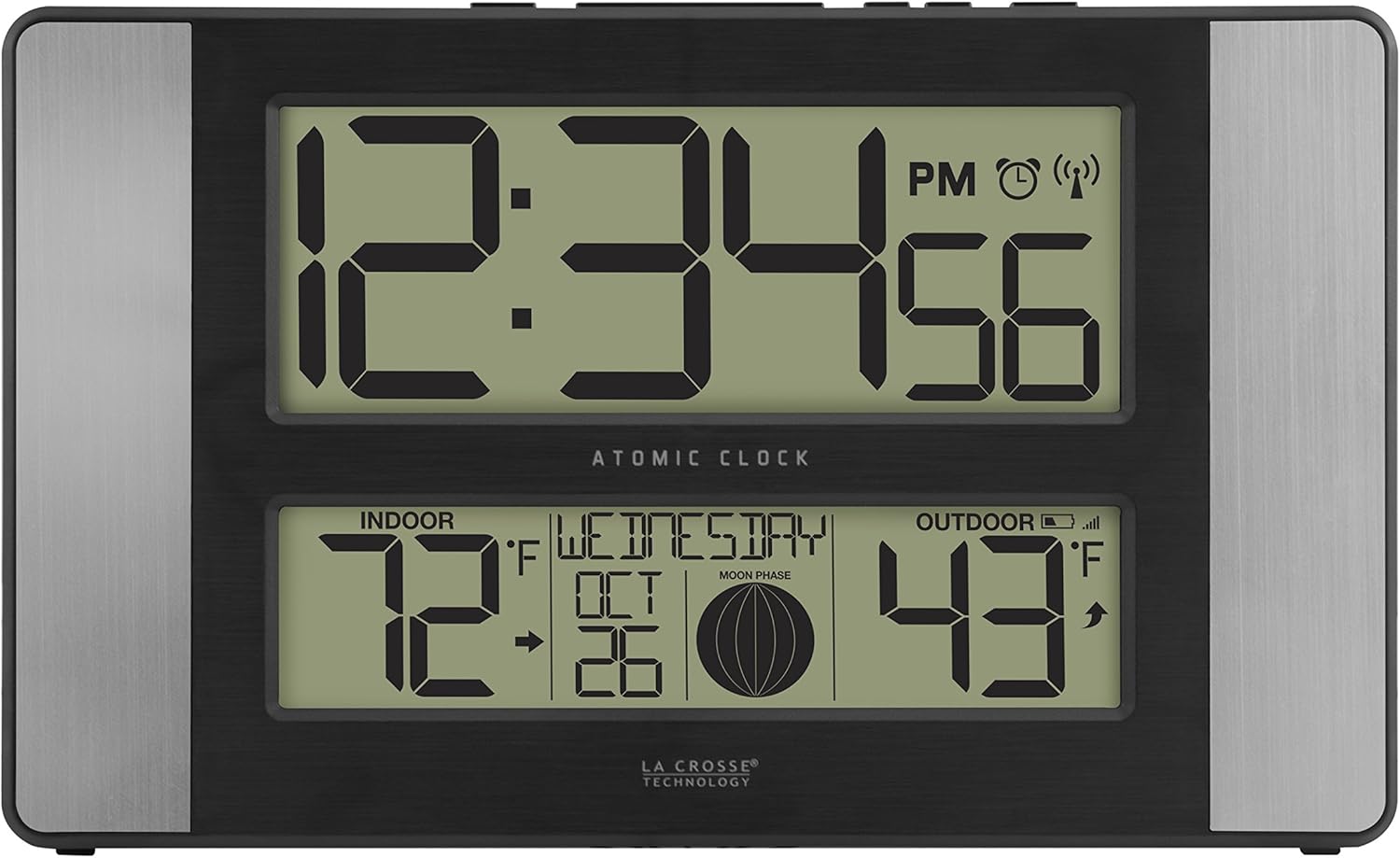
Image: Front view of the La Crosse Technology Atomic Digital Clock displaying time, indoor and outdoor temperatures, date, and moon phase.
Setup
Battery Installation
- Insert 2 AA batteries into the wireless outdoor sensor. Ensure correct polarity.
- Insert 2 AA batteries into the main atomic clock unit. Ensure correct polarity.
- Press the TX button on the remote sensor to transmit the RF signal.
- Keep the remote sensor 5-10 feet from the atomic clock during initial setup to establish a strong connection.
- Once the RF connection is established, the outdoor temperature will appear on the clock display.

Image: The main clock unit displayed alongside its wireless outdoor temperature sensor, illustrating their connection.
Initial Settings Configuration
After battery installation, configure the basic settings:
- Hold the SET button for 3 seconds to enter the settings menu.
- Use the +/- buttons to adjust values.
- Press SET to confirm each setting and move to the next.
The setting order is as follows:
- Language: English | Español
- Beep ON | OFF
- Atomic ON | OFF (for automatic time synchronization)
- DST ON | OFF (Daylight Saving Time)
- Time Zone (7 USA time zone settings: Atlantic to Hawaiian)
- Hour
- Minutes
- Year
- Month
- Date
- Fahrenheit | Celsius (for temperature display)
Allow the remote sensor and atomic clock to remain together for 15 minutes after setup to ensure a stable connection. Avoid pressing buttons during this period.
Operating Instructions
Time and Date Display
The large LCD display shows the current time, including AM/PM indicator, and seconds. The date is displayed with the day of the week, month, and day. The clock automatically synchronizes with the atomic time signal (WWVB) for precise accuracy and adjusts for Daylight Saving Time if enabled.
Temperature Monitoring
The clock displays both indoor and outdoor temperatures in Fahrenheit or Celsius. The outdoor temperature is received wirelessly from the included weather-resistant sensor, which has a range of up to 330 feet (100 meters) in open air. Ensure the outdoor sensor is mounted vertically for optimal performance.
Alarm Function
To set the alarm, press the ALARM button. Use the +/- buttons to adjust the alarm time and SET to confirm. The clock features a crescendo alarm. Press the SNOOZE button to activate a 10-minute snooze period.
Moon Phase Display
The clock includes a moon phase icon, providing a visual representation of the current lunar phase.
Maintenance
To ensure the longevity and accurate operation of your La Crosse Technology Atomic Digital Clock, follow these general maintenance guidelines:
- Clean the display and casing with a soft, dry cloth. Avoid abrasive cleaners or solvents.
- Replace batteries in both the main unit and the sensor when the low battery indicator appears on the display. Use fresh AA alkaline batteries.
- Ensure the outdoor sensor is placed in a location protected from direct sunlight and heavy precipitation for accurate readings and extended lifespan.
- Avoid exposing the main unit to extreme temperatures, humidity, or direct sunlight.
Troubleshooting
Factory Restart Procedure
A factory restart can resolve many common issues by returning the atomic clock and remote sensor to their default state. Follow these steps:
- Remove all batteries from both the remote sensor and the atomic clock.
- Press any button on the atomic clock at least 20 times to clear all internal memory.
- Verify that the atomic clock display is completely blank before proceeding.
- Leave both units without power for a minimum of 15 minutes. This step is crucial for a complete reset.
- Insert fresh AA batteries into the remote sensor first, then into the main clock unit.
- Press the TX button on the remote sensor to initiate RF signal transmission.
- Keep the remote sensor within 5-10 feet of the atomic clock to facilitate connection.
- Once the RF connection is established, the outdoor temperature will appear on the clock.
- Allow both units to sit together for 15 minutes without interaction to establish a strong, stable connection.
Outdoor Sensor Transmission Tips
- For optimal 433MHz transmission, place the remote sensor no more than 330 feet (100 meters) from the atomic clock in an open-air environment.
- Avoid placing the sensor near large metal objects, electronic devices, or thick walls that may interfere with the wireless signal.
- Ensure the outdoor sensor is mounted vertically to prevent moisture accumulation and ensure proper operation.
Specifications
| Feature | Detail |
|---|---|
| Brand | La Crosse Technology |
| Model Number | 513-1417AL-INT |
| Display Type | LCD |
| Style | Modern |
| Special Features | Alarm, Clock, Wireless Outdoor Temperature |
| Product Dimensions | 11.1"W x 6.61"H |
| Power Source | Battery Powered (4 AA batteries required, not included) |
| Indoor/Outdoor Usage | Indoor, Outdoor (sensor) |
| Material | Plastic |
| Mounting Type | Wall Mount, Tabletop (with fold-out stand) |
| Operation Mode | Atomic |
| Connectivity Technology | 433 MHz |
| Included Components | Indoor clock, wireless sensor, instructional manual, warranty card |

Image: Diagram showing the dimensions of the La Crosse Technology Atomic Digital Clock.
Product Videos
Product Overview
Video: A brief overview of the La Crosse Technology Atomic Digital Clock, highlighting its features and design.
Battery Powered Atomic Wall Clock
Video: Demonstrates the battery installation and basic functionality of the atomic wall clock.
Warranty
This product comes with a 1-year limited parts and labor warranty. Please refer to the included warranty card for full details and terms.
Support
For additional support, troubleshooting, or product inquiries, please visit the official La Crosse Technology website or contact their customer service department. Contact information can be found on the warranty card or the manufacturer's website.


