1. Introduction
Thank you for choosing the Blaupunkt AHS601 Humidifier. This device is designed to improve the air quality in your home or office by maintaining optimal humidity levels, featuring an integrated ionizer and aroma diffuser for enhanced comfort. Please read this manual carefully before operating the device to ensure safe and efficient use.
2. Safety Instructions
To reduce the risk of electric shock, fire, or injury, always follow basic safety precautions when using electrical appliances.
- Do not immerse the unit, power cord, or plug in water or other liquids.
- Always unplug the humidifier before filling, cleaning, or moving it.
- Ensure the voltage specified on the rating label matches your mains voltage.
- Keep the humidifier out of reach of children and pets.
- Do not block the mist outlet.
- Use only clean, cool tap water. Distilled or demineralized water is recommended to prevent mineral buildup.
- Do not add essential oils directly into the water tank; use the dedicated aroma diffuser tray.
- If the power cord is damaged, it must be replaced by the manufacturer, its service agent, or similarly qualified persons to avoid a hazard.
3. Product Components
Familiarize yourself with the main parts of your Blaupunkt AHS601 Humidifier.
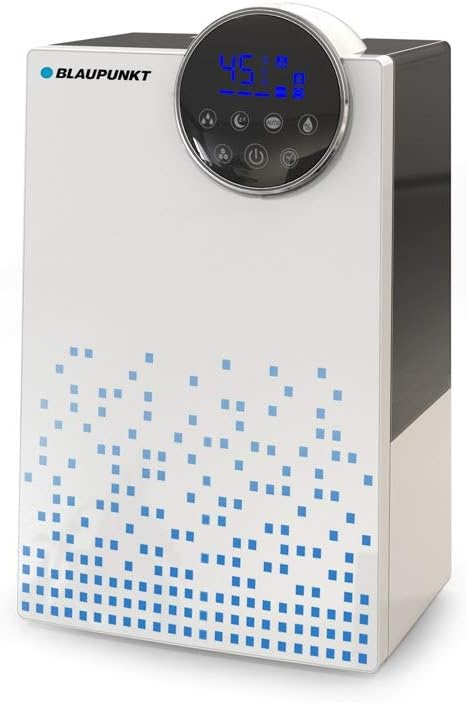
Figure 3.1: Front view of the Blaupunkt AHS601 Humidifier, showing the control panel with LED display and touch buttons.

Figure 3.2: The Blaupunkt AHS601 Humidifier in operation, clearly showing mist being emitted from the top outlet.
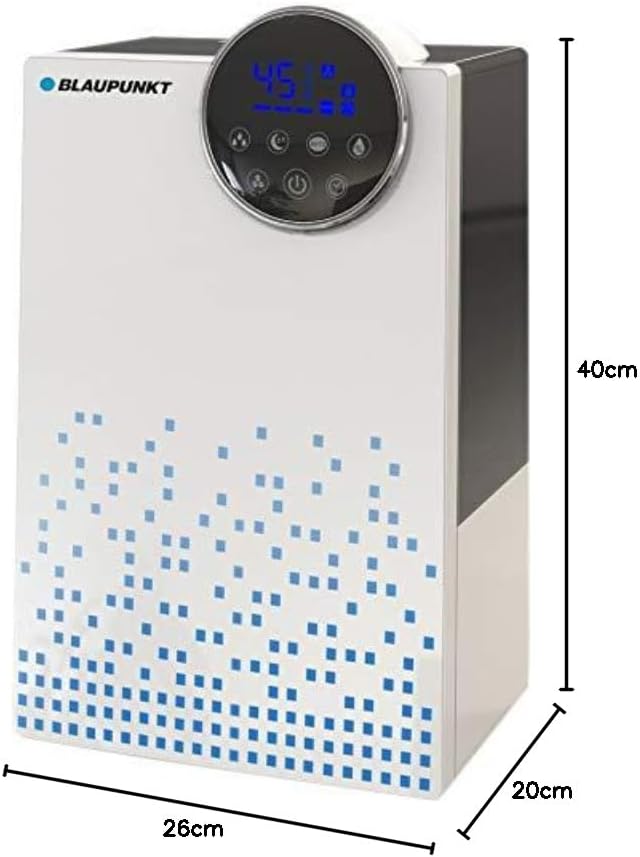
Figure 3.3: The Blaupunkt AHS601 Humidifier with indicated dimensions: 40cm height, 26cm width, and 20cm depth.
- Water Tank: 4.5-liter capacity for extended operation.
- Control Panel: LED display with touch-sensitive buttons for various functions.
- Mist Outlet: Top opening for mist dispersion.
- Aroma Diffuser Tray: Separate compartment for essential oils.
- Base Unit: Contains the ultrasonic transducer and electronic components.
- Resin Filter: Helps reduce water hardness.
- Remote Control: For convenient operation from a distance.
4. Setup
- Unpack: Carefully remove the humidifier from its packaging. Retain packaging for future storage or transport.
- Placement: Place the unit on a firm, flat, water-resistant surface at least 15 cm (6 inches) away from walls and furniture. Do not place it directly on carpet or a towel.
- Fill Water Tank:
- Remove the water tank from the base.
- Unscrew the tank cap at the bottom of the tank.
- Fill the tank with clean, cool tap water. Distilled or demineralized water is recommended.
- Screw the cap back on tightly.
- Place the filled water tank back onto the base unit, ensuring it is seated correctly.
- Connect Power: Plug the power cord into a suitable electrical outlet (220-240V ~ 50/60Hz). The unit will enter standby mode.
5. Operating Instructions
The Blaupunkt AHS601 features an LED display with touch controls and a remote control for ease of use.
5.1. Control Panel and Display
The LED display shows current humidity, temperature, and active functions. Touch buttons allow control of various settings.
5.2. Basic Operation
- Power On/Off: Press the Power button (symbol: circle with vertical line) to turn the unit on or off.
- Mist Level Adjustment: Press the Mist button (symbol: mist icon) repeatedly to cycle through low, medium, and high mist output levels.
- Ionizer Function: Press the Ionizer button (symbol: ion icon) to activate or deactivate the air ionizer, which helps purify the air.
- Aroma Diffuser: Open the aroma tray (usually located at the back or side of the base unit). Add a few drops of essential oil onto the sponge. Close the tray. The aroma will diffuse with the mist.
- Integrated Hygrostat: Press the Humidity button (symbol: humidity icon) to set your desired humidity level (e.g., 40% to 80%). The humidifier will automatically turn on/off to maintain this level.
- Timer Function: Press the Timer button (symbol: clock icon) to set an operating time (e.g., 1-12 hours). The unit will automatically shut off after the set time.
- Night Mode: Press the Night Mode button (symbol: moon icon) to dim the LED display and reduce operational noise for undisturbed sleep.
6. Maintenance and Cleaning
Regular cleaning is essential for optimal performance and hygiene.
- Daily Maintenance:
- Unplug the unit and empty any remaining water from the tank and base.
- Rinse the water tank and base with fresh water.
- Wipe the surfaces dry with a clean cloth.
- Weekly Cleaning (to remove mineral deposits):
- Unplug the unit and empty all water.
- Pour 2-3 tablespoons of white vinegar into the water tank and base.
- Let it sit for 20-30 minutes to loosen mineral buildup.
- Use a soft brush or cloth to clean the inside of the tank and the ultrasonic transducer in the base.
- Rinse thoroughly with clean water until the vinegar smell is gone.
- Do not use harsh chemicals or abrasive cleaners.
- Resin Filter Maintenance: The integrated resin filter helps reduce water hardness. Refer to the filter's specific instructions for cleaning or replacement frequency. Typically, it should be rinsed regularly and replaced every few months depending on water hardness and usage.
- Storage: If storing the humidifier for an extended period, ensure it is clean and completely dry. Store it in a cool, dry place.
7. Troubleshooting
Before contacting customer support, please refer to the following table for common issues and solutions.
| Problem | Possible Cause | Solution |
|---|---|---|
| No mist output | No water in tank; Water tank not seated correctly; Ultrasonic transducer dirty. | Refill water tank; Re-seat tank properly; Clean ultrasonic transducer. |
| Unusual odor | Stagnant water; Dirty water tank/base. | Empty and clean the unit thoroughly; Use fresh water daily. |
| White dust around unit | Hard water used. | Use distilled or demineralized water; Clean the unit regularly to remove mineral deposits. |
| Unit not turning on | Not plugged in; Power outage; Unit malfunction. | Check power connection; Verify power supply; If problem persists, contact support. |
| Excessive noise (>35dB) | Unit not on a flat surface; Water level too low; Fan obstruction. | Ensure stable placement; Refill water; Check for obstructions and clean if necessary. |
8. Specifications
- Model: AHS601
- Brand: Blaupunkt
- Power: 25 W
- Voltage: 220-240 V ~ 50/60 Hz
- Water Tank Capacity: 4.5 Liters
- Humidification Capacity: 350 ml/h
- Noise Level: Less than 35 dB(A)
- Dimensions (L x W x H): Approximately 26 cm x 20 cm x 40 cm (10.2 x 7.9 x 15.7 inches)
- Weight: 2.1 kg (4.6 lbs)
- Color: Blue, White
- Special Features: Ionizer, Aroma Diffuser, Integrated Hygrostat, Timer Function, Night Mode, LED Display, Touch Control, Remote Control, Resin Filter.
9. Warranty and Support
The Blaupunkt AHS601 Humidifier comes with a 2-year manufacturer's warranty. This warranty covers defects in materials and workmanship under normal use. It does not cover damage resulting from misuse, neglect, accident, alteration, or unauthorized repair.
For warranty claims or technical support, please contact your retailer or the authorized Blaupunkt service center. Please have your proof of purchase and the product model number (AHS601) ready when contacting support.