
1. Introduction
Welcome to the user manual for your new CT TEK Performance Series VR 3D Virtual Reality Glasses. This manual provides essential information on how to set up, operate, maintain, and troubleshoot your VR glasses to ensure an optimal virtual reality experience. Please read this manual thoroughly before using the product.
2. Product Overview
The CT TEK Performance Series VR 3D Virtual Reality Glasses are designed to transform your smartphone into an immersive virtual reality viewer. Compatible with Android and iOS smartphones ranging from 3.0 to 6.0 inches, these glasses allow you to experience 3D games, virtual tours, and animated films with a wide field of view.

Figure 2.1: Front-side view of the CT TEK VR Glasses, showcasing the white and black design with the CT TEK logo and "VR 3D VIRTUAL REALITY GLASSES" text.
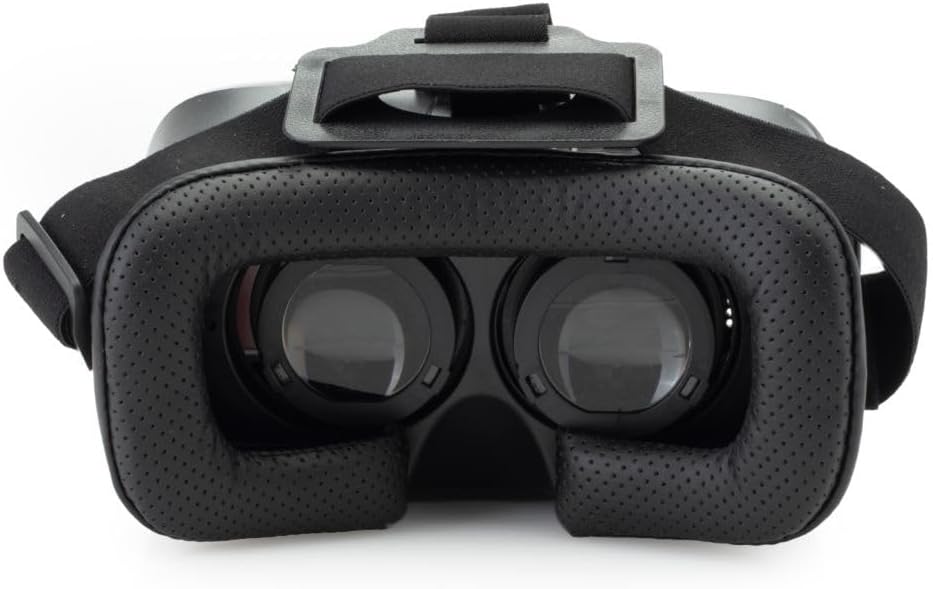
Figure 2.2: Inside view of the VR Glasses, highlighting the adjustable lenses and the comfortable black perforated leatherette face padding designed for extended wear.

Figure 2.3: Side view of the VR Glasses, illustrating the focus and pupil distance adjustment knobs located on the top and side of the headset.
3. What's in the Box
Upon unboxing your CT TEK Performance Series VR 3D Virtual Reality Glasses, please ensure all components are present:
- CT TEK Performance Series VR 3D Virtual Reality Glasses
- Adjustable Headstrap (pre-attached or included separately)
- User Manual (this document)
Note: Smartphone is not included and must be provided by the user.
4. Setup Guide
4.1 Inserting Your Smartphone
- Open the front cover of the VR glasses. This usually involves pulling or unlatching the front panel.
- Carefully place your smartphone into the designated tray or holder. Ensure the phone is centered and securely held to prevent movement during use.
- Close the front cover, ensuring it latches securely.
4.2 Adjusting the Headstrap
- Place the VR glasses on your head.
- Adjust the top strap and side straps to achieve a comfortable and secure fit. The headset should feel snug but not overly tight.
- Ensure the weight is evenly distributed and the headset does not slip during head movements.
4.3 Focus and Pupil Distance Adjustment
For optimal visual clarity, adjust the focus and pupil distance (IPD) to match your eyes.
- While wearing the headset and viewing content, locate the focus adjustment knobs (often on the top or side of the headset). Rotate these knobs until the image appears sharp and clear.
- Locate the pupil distance adjustment (IPD) mechanism (often a slider or knob on the top). Adjust this until the two images merge into a single, comfortable view without eye strain.
5. Operating Instructions
5.1 Getting Started with VR Content
To begin your VR experience, you will need to download virtual reality applications or content onto your smartphone. Many free and paid VR apps are available on the Google Play Store (for Android) and Apple App Store (for iOS).
- Search for "VR apps," "3D games," or "virtual reality" in your phone's app store.
- Download and install your desired VR content.
- Launch the VR application on your smartphone before inserting it into the VR glasses.
- Some apps may require a Bluetooth controller for interaction (not included with these VR glasses).
5.2 Compatible Devices
These VR glasses are compatible with most Android and iOS smartphones with screen sizes ranging from 3.0 inches to 6.0 inches. Ensure your smartphone's operating system is up-to-date for optimal performance with VR applications.
6. Care and Maintenance
- Cleaning the Lenses: Use a soft, dry microfiber cloth specifically designed for optical lenses. Do not use abrasive cloths, paper towels, or chemical cleaners, as these can scratch or damage the lenses.
- Cleaning the Body: Wipe the exterior of the VR glasses with a soft, slightly damp cloth. Avoid getting moisture into any openings.
- Storage: Store the VR glasses in a cool, dry place away from direct sunlight and extreme temperatures. Keep them in their original packaging or a protective case when not in use to prevent dust accumulation and scratches.
- Avoid Drops and Impacts: Handle the VR glasses with care to prevent damage from accidental drops or impacts.
7. Troubleshooting
If you encounter issues with your CT TEK Performance Series VR 3D Virtual Reality Glasses, please refer to the following common problems and solutions:
| Problem | Possible Cause | Solution |
|---|---|---|
| Image is blurry or out of focus. | Incorrect focus adjustment. | Adjust the focus knobs on the top/side of the headset until the image is clear. |
| Double vision or eye strain. | Incorrect pupil distance (IPD) adjustment. | Adjust the IPD slider/knob until the two images merge into one comfortable view. |
| Smartphone does not fit or is loose. | Smartphone size is outside the compatible range (3.0-6.0 inches). Incorrect placement. | Ensure your smartphone is within the specified size range. Re-insert the phone, ensuring it is centered and securely latched. |
| No VR content displaying. | VR app not launched or installed. Phone screen orientation locked. | Ensure a VR application is running on your smartphone before inserting it. Check your phone's display settings to ensure screen rotation is enabled. |
8. Technical Specifications
| Feature | Detail |
|---|---|
| Product Dimensions | 9 x 7 x 5 inches |
| Item Weight | 15.2 ounces |
| Model Number | 4330952529 |
| Brand | CT TEK |
| Color | Black |
| Special Feature | Wide Field of View |
| Connectivity Technology | HDMI, USB Type C (Note: These VR glasses are passive and rely on the smartphone's display. The listed connectivity might refer to compatible phone features or general VR headset capabilities, but these glasses do not have direct HDMI/USB-C inputs for display.) |
| Included Components | Headstrap |
| Compatible Devices | Smartphone (3.0 - 6.0 inch displays) |
| Specific Uses For Product | Gaming, 3D movie watching, virtual tourism, educational purposes |
| Age Range (Description) | Teen, Adult |
| Operating System Compatibility | iOS, Android |
| Field Of View | 100 Degrees |
| Country of Origin | Japan |
| Date First Available | December 10, 2016 |
9. Warranty and Support
CT TEK stands behind the quality of its products. For specific warranty information regarding your Performance Series VR 3D Virtual Reality Glasses, please refer to the warranty card included with your purchase or visit the official CT TEK website.
For technical support, troubleshooting assistance beyond this manual, or inquiries about replacement parts, please contact CT TEK customer service. Contact details can typically be found on the product packaging or the official CT TEK website.
Please retain your proof of purchase for warranty claims.