
1. Introduction
The LGIDTECH B3 Wireless 4-Zone RGB/RGBW Smart Panel Controller is designed for convenient control of Mi.Light RGB/RGBW series LED lights and strip controllers. This wall-mounted panel operates wirelessly using 2.4GHz RF technology, offering a control distance of up to 30 meters. It features a touch-sensitive interface for color selection, brightness dimming, and mode changes across four independent zones.

Image 1.1: Front view of the LGIDTECH B3 Smart Panel Controller, showing the touch interface with color and dimming sliders, and zone control buttons.
2. Product Features
- Wireless Operation: 2.4GHz RF wireless transmitting with a 30-meter (98 feet) control distance, eliminating the need for complex wiring.
- 4-Zone Control: Independently control up to four zones, each capable of managing numerous compatible lamps or controllers.
- Color and Brightness Control: Offers 16 million colors via a touch color slider and 1%-100% brightness dimming.
- Dynamic Modes: Includes 9 color changing modes with adjustable speed.
- Battery Powered: Operates on 2 AAA batteries (not included), simplifying installation without requiring changes to existing electrical circuits.
- Sensitive Touch Interface: High-precision capacitive touch screen IC for responsive control.
- Durable Design: Features a high-end tempered glass panel for scratch and crushing resistance.
- Audible Feedback: Buttons provide sound feedback upon touch (can be turned off).
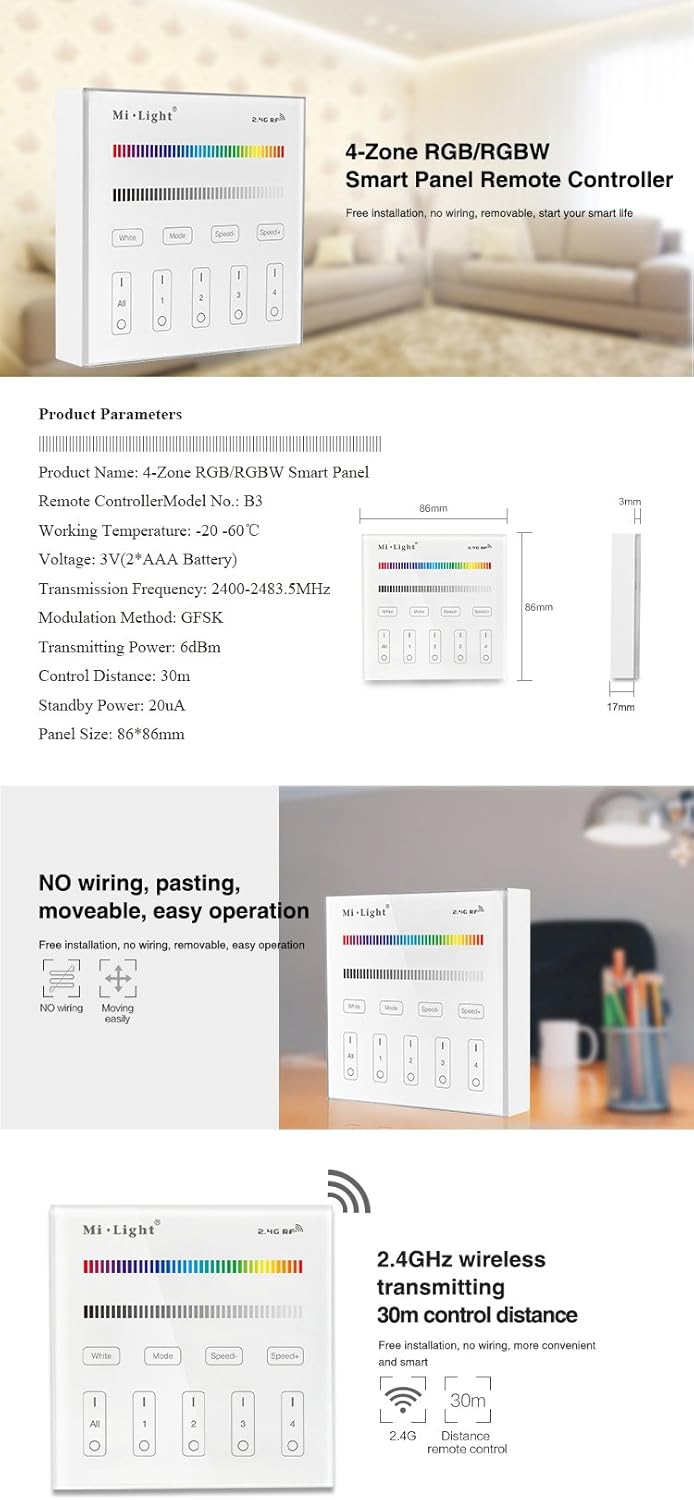
Image 2.1: Overview of the B3 Smart Panel Controller highlighting its 4-zone RGB/RGBW capabilities and key dimensions (86x86mm panel size, 3mm thickness).

Image 2.2: Illustration of the controller's easy installation, emphasizing no wiring, pasting, and movable operation.
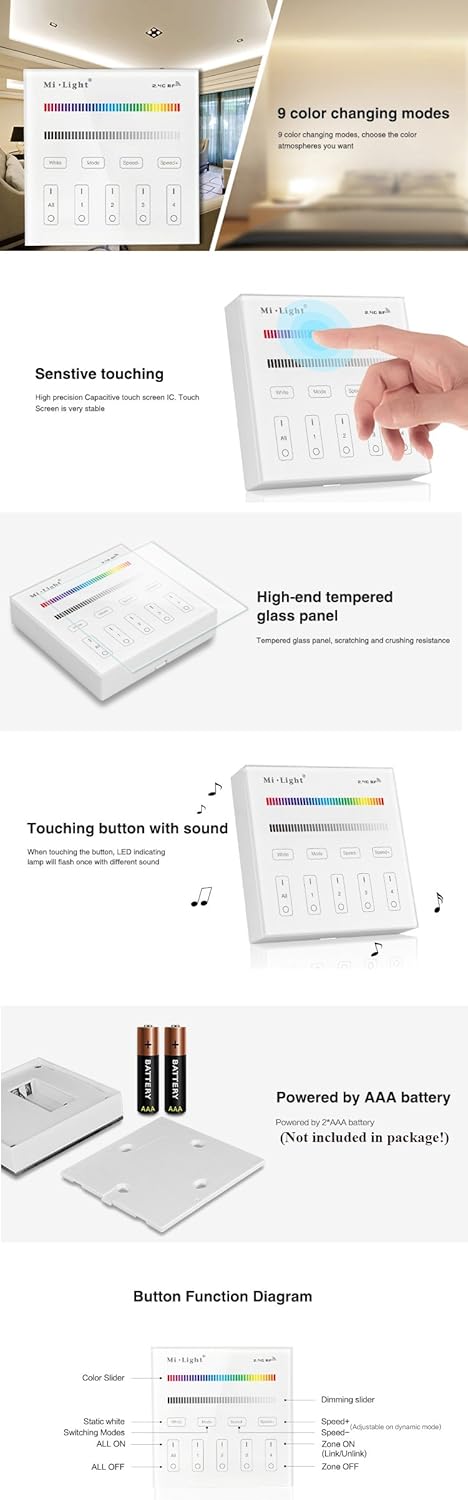
Image 2.3: Diagram showing the 2.4GHz wireless transmitting capability and 30m control distance.
3. Specifications
| Model No. | B3 (JPB3) |
| Working Temperature | -20°C to 60°C |
| Voltage | 3V (2*AAA Battery) |
| Transmission Frequency | 2400-2483.5MHz |
| Modulation Method | GFSK |
| Transmitting Power | 6dBm |
| Control Distance | 30m |
| Standby Power | 20uA |
| Panel Size | 86mm x 86mm |
| Material | Glass, Plastic |
| Compatible Products | Mi.Light THE NEWEST RGB and RGBW series LED bulbs, downlights, and strip controllers (e.g., FUT037, FUT038). Not compatible with old version products. |

Image 3.1: Product packaging detailing features and technical parameters of the B3 controller.
4. Setup
4.1 Battery Installation
- Gently remove the back cover of the controller.
- Insert two (2) AAA batteries into the battery compartment, ensuring correct polarity (+/-). Batteries are not included.
- Replace the back cover securely.
Image 4.1: The back of the B3 controller showing the battery compartment for two AAA batteries.
4.2 Mounting the Controller
The B3 controller is designed for easy wall mounting. It can be affixed to a wall using adhesive or screws (not included), depending on your preference and wall surface. Ensure the mounting location is within 30 meters of the lights you intend to control.
5. Operating Instructions
The LGIDTECH B3 controller features a touch-sensitive glass panel for intuitive control.

Image 5.1: Detailed diagram of the B3 controller's touch buttons and sliders.
- Color Slider: Touch the color spectrum bar to select your desired color. The controller supports 16 million colors.
- Dimming Slider: Touch the grayscale bar below the color slider to adjust brightness from 1% to 100%.
- White Button: Touch the "White" button to switch the light to pure white mode.
- Mode Button: Touch the "Mode" button to cycle through 9 different color changing modes.
- Speed- / Speed+ Buttons: Use "Speed-" to slow down the current dynamic mode and "Speed+" to accelerate it.
- Zone Control Buttons (All, 1, 2, 3, 4):
- ALL ON: Touch the "All" button to turn on all linked lights. Long press "All ON" for 5 seconds to turn on the indicating sound.
- Zone (1-4) ON: Touch a specific zone button (1, 2, 3, or 4) to turn on lights linked to that zone.
- ALL OFF: Touch the "All" button again to turn off all linked lights. Long press "All OFF" for 5 seconds to turn off the indicating sound.
- Zone (1-4) OFF: Touch a specific zone button (1, 2, 3, or 4) again to turn off lights linked to that zone.

Image 5.2: Demonstrates the touch functionality for selecting 16 million colors and dimming brightness from 1% to 100%.
5.1 Turning Off Key Tone
To turn off the audible feedback (key tone) when pressing buttons, long press the "ALL OFF" key for 5 seconds. Repeat the process to turn the key tone back on.
6. Linking and Unlinking Devices
The B3 controller needs to be linked with compatible Mi.Light RGB/RGBW LED lights or strip controllers to function.
6.1 Linking
- First, power off the light or controller you wish to link.
- Then, power it on.
- Within 3 seconds of powering on, touch any of the Zone 'I' (ON) buttons (1, 2, 3, or 4) on the B3 controller briefly.
- The linking is successful when the light blinks 3 times. If it does not blink, try again.
6.2 Unlinking
- First, power off the light or controller you wish to unlink.
- Then, power it on.
- Within 3 seconds of powering on, long press the Zone 'I' (ON) button (1, 2, 3, or 4) that the light is currently linked to, or the 'All' ON button.
- The unlinking is successful when the light blinks 9 times. If it does not blink, try again.

Image 6.1: Depiction of the 4-zone individual control capability, showing different rooms controlled by a single panel.
7. Maintenance
- Cleaning: Wipe the glass panel with a soft, dry cloth. Avoid abrasive cleaners or solvents.
- Battery Replacement: Replace AAA batteries when the controller's responsiveness decreases or it stops functioning. It is recommended to use high-quality or rechargeable AAA batteries.
- Storage: If storing the controller for an extended period, remove the batteries to prevent leakage.
- Environment: Keep the controller away from extreme temperatures, direct sunlight, and high humidity.
8. Troubleshooting
| Problem | Possible Cause / Solution |
|---|---|
| Controller not responding. |
|
| Lights not linking/unlinking. |
|
| Inconsistent color or brightness. |
|
| Key tone is always on/off. |
|
If you encounter issues not covered here, please refer to the support section.
9. Warranty and Support
This LGIDTECH product is manufactured by Mi.Light. For specific warranty information, please refer to the documentation provided with your purchase or contact your retailer.
For technical support or further assistance, please contact LGIDTECH customer service through the retailer where the product was purchased.
Manufacturer: Mi.Light
Brand: LGIDTECH