
Introduction
This manual provides comprehensive instructions for the safe and proper installation and operation of your SANUS VLT6-B1 Premium Tilting TV Wall Mount. This mount is designed to securely hold flat-panel televisions ranging from 46 to 90 inches and weighing up to 150 lbs. Please read all instructions carefully before beginning installation.
Safety Information
- Weight Capacity: Do not exceed the maximum weight capacity of 150 lbs (68 kg).
- TV Size: Ensure your TV's screen size is between 46 and 90 inches.
- Wall Type: This mount is designed for installation on wood studs (16-24 inch on-center) or solid concrete/concrete block walls. Do not install on drywall alone.
- Tools: Use appropriate tools and follow all safety precautions for power tools.
- Assistance: Two people are recommended for safe installation, especially when lifting the TV.
- Cable Management: Ensure all cables are routed safely and do not interfere with the mount's movement.
Package Contents
Verify that all components are present and undamaged before proceeding with installation. If any parts are missing or damaged, contact customer support.

Image: All-inclusive hardware and mount components for the SANUS VLT6-B1.
- Wall Plate Assembly
- TV Brackets (2)
- Mounting Hardware Kit (various screws, washers, spacers for TV and wall)
- Drill Template
- Magnetic Bubble Level
- Instruction Manual
Setup and Installation
Installation typically takes around 30 minutes. Follow these steps for a secure setup.
Video: Official SANUS video demonstrating the installation process for the Premium Tilting TV Mount.
- Pre-Installation:
- Determine the desired TV height and location on the wall.
- Locate wall studs using a stud finder or ensure the concrete wall is suitable.
- Use the provided drill template to mark pilot hole locations.
- Secure Wall Plate:

Image: Visual guide for DIY-friendly installation, including securing the wall plate to studs or concrete.
- Drill pilot holes at the marked locations.
- Attach the wall plate securely to the wall using the appropriate hardware for your wall type. The open wall plate design allows mounting over electrical outlets.
- Attach TV Brackets:
- Carefully place your TV face down on a soft, clean surface.
- Attach the two TV brackets to the back of your TV using the correct screws, washers, and spacers from the hardware kit. Ensure they are tightened securely.
- Mount TV to Wall Plate:
- With assistance, carefully lift the TV and hook the attached brackets onto the wall plate.
- Ensure the TV is properly seated and locked into place.
- Use the leveling and centering features to fine-tune the TV's position even after it's on the wall.
- Cable Management:
- Route all necessary cables through the integrated cable management channels on the mount arms.
- The 5.7-inch extension provides ample space for easy cable access and routing.
Operating Instructions
The SANUS VLT6-B1 mount offers flexible viewing options:
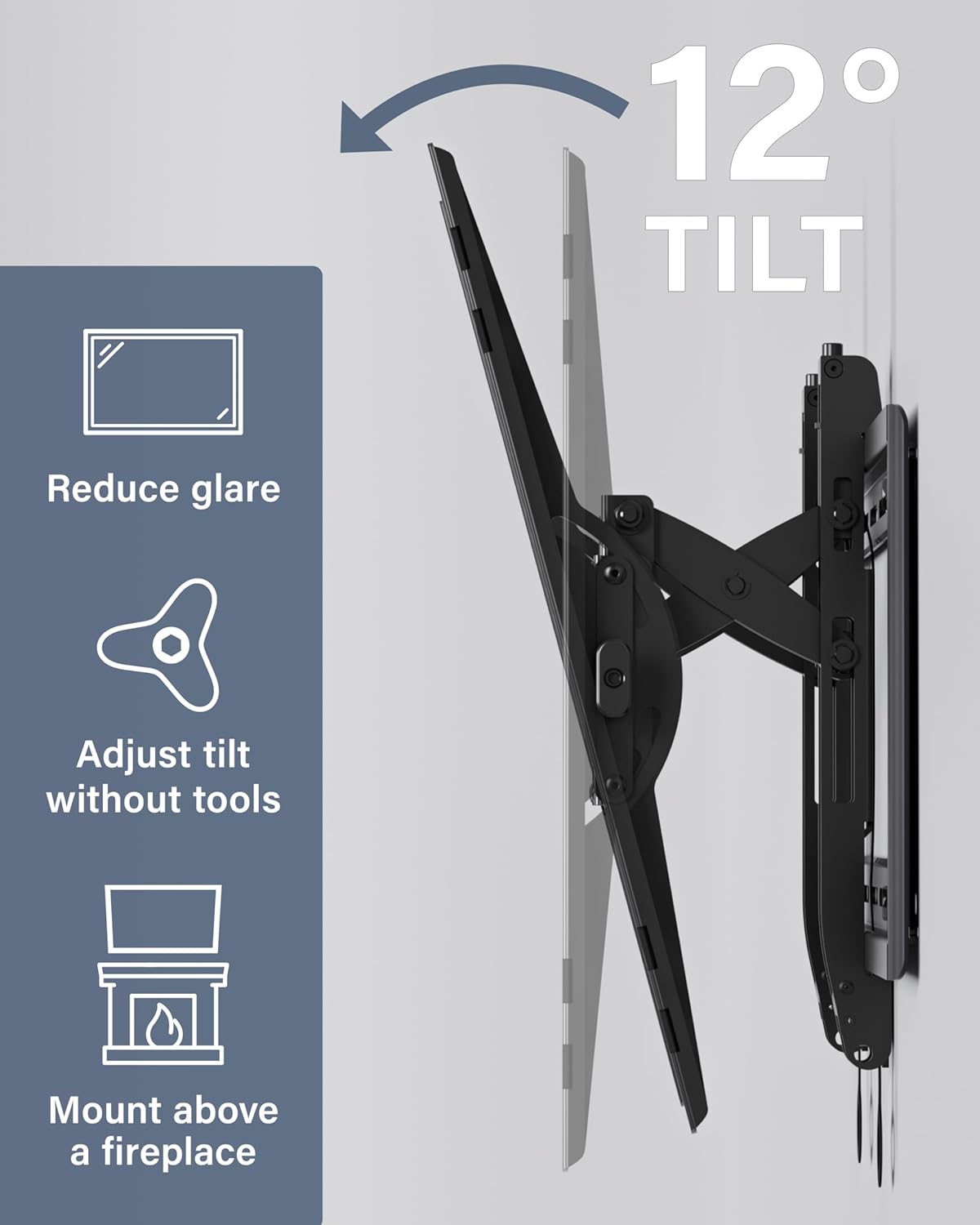
Image: Illustration of the 12-degree tilt feature for glare reduction and optimal viewing.
- Tilting: The mount features 12 degrees of advanced tilt. This is ideal for reducing glare from windows or lights, especially when the TV is mounted above eye level (e.g., above a fireplace). Adjust the tilt by gently pushing or pulling the top or bottom of the TV.
- Extension: The mount extends 5.7 inches from the wall. This extension allows for maximum tilt range and provides easy access to cables behind the TV. When not needed, the TV can be effortlessly pushed back closer to the wall for a low-profile appearance.
- Leveling and Centering: After installation, the TV can be height-adjusted and leveled to fine-tune your view, even if wall studs are off-center.
Maintenance
- Cleaning: Clean the mount with a soft, dry cloth. Avoid abrasive cleaners or solvents.
- Periodic Checks: Periodically check all screws and connections to ensure they remain tight and secure.
- Movement: If the mount's movement becomes stiff, apply a small amount of silicone-based lubricant to the moving parts.
Troubleshooting
| Problem | Possible Cause | Solution |
|---|---|---|
| TV is not level | Minor misalignment during installation. | Use the post-installation leveling adjustment feature to correct. |
| Mount feels loose | Screws may have loosened over time. | Retighten all mounting screws on the wall plate and TV brackets. |
| Difficulty tilting/extending | Mechanism may be stiff or cables are interfering. | Check for cable interference. Apply silicone lubricant to moving joints if needed. |
| Cannot attach TV to wall plate | TV brackets not correctly aligned or installed. | Ensure TV brackets are installed according to VESA pattern and are not obstructed. |
Specifications
- Model Number: VLT6-B1
- Brand: Sanus
- Material: Alloy Steel
- Color: Black
- Mounting Type: Wall Mount
- Movement Type: Tilt
- Compatible Devices: Television
- TV Size Compatibility: 46" - 90"
- Weight Capacity: Up to 150 lbs (68 kg)
- Maximum Tilt Angle: 12 Degrees
- Extension from Wall: 5.7 inches
- VESA Patterns: 200x100 through 690x415
- Product Dimensions: 32.5 x 10.9 x 3 inches
- Item Weight: 0.01 ounces
- UPC: 793795530936
Warranty and Support
The SANUS VLT6-B1 Premium Tilting TV Wall Mount comes with a 5-year warranty.
For any questions or assistance with installation, please contact SANUS's US-based customer care team. Our experts are available 7 days a week to provide support.
Contact Information: Refer to the product packaging or the official SANUS website for the most current customer support details.


