Introduction
This instruction manual provides detailed guidance for assembling and interacting with your LEGO Icons Bumblebee (Model 10338) building set. This collectible model allows you to construct the iconic Transformers character, Bumblebee, featuring articulated joints and the ability to transform between robot and vehicle modes. Designed for adult builders, this set offers an engaging and rewarding construction experience.

Image: The fully assembled LEGO Icons Bumblebee model in its robot form, equipped with an ion blaster.
Safety Information
WARNING: CHOKING HAZARD. Small parts. Not suitable for children under 3 years.
Please ensure all small parts are kept away from young children to prevent accidental ingestion. This product is recommended for ages 18 years and up.
What's in the Box
Your LEGO Icons Bumblebee set (Model 10338) includes all the necessary LEGO elements to construct the Bumblebee character. Key components and features include:
- LEGO bricks and specialized elements for building the Bumblebee figure.
- Articulated joints for posing the robot.
- An ion blaster accessory.
- A jetpack accessory.
- A display plate with power statistics.
- Printed building instructions.

Image: The front packaging of the LEGO Icons Bumblebee set, showing the robot mode.

Image: The back packaging of the LEGO Icons Bumblebee set, illustrating the transformation process and various features.
Setup and Assembly
Follow the step-by-step instructions provided in the included building guide. For an enhanced experience, digital building instructions are available through the LEGO Builder app. This app offers a digital version of the assembly instructions, which can assist in the construction process.
- Unpack Components: Carefully open the box and sort the LEGO elements into their respective bags.
- Review Instructions: Familiarize yourself with the building guide or the LEGO Builder app.
- Begin Construction: Follow the sequence of steps to assemble Bumblebee. Pay close attention to the details for articulated joints and accessory integration.
- Digital Instructions: Download the LEGO Builder app for interactive 3D building instructions.

Image: A builder's setup showing LEGO parts, a pencil, and a tablet displaying digital building instructions for the set.
Operating and Transformation
The LEGO Icons Bumblebee model is designed to transform between its robot (Autobot) mode and vehicle mode. This transformation utilizes the model's articulated joints and specific movable sections.
- Robot Mode: In this mode, Bumblebee stands upright, showcasing its detailed robot form, articulated limbs, and ability to hold the ion blaster and jetpack.
- Vehicle Mode: Transform Bumblebee into its classic vehicle form by carefully folding and reconfiguring the parts as shown in the instructions.
- Transformation Steps: Refer to the detailed diagrams in your building manual or the LEGO Builder app for the precise sequence of transformation. Ensure all parts are correctly aligned and secured in each mode.

Image: A visual representation of the LEGO Bumblebee transforming from vehicle mode, through an intermediate stage, to its robot mode.
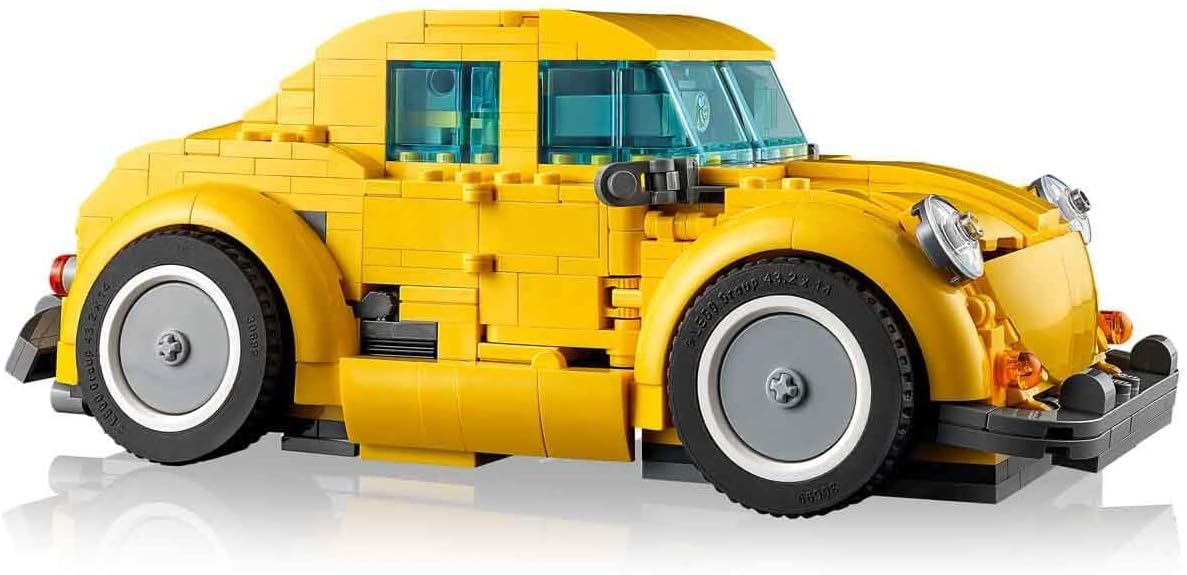
Image: The LEGO Bumblebee model fully transformed into its vehicle mode, viewed from the side.
Video: A product overview demonstrating the unboxing, articulated joints, transformation from robot to vehicle mode, and the ion blaster and jetpack accessories of the LEGO Icons Bumblebee set.
Maintenance and Care
To ensure the longevity and appearance of your LEGO Icons Bumblebee model, follow these care guidelines:
- Cleaning: Dust your model regularly with a soft, dry cloth or a soft brush. For deeper cleaning, use a mild soap solution and a soft cloth, then rinse with clear water and air dry. Avoid harsh chemicals or abrasive materials.
- Storage: Store the model in a cool, dry place away from direct sunlight to prevent discoloration or warping of plastic elements.
- Handling: Handle the model carefully, especially during transformation, to avoid accidental detachment of parts.
Troubleshooting
If you encounter any issues during assembly or with the model, consider the following:
- Missing Pieces: If you find any missing pieces, please refer to the LEGO Customer Service website for replacement parts.
- Assembly Difficulties: Double-check the building instructions. Sometimes a small error in an earlier step can affect later assembly. The digital instructions in the LEGO Builder app can provide a clearer view.
- Transformation Issues: Ensure all joints are correctly aligned and moved in the sequence specified in the instructions. Forceful manipulation can damage the model.
Specifications
| Feature | Detail |
|---|---|
| Product Dimensions | 15.04 x 10.31 x 3.7 inches |
| Item Weight | 0.352 ounces |
| Item Model Number | 10338 |
| Manufacturer Recommended Age | 18 years and up |
| Release Date | September 1, 2024 |
| Manufacturer | LEGO |
Warranty and Support
For information regarding product warranty, missing parts, or general support, please visit the official LEGO website or contact their customer service.
- LEGO Customer Service: www.lego.com/service
- Replacement Parts: www.lego.com/service/replacementparts


