
Introduction
This manual provides detailed instructions for the safe and efficient operation of your Boytone BT-101B Wireless Mobile Briefcase Turntable. This portable turntable features integrated speakers and supports playback from vinyl records, FM radio, USB drives, SD cards, and wireless devices. It also includes functionality for converting vinyl, radio, and auxiliary audio to MP3 format.
Important Safety Instructions
- Read all instructions before operating the device.
- Keep this manual for future reference.
- Do not expose the unit to rain or moisture.
- Do not block any ventilation openings.
- Use only attachments/accessories specified by the manufacturer.
- Unplug the unit during lightning storms or when unused for long periods.
- Refer all servicing to qualified service personnel.
Package Contents
Verify that all items listed below are included in your package:
- Boytone BT-101B Turntable Unit
- USB Cable
- User Manual (this document)
- (Note: SD card and built-in speakers are integrated into the unit.)
Product Overview
Familiarize yourself with the components of your Boytone BT-101B turntable.

Figure 1: Front view of the Boytone BT-101B Turntable with the lid open, revealing the record platter, tonearm, and integrated speakers.

Figure 2: Detailed view of the control panel, featuring the digital display, function buttons, USB port, SD card slot, and auxiliary input. Icons for Bluetooth, FM Radio, Headphone Jack, and Built-in Rechargeable Battery are also visible.

Figure 3: Rear and side views of the turntable, illustrating the external connection ports such as USB and RCA outputs.
Key Components:
- Turntable Platter: Where vinyl records are placed.
- Tonearm: Holds the stylus (needle) for playing records.
- Speed Selector: Adjusts playback speed (33, 45, 78 RPM).
- Control Panel: Includes display, function buttons, USB, SD, and AUX inputs.
- Built-in Speakers: For direct audio output.
- Wireless Connectivity: For streaming audio from external devices.
- RCA Output: For connecting to external amplifiers or speakers.
- Headphone Jack: For private listening.
Setup
- Unpacking: Carefully remove the turntable from its packaging. Retain packaging for future transport or storage.
- Power Connection: Connect the provided USB cable to the unit's power input and to a suitable USB power adapter (not included) or a powered USB port. The unit has a built-in rechargeable battery for portable use.
- Initial Charge: For optimal battery life, fully charge the unit before first use.
- Placement: Place the turntable on a stable, level surface away from direct sunlight, heat sources, and excessive dust or vibration.
- Remove Stylus Protector: Gently remove the clear plastic protector from the stylus (needle) before playing records.
Operating Instructions
Powering On/Off
To power on the unit, rotate the Volume/Power knob clockwise. The display will illuminate. To power off, rotate the knob counter-clockwise until it clicks.
Playing Vinyl Records
- Open the turntable lid.
- Place a vinyl record on the platter.
- Select the appropriate speed (33, 45, or 78 RPM) using the Speed Selector switch. For 45 RPM records, place the included 45 RPM adapter on the spindle.
- Gently release the tonearm from its rest and position the stylus over the desired track on the record.
- Lower the tonearm slowly onto the record. Playback will begin.
- Adjust the volume using the Volume/Power knob.
- At the end of the record, the tonearm will automatically return to its rest (auto-stop feature). If not, manually lift the tonearm and return it to its rest.
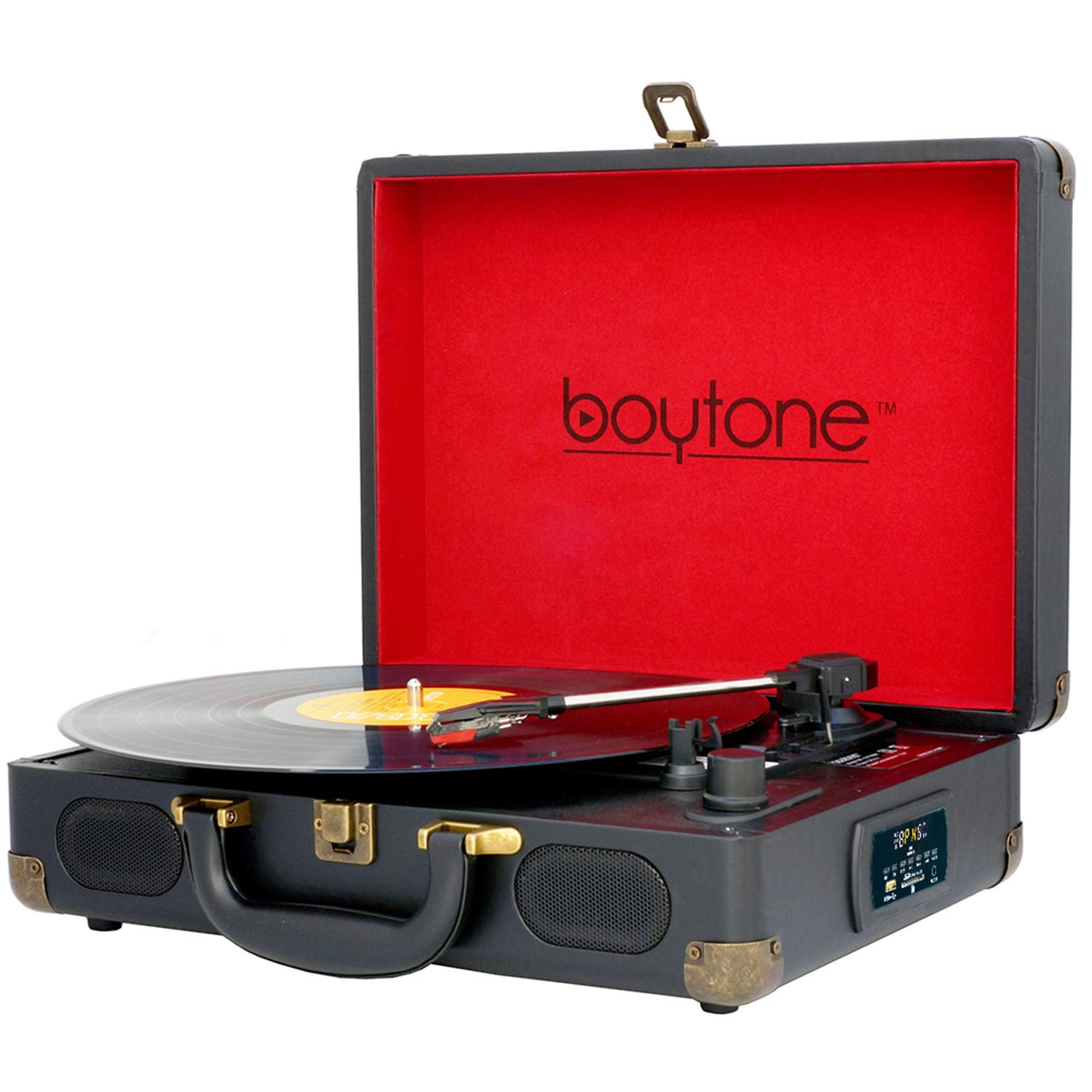
Figure 4: Visual guide for selecting the correct playback speed (33, 45, 78 RPM) for different record sizes (7", 10", 12").
Wireless Music Playback (Bluetooth)
- Power on the turntable.
- Press the MODE button repeatedly until "BT" appears on the display, indicating Bluetooth mode. The unit will enter pairing mode.
- On your external device (smartphone, tablet, etc.), enable Bluetooth and search for available devices.
- Select "Boytone" from the list of devices to pair. Once paired, a confirmation sound may be heard.
- Start playing music on your external device. Audio will now stream through the turntable's speakers.
FM Radio Operation
- Power on the turntable.
- Press the MODE button repeatedly until "FM" appears on the display.
- Press the FM SEARCH button to automatically scan and save available FM stations.
- Use the Previous/Next buttons (|< and >|) to navigate through saved stations.
- Adjust the volume using the Volume/Power knob.
USB/SD Card Playback
- Power on the turntable.
- Insert a USB drive into the USB port or an SD card into the SD card slot.
- Press the MODE button until "USB" or "SD" appears on the display. The unit will automatically begin playing compatible MP3/WMA files.
- Use the Play/Pause, Previous, and Next buttons to control playback.
- Adjust the volume using the Volume/Power knob.
Vinyl/Radio/AUX to MP3 Conversion
The turntable can convert audio from vinyl records, FM radio, or auxiliary input directly to MP3 files on a connected USB drive or SD card.
- Insert a USB drive or SD card into the respective slot.
- Select the desired source (Vinyl, FM Radio, or AUX) using the MODE button.
- Begin playback of the source audio (e.g., start playing a record, tune to an FM station, or play audio through the AUX input).
- Press the REC button on the control panel. The display may indicate recording status.
- Press the STOP button to end the recording. The MP3 file will be saved to the USB drive or SD card.
Auxiliary Input (AUX IN)
Connect an external audio device (e.g., MP3 player, smartphone) to the AUX IN port using a 3.5mm audio cable (not included). Press the MODE button until "AUX" appears on the display. Audio from the external device will play through the turntable's speakers.
Headphone Jack
For private listening, connect headphones (not included) to the Headphone Jack. The built-in speakers will be muted.
Maintenance
- Cleaning the Unit: Wipe the exterior of the turntable with a soft, dry cloth. Do not use abrasive cleaners or solvents.
- Cleaning the Stylus: Periodically clean the stylus using a soft brush designed for stylus cleaning, brushing gently from back to front.
- Record Care: Keep records clean and free of dust. Store them vertically in their sleeves to prevent warping.
- Stylus Replacement: The stylus is a consumable part and will wear out over time. Replace it when sound quality deteriorates or distortion occurs. Consult Boytone support for replacement stylus information.
Troubleshooting
| Problem | Possible Cause | Solution |
|---|---|---|
| No power | Unit not plugged in; battery drained; power knob off. | Ensure power cable is connected; charge battery; turn power knob clockwise. |
| No sound from speakers | Volume too low; headphones connected; incorrect mode selected. | Increase volume; disconnect headphones; select correct mode (e.g., PHONO, BT, FM, USB, SD, AUX). |
| Record skips or distorts | Record is dirty or damaged; stylus is worn or dirty; turntable not level. | Clean record; clean or replace stylus; place turntable on a level surface. |
| Bluetooth not connecting | Turntable not in BT mode; device too far; device already paired to another unit. | Ensure turntable is in BT mode; move device closer; unpair from other devices and try again. |
| MP3 conversion issues | USB/SD card full or incompatible format; REC button not pressed. | Use a compatible USB/SD card with sufficient space; ensure REC button is pressed during recording. |
Specifications
| Model Number | BT-101B |
| Brand | Boytone |
| Vinyl Speeds | 33 / 45 / 78 RPM |
| Connectivity | Wireless (Bluetooth), USB, SD Card, AUX In (3.5mm), RCA Out |
| Audio Playback | MP3, WMA |
| Conversion | Vinyl, Radio, AUX to MP3 |
| Speakers | Dual Built-in Speakers |
| Power Source | Rechargeable Battery, USB Power |
| Item Weight | 7 pounds (3.17 kg) |
| Dimensions (approx.) | 16.1 x 13.1 x 5.9 inches (40.9 x 33.3 x 15 cm) |
| Material | Plastic |
Warranty and Support
Boytone products are designed and manufactured to the highest quality standards. This product is covered by a limited warranty. For specific warranty terms and conditions, please refer to the warranty card included with your purchase or visit the official Boytone website.
For technical support, service, or replacement parts, please contact Boytone customer service:
- Website: www.boytone.com (Note: This is a placeholder URL, please refer to actual product documentation for correct contact information.)
- Email: support@boytone.com (Note: This is a placeholder email, please refer to actual product documentation for correct contact information.)
- Phone: (Refer to product documentation for phone number)
Please have your model number (BT-101B) and purchase date available when contacting support.

